


Tables in LaTeX
Write the rows in a tabular environment, with & between cells and \\ at the end of each row, and put it in a table float when it needs a caption and a number.
A first table
A table starts with \begin{tabular}{...}. The braces hold one letter per column: l for left, c for centred, r for right. Inside, & moves to the next cell and \\ ends the row.
Three columns, three alignments
\begin{tabular}{lcr}
Fruit  & Colour & Price \\
Apple  & red    & 0.44 \\
Banana & yellow & 1.20 \\
\end{tabular}
You do not need to line up the & signs in your source. Spaces around them are ignored, so align them only if it helps you read the code.
Column types
The column specification decides how many columns there are and how each one is aligned.
| Letter | Meaning | In Scissor LaTeX |
|---|---|---|
l, c, r | left, centred, right | Works. |
p{4cm} | a paragraph column of a fixed width | Read as a left-aligned column. The width is ignored, so long text does not wrap at 4 cm. |
m{..}, b{..} | paragraph columns from the array package | Read as left-aligned columns; the width is ignored. |
X (tabularx) | a column that stretches to fill the width | Read as a left-aligned column. |
| | a vertical line between columns | Works. |
@{..}, >{..}, <{..} | spacing and code around cells | Accepted and ignored. |
Lines: \hline or booktabs
\hline draws a line across the table, and | in the column specification draws vertical lines. This gives the classic boxed look.
A boxed table with \hline and |
\begin{tabular}{|l|r|}
\hline
Name & Points \\
\hline
Erika Mustermann & 44 \\
John Doe & 38 \\
\hline
\end{tabular}
Many journals prefer fewer lines. The booktabs package gives you three: \toprule above the header, \midrule under it and \bottomrule at the end, with no vertical lines.
The same data with booktabs
\begin{tabular}{lr}
\toprule
Name & Points \\
\midrule
Erika Mustermann & 44 \\
John Doe & 38 \\
\bottomrule
\end{tabular}Captions, numbers and references
To give a table a caption and a number, put the tabular in a table environment. Add \caption{...} and, after it, a \label{...}. Then \ref{...} prints the table's number anywhere in the text.
A numbered table with a caption
\begin{table}[ht]
  \centering
  \caption{Points after the first round.}
  \label{tab:points}
  \begin{tabular}{lr}
    \toprule
    Name & Points \\
    \midrule
    Erika Mustermann & 44 \\
    Hans Mustermann  & 41 \\
    \bottomrule
  \end{tabular}
\end{table}

Table~\ref{tab:points} shows the points.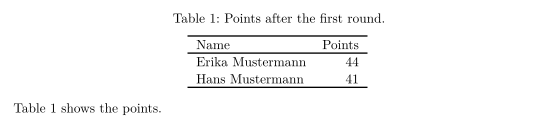
The caption goes where you write it: above the table here, which is the usual place for tables. Put \caption after the tabular if you want it below.
Cells that span columns
\multicolumn{n}{align}{text} joins n cells of a row into one, with its own alignment. A common use is a header over a group of columns.
A header over two columns
\begin{tabular}{lcc}
\toprule
       & \multicolumn{2}{c}{Round} \\
Name   & 1  & 2  \\
\midrule
Erika  & 44 & 40 \\
John   & 38 & 45 \\
\bottomrule
\end{tabular}
Cells that span rows
In LaTeX, \multirow{n}{*}{text} from the multirow package makes a cell taller than one row. Scissor LaTeX keeps the text but not the span: it sits in the first row, and the rows below stay empty in that column.
\multirow: the text stays in the first row
\begin{tabular}{llr}
\toprule
Group & Name & Points \\
\midrule
\multirow{2}{*}{A} & Erika & 44 \\
                   & John  & 38 \\
\bottomrule
\end{tabular}
For most tables this reads fine. If the label should be centred across the rows, write it in the middle row instead.
What differs from a TeX installation
All of these compile in a TeX installation too, so a document you write here still works there.
Related: cells over several rows with multirow, column widths with array, tabularx, longtable, captions with caption, subcaption, and placement with Floats. To build a table by clicking, use the LaTeX table generator.
Questions and answers
How do I add a caption to a table in LaTeX?
Put the tabular inside \begin{table} ... \end{table} and write \caption{Your text} inside it. Scissor LaTeX numbers the table and prints "Table 1:" before the caption.
Why does my long text not wrap in a p column?
Scissor LaTeX does not apply column widths yet, so a p{4cm} column is as wide as its longest line. Break long cells with \newline, or shorten them.
How do I merge cells in a LaTeX table?
Use \multicolumn{2}{c}{text} to merge cells across columns. Merging down rows with \multirow keeps the text but not the span in Scissor LaTeX.
Every example on this page is typeset by Scissor LaTeX when the site is built. Last updated 2026-11-06.