


LaTeX bibliography with BibTeX, natbib and biblatex
Put your sources in a .bib file in the project, cite them with \cite{key} (or \citep, \citet, \parencite, \textcite), and write \bibliography{...} or \printbibliography where the list of references should go.
The .bib file
A .bib file holds one entry per source. Each entry has a type (@article, @book, @inproceedings, @misc ...), a key that you cite it by, and fields such as author, title and year. The examples on this page use this file, refs.bib:
@article{doe2024,
  author  = {John Doe and Erika Mustermann},
  title   = {Measuring Things Carefully},
  journal = {Journal of Examples},
  year    = {2024},
  volume  = {44},
  pages   = {1--12}
}

@book{mustermann2021,
  author    = {Erika Mustermann},
  title     = {A Short Book on Long Tables},
  publisher = {Example Press},
  address   = {Berlin},
  year      = {2021}
}
Add the file to your project like any other file. Scissor LaTeX reads every .bib file in the project and merges them, so the file name in \bibliography{refs} or \addbibresource{refs.bib} does not have to match. To clean up, sort and deduplicate a .bib file first, use the BibTeX formatter; the citation key cleaner makes the keys consistent.
Plain BibTeX: \cite and \bibliography
The classic way is \cite{key} in the text, then \bibliographystyle{...} and \bibliography{...} where the list goes.
\cite with a numeric style
Careful measuring is discussed by \cite{doe2024}, and long tables
in \cite[p.~44]{mustermann2021}.

\bibliographystyle{plain}
\bibliography{refs}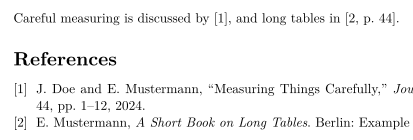
Only the sources you cite are listed. To list one you do not cite, write \nocite{key}; \nocite{*} lists every entry of the .bib files, as in a TeX installation.
natbib: author-year citations
With natbib and an author-year style such as plainnat, \citet gives a textual citation ("Doe and Mustermann (2024)") and \citep a parenthetical one.
\citet and \citep with plainnat
\citet{doe2024} measured carefully. Tables can be long
\citep{mustermann2021}, and plots can explain themselves
\citep[p.~44]{mustermann2023}.

\bibliographystyle{plainnat}
\bibliography{refs}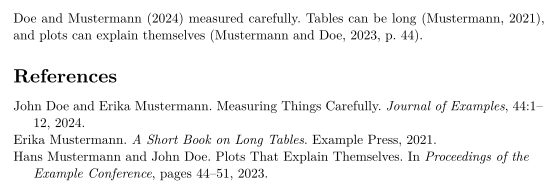
biblatex: \parencite and \textcite
biblatex users load the package, name the .bib file with \addbibresource and print the list with \printbibliography.
biblatex with \parencite and \textcite
\documentclass{article}
\usepackage{biblatex}
\addbibresource{refs.bib}
\begin{document}
\textcite{doe2025} keeps notes on typesetting.
Plots can explain themselves \parencite{mustermann2023}.

\printbibliography
\end{document}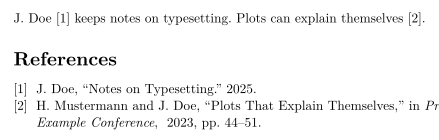
Citation commands
| Command | In Scissor LaTeX | Notes |
|---|---|---|
\cite{key}, \cite{a,b} | Works | Several keys print one citation each, side by side. |
\cite[p.~44]{key} | Works | The note after the key ("p. 44") goes inside the citation. |
\citep, \parencite, \autocite | Works | Parenthetical; numeric styles print a number. |
\citep[see][p.~44]{key} | Partly | The note before ("see") is printed in front of the parentheses, not inside them. |
\citet, \textcite | Works | Textual: the author, then the year or number. |
\citeauthor{key} | Partly | Prints the same as \citet, not the names alone. |
\citeyear{key} | Works | The year only. |
\citealt, \citealp, \citenum | Partly | Printed as a plain \cite. |
\footcite{key} | Partly | Printed inline as a plain citation, not in a footnote. |
\nocite{key} | Works | Listed without a citation in the text. |
\nocite{*} | Works | Lists every entry of the .bib files. |
Reference styles
The name in \bibliographystyle{...} picks the style. Scissor LaTeX maps the common BibTeX style names to similar styles:
| \bibliographystyle{…} | Result in Scissor LaTeX |
|---|---|
apalike, apa, apacite, authoryear | APA: author and year |
natbib, plainnat, abbrvnat, acl_natbib | Author and year, as natbib (plainnat) |
unsrtnat | Numbers in citation order, as unsrtnat |
ieeenat_fullname, ieee_fullname | IEEE: numbers in citation order |
splncs04, splncs03, splncs | Springer LNCS: numbers |
ACM-Reference-Format | ACM: numbers |
chicago, chicago-author-date | Chicago: author and date |
mla | MLA: author and page |
ieeetr, IEEEtran, ieee, plain, abbrv, unsrt, plainurl, abbrvurl, unsrturl, siam, acm | IEEE: numbers in citation order |
nature | Nature: superscript numbers |
vancouver | Vancouver: numbers |
harvard, agsm, dcu | Harvard: author and year |
apsrev4-2, apsrev4-1, apsrev, apsrmp4-2, apsrmp4-1, sn-aps | american-physics-society |
aipnum4-2, aipnum4-1, aipnum | american-institute-of-physics |
aipauth4-2, aipauth4-1 | Author and year, as natbib (plainnat) |
elsarticle-num, elsarticle-num-names, model1-num-names | elsevier-with-titles |
elsarticle-harv, model2-names | elsevier-harvard |
sn-mathphys-num, sn-mathphys | springer-mathphys |
sn-mathphys-ay, sn-basic, sn-vancouver-ay | springer-basic-author-date |
sn-vancouver-num, sn-vancouver | springer-vancouver |
sn-nature | Nature: superscript numbers |
sn-apacite, sn-apa | APA: author and year |
sn-chicago | Chicago: author and date |
amsplain, amsplainurl | AMS |
aa, aa-note, aa_url, aasjournalv7, aasjournal, aasjournal7, apj | APJ |
iopart-num, iopart | institute-of-physics-numeric |
mdpi | multidisciplinary-digital-publishing-institute |
plos2025, plos2015, plos2009 | plos |
icml…, iclr… (with a year) | Author and year, as natbib (plainnat) |
journal styles that number references (…-num, apsrev…, JHEP, aip…, achemso, siam…) | IEEE: numbers in citation order |
journal author-year styles (aasjournal…, …-harv, mnras, aa, agu, ametsoc) | Author and year, as natbib (plainnat) |
any other name (alpha, a project .bst …) | IEEE: numbers in citation order, with a note in the Problems tab |
plain, abbrv, unsrt and the other numbered classics use the IEEE style: numbers in square brackets, in the order the sources are first cited. Any name that is not in the table, such as alpha or amsalpha (whose labels look like [Knu84]) or a .bst file of your own, uses the same numbered style, and the Problems tab says so: "Bibliography style alpha is not available; using numbered references [1] instead". The conference layouts choose their own style.
Missing sources and thebibliography
A key that is not in any .bib file prints as [key?] in red, and the Problems tab lists it:
A key that is not in the .bib file
This is in the file \cite{doe2024}, this is not \cite{nobody2020}.

\bibliography{refs}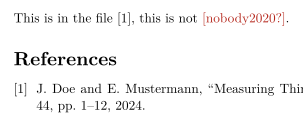
Problems tab: Citations not found in the .bib file: nobody2020
An entry of a .bib file that cannot be read, for example one with a missing closing brace or a key used twice, is left out on its own: the Problems tab names it with its line, as in "Skipped .bib entries: doe2023 (line 12, a closing brace is missing)", and the other entries are cited as usual.
A hand-written thebibliography list is printed as a list, but its \bibitem keys cannot be cited. Move the entries to a .bib file to cite them.
What differs from a TeX installation
For the packages, see natbib and biblatex. The full manuals are on CTAN: natbib, biblatex.
Questions and answers
How do I add a bibliography in LaTeX?
Add a .bib file to the project, cite entries with \cite{key}, and write \bibliography{refs} (or \printbibliography with biblatex) where the list should appear.
Why does my citation show [key?]?
The key is not in any .bib file of the project. Check the spelling, and check that the .bib file was added to the project. The Problems tab lists every missing key.
What is the difference between \citet and \citep?
\citet is for citations that are part of the sentence ("Doe and Mustermann (2024) show ..."). \citep puts the whole citation in parentheses.
Do I need to run BibTeX?
No. Scissor LaTeX reads the .bib files itself every time it typesets, so citations and the reference list are always up to date.
Every example on this page is typeset by Scissor LaTeX when the site is built. Last updated 2026-11-06.