


enumitem and paralist in Scissor LaTeX
The enumitem and paralist packages work partly in Scissor LaTeX: enumitem's options in brackets (label=, start=, resume, noitemsep) are accepted and ignored, and \newlist and inline lists are not supported; paralist's compactitem, compactenum and compactdesc work like the standard lists.
What the packages do
enumitem lets you change lists through options: \begin{enumerate}[label=(\alph*)] numbers with (a), (b), (c), start=4 begins at 4, resume continues an earlier list, and noitemsep removes the space between items. \setlist sets options for all lists, and \newlist defines list environments of your own.
paralist is an older package with ready-made compact lists (compactitem, compactenum, compactdesc) and lists set inside a paragraph (inparaenum). enumerate, a third small package, gives \begin{enumerate}[(a)].
What works here
| Feature | In Scissor LaTeX | Notes |
|---|---|---|
itemize, enumerate, description | Works | See Lists. |
Options in brackets: label=, start=, leftmargin=, noitemsep, nosep | Left out | Accepted without a message; numbering stays 1, 2, 3. |
resume | Left out | The list starts at 1 again. Two lists with nothing between them do continue the numbering, see below. |
\setlist{...} | Left out | Ignored in the preamble; in the body it is skipped with a message and its arguments are printed. |
\newlist, \setlist[name]{...} | Not supported | The new environment is unknown: its items are printed without labels. |
enumerate*, itemize* (option inline) | Not supported | The items are printed as plain text, without labels. |
compactitem, compactenum, compactdesc | Works | Like itemize, enumerate and description. The spacing is the normal list spacing. |
asparaenum, inparaenum | Partly | Set as a normal numbered list; inparaenum does not stay in the paragraph. |
\begin{enumerate}[(a)] (enumerate package) | Left out | Numbered 1, 2, 3. |
Examples
The options of enumitem are accepted, so a document with them opens and typesets, but the labels stay 1, 2, 3:
label= and start= are ignored
\begin{enumerate}[label=(\alph*), start=4, noitemsep]
  \item Numbered 1 here, (d) in a TeX installation.
  \item Numbered 2 here, (e) in a TeX installation.
\end{enumerate}
When the labels matter, write them yourself in a description list. The labels come out exactly as typed, here and in every TeX installation:
Your own labels with description
\begin{description}
  \item[(a)] Erika Mustermann collects the samples.
  \item[(b)] John Doe weighs all 44 of them.
  \item[(c)] Hans Mustermann writes the report.
\end{description}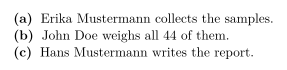
paralist's compact lists work like the standard ones:
compactitem and compactenum
Before you start:
\begin{compactitem}
  \item read the brief,
  \item check the equipment.
\end{compactitem}
Then:
\begin{compactenum}
  \item weigh the sample,
  \item write down the result.
\end{compactenum}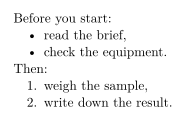
resume is ignored. A list continues the numbering of the one before only when nothing but blank lines stands between them; a sentence in between starts it again at 1:
resume: the second list starts at 1
\begin{enumerate}
  \item Prepare the room.
\end{enumerate}
A short break follows.
\begin{enumerate}[resume]
  \item Start the test (2 in a TeX installation).
\end{enumerate}
Compatibility
- From a TeX installation to here: lists typeset with their text, but with standard labels and spacing. Lists defined with
\newlistlose their labels; replace them withenumerateordescription. - From here to a TeX installation: documents compile there unchanged, and the enumitem options then take effect.
The full manuals are on CTAN: enumitem and paralist. For lists in general, see Lists: itemize, enumerate, description.
Questions and answers
How do I number a list with (a), (b), (c)?
In a TeX installation, \begin{enumerate}[label=(\alph*)] with enumitem. Scissor LaTeX ignores the option, so use a description list with \item[(a)] if the letters must show here.
How do I remove the space between list items?
noitemsep is ignored here, and the spacing is fixed. It takes effect when you compile the document in a TeX installation.
Every example on this page is typeset by Scissor LaTeX when the site is built. Last updated 2026-11-06.