


Cross-references in LaTeX: \label and \ref
Put \label{key} right after the thing you want to refer to (after \section{...}, after \caption{...}, inside an equation) and write \ref{key} where you want its number; Scissor LaTeX fills in the number when it typesets.
Label, then refer
A cross-reference has two halves. \label{key} marks a numbered thing, and \ref{key} prints its number. The key is any name you choose; prefixes such as sec:, fig:, tab: and eq: are a habit that keeps keys readable, not a rule.
Referring to a section and a figure
\section{Results}
\label{sec:results}

\begin{figure}[h]
  \centering
  \begin{tikzpicture}
    \draw (0,0) -- (1,0.8) -- (2,0.3) -- (3,1.1);
  \end{tikzpicture}
  \caption{Measured values.}
  \label{fig:values}
\end{figure}

Section~\ref{sec:results} shows the values in Figure~\ref{fig:values}.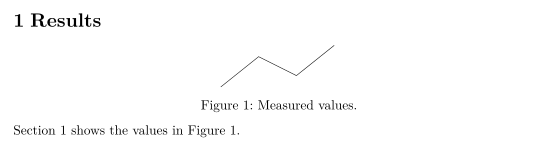
The ~ between the word and the reference is a space that never breaks, so "Figure" and its number stay on the same line.
Where to put the label
The label takes the number of the closest numbered thing before it:
| Refer to | Put \label | \ref prints |
|---|---|---|
| A section | right after \section{...} (or \subsection, \chapter) | 2, 2.1 |
| A figure or table | after \caption{...}, inside the float | 1 |
| An equation | inside equation or a numbered align | 1 |
| A list item | after \item in an enumerate | 2, 2b |
| A theorem | inside theorem, lemma and similar environments | 1 |
| A footnote | inside the \footnote{...} text | 2 |
Equations
\eqref{key} prints an equation number in parentheses, as equation numbers are usually shown. \ref{key} gives the bare number.
\eqref and \ref for an equation
\begin{equation}
  a^2 + b^2 = c^2
  \label{eq:pythagoras}
\end{equation}
Equation~\eqref{eq:pythagoras} is famous; its number is \ref{eq:pythagoras}.
An align or gather block gets one number in Scissor LaTeX, not one per row. Only the first \label in the block is kept, so a reference to a later row's label prints ??. See Equations, alignment and numbering for the details.
Commands that add the name: \autoref and \cref
\autoref (from hyperref) and \cref (from cleveref) print the kind of thing together with its number, so you do not have to write "Figure" yourself. \cref follows cleveref's defaults: lower case and short names ("fig.", "eq."), and \Cref at the start of a sentence gives the capitalised, full name.
\autoref, \cref and \Cref
\section{Method}
\label{sec:method}
\begin{equation}
  y = 44x
  \label{eq:line}
\end{equation}
\begin{table}[h]
  \centering
  \caption{Settings.}
  \label{tab:settings}
  \begin{tabular}{lr} Runs & 44 \\ \end{tabular}
\end{table}
\autoref{sec:method} uses \cref{tab:settings} and \cref{eq:line}.
\Cref{tab:settings} lists the runs.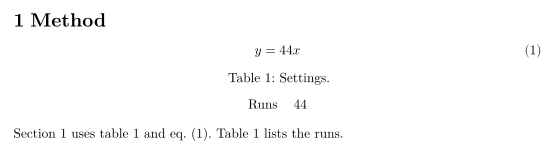
cleveref can also refer to several labels at once, and to a range:
Lists and ranges with \cref
\begin{equation} a = 1 \label{eq:a} \end{equation}
\begin{equation} b = 2 \label{eq:b} \end{equation}
See \cref{eq:a,eq:b}, or \crefrange{eq:a}{eq:b}.
The package options capitalise (or capitalize), noabbrev and nameinlink are read, and so are \crefname and \Crefname in the preamble.
cleveref options and \crefname
\documentclass{article}
\usepackage{amsmath}
\usepackage[capitalise,noabbrev]{cleveref}
\crefname{table}{Tab.}{Tabs.}
\begin{document}
\begin{equation} E = mc^2 \label{eq:e} \end{equation}
\begin{table}[h]
  \centering
  \caption{Masses.}
  \label{tab:m}
  \begin{tabular}{l} 44 kg \\ \end{tabular}
\end{table}
\cref{eq:e} uses the mass in \cref{tab:m}.
\end{document}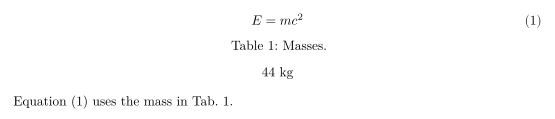
| Command | In Scissor LaTeX | Notes |
|---|---|---|
\ref{key} | Works | The number only. |
\eqref{key} | Works | The number in parentheses. |
\pageref{key} | Works | The page number where the label is. |
\autoref{key} | Partly | "Section 2", "Figure 1", "Table 1", "Theorem 1". For equations it prints the bare number, not "Equation 1". |
\cref, \Cref | Works | One or several labels; cleveref's default names, or yours from \crefname. |
\crefrange, \cpageref, \namecref | Works | A range, the page, or the name alone. |
\nameref{key} | Partly | Prints the number, not the section title. |
\vref{key} | Partly | Prints the number, without "on the next page". |
\hyperref[key]{text} | Works | Prints your text as a link to the label. |
Pages and missing labels
\pageref prints the page a label is on. A reference to a label that does not exist prints a bold ??, just as LaTeX does before its second run, and the Problems tab lists every missing label once: "References to labels that do not exist (shown as ??): sec:nowhere".
\pageref and a missing label
\section{Data}
\label{sec:data}
The data is described on page~\pageref{sec:data}.
This label does not exist: Section~\ref{sec:nowhere}.
Problems tab: References to labels that do not exist (shown as ??): sec:nowhere
What differs from a TeX installation
For the packages, see cleveref and hyperref; the full manuals are on CTAN: cleveref, hyperref.
Questions and answers
Why does my reference show ?? in LaTeX?
The label does not exist, or it is spelled differently from the \ref. In Scissor LaTeX it can also mean the label is the second one in an align block, which gets only one number.
How do I reference an equation with parentheses?
Use \eqref{key} from amsmath. It prints the number in parentheses, for example (1).
What is the difference between \ref and \autoref?
\ref prints only the number. \autoref adds the kind, such as "Figure 1" or "Section 2", which saves you typing the word yourself.
Every example on this page is typeset by Scissor LaTeX when the site is built. Last updated 2026-11-06.