


What is Scissor LaTeX?
Scissor LaTeX is a LaTeX editor that runs entirely in your browser. You write LaTeX on the left and see typeset pages on the right as you type, with nothing to install and no server that compiles your work.
An editor that runs in your browser
Open the editor and start typing. The pages next to your source update a moment after each change, so there is no Compile button and no waiting for a queue.
Everything happens on your device. Your projects are saved in the browser's own storage, and you can keep a copy in your own Google Drive if you like. No account is needed, and your documents are never uploaded to a server of ours.
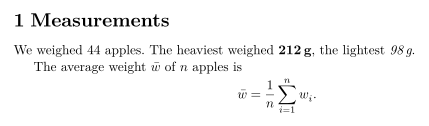
A small document, typeset by the editor
\section{Measurements}
We weighed 44 apples. The heaviest weighed
\textbf{212\,g}, the lightest \emph{98\,g}.

The average weight $\bar{w}$ of $n$ apples is
\[
  \bar{w} = \frac{1}{n} \sum_{i=1}^{n} w_i .
\]
How it works
No TeX program runs, not even in the background. Scissor LaTeX reads your LaTeX, converts it to Typst, a modern typesetting system, and lays out the pages with Typst. Both steps run in your browser as WebAssembly.
This is why the preview is fast: a typical page appears in well under a second. It also means a few things work differently from a TeX installation such as TeX Live or MiKTeX:
- The common commands and environments are understood directly: sections, lists, tables, figures, math, theorems, citations, cross-references, pgfplots and TikZ drawings.
- A package is not loaded from a file.
\usepackagenever fails, and the commands of the popular packages are understood one by one. The package reference says what works for each package. - A command the editor does not know is skipped, and its text is kept. The Problems tab tells you which commands were skipped.
An unknown command is skipped, its text stays
Results are in \highlightbox{the table below}.Problems tab: Skipped 1 unknown command: \highlightbox
Inline math and display math
Math works as you know it. Put short formulas in the text between $ ... $ and give larger ones their own line with \[ ... \] or an equation environment.
Inline math and display math
The area of a circle with radius $r$ is $\pi r^2$.
A display formula gets its own centred line:
\begin{equation}
  \int_0^{r} 2\pi t \, dt = \pi r^2 .
\end{equation}
If a formula uses a command the editor cannot read, that formula is shown in red source code and the rest of the document still typesets. See Math in LaTeX: the basics.
What you can do with it
- Write papers, reports, theses, homework, letters and CVs, starting from a template or a blank page.
- Open a project from a .zip, a folder or Google Drive, and export it again as PDF, HTML, Markdown or .zip. See Projects and files and Export.
- Keep working without a connection. See Working offline.
What differs from a TeX installation
Your source stays standard LaTeX. You can take a project from Scissor LaTeX to any TeX installation and back.
Questions and answers
Do I need to install anything to use Scissor LaTeX?
No. It runs in a current browser on a computer, tablet or phone. After your first visit it also works offline (open it online once after each update).
Is my document uploaded to a server?
No. Typesetting happens in your browser, and projects are stored on your device. Only what you save to your own Google Drive leaves the device.
Is Scissor LaTeX the same as Overleaf?
No. Overleaf runs a TeX installation on its servers. Scissor LaTeX converts LaTeX to Typst and typesets it in your browser, so it needs no server and works offline after your first visit, but some packages behave differently.
Every example on this page is typeset by Scissor LaTeX when the site is built. Last updated 2026-11-07.