


mathtools in Scissor LaTeX
The mathtools package works in Scissor LaTeX: \DeclarePairedDelimiter, the colon relations such as \coloneqq, dcases, cases*, the starred matrices, \prescript and \shortintertext work; \splitfrac, multlined and a few rarer commands show a red formula.
What the package does
mathtools builds on amsmath. It fixes a few spacing details and adds tools: colon relations such as :=, zero-width boxes (\mathclap), more extensible arrows, brackets above and below, dcases, matrices with column alignment, and \DeclarePairedDelimiter for brackets that grow on request.
It loads amsmath for you, so \usepackage{mathtools} is enough.
What works here
| Command | In Scissor LaTeX | Notes |
|---|---|---|
\coloneqq, \eqqcolon, \Coloneqq, \vcentcolon | Works | |
\mathclap, \mathllap, \mathrlap | Partly | The content is shown, but at its full width. |
\xRightarrow[...]{...}, \xleftrightarrow, \xhookrightarrow, \xmapsto | Works | |
\overbracket, \underbracket | Works | |
\lparen, \rparen | Works | |
rcases, drcases | Works | |
dcases, dcases*, cases* | Works | |
pmatrix*, bmatrix*, vmatrix* | Works | |
\DeclarePairedDelimiter, \DeclarePairedDelimiterX, \DeclarePairedDelimiterXPP | Works | |
\splitfrac, \smashoperator, \adjustlimits, \mathmakebox | Not supported | Red formula. |
multlined, \shoveleft, \Aboxed | Not supported | Red formula. |
\prescript, \shortintertext | Works |
Examples
Definitions with \coloneqq, and a long label under a brace kept narrow with \mathclap:
\coloneqq and \mathclap
f(x) \coloneqq x^2 + 44,
\qquad
\underbrace{a_1 + a_2 + \dots + a_n}_{\mathclap{\text{all the terms of the sequence}}}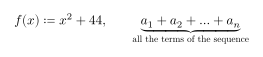
Extensible arrows and brackets:
Arrows and brackets with labels
A \xRightarrow{\text{proof}} B \xmapsto{\;g\;} C
\qquad
\overbracket{x + y}^{\text{sum}} \cdot \underbracket{u - v}_{\text{difference}}
\DeclarePairedDelimiter defines brackets: \abs{x} keeps them small, \abs*{x} lets them grow and \abs[\Big]{x} sets their size:
\DeclarePairedDelimiter and its forms
\documentclass{article}
\usepackage{mathtools}
\DeclarePairedDelimiter{\abs}{\lvert}{\rvert}
\begin{document}
\[ \abs{x - 44} < 1, \qquad \abs*{\frac{a}{b}} \le 1, \qquad \abs[\Big]{y} \]
\end{document}
For a piecewise function with fractions in display size, use dcases:
dcases
g(x) =
\begin{dcases}
  \frac{1}{x} & x > 0 \\
  0            & x \le 0
\end{dcases}
Compatibility
- From a TeX installation to here: documents typeset with the same numbers; only the few commands marked as not supported above show a red formula.
- From here to a TeX installation: documents compile there unchanged.
The full manual is on CTAN: ctan.org/pkg/mathtools. See also amsmath and Your own commands with \newcommand.
Questions and answers
Does \DeclarePairedDelimiter work?
Yes. Declare the command in the preamble; the plain, starred and sized forms work as in a TeX installation.
Does \coloneqq work without mathtools?
In Scissor LaTeX it does, but a TeX installation needs mathtools (or another package that defines it), so keep the line.
Every example on this page is typeset by Scissor LaTeX when the site is built. Last updated 2026-11-07.