


Code listings in LaTeX
Put the code in a verbatim, lstlisting or minted environment, or use \verb|...| inline; Scissor LaTeX sets it in a monospaced font exactly as typed and colours the syntax when you name the language.
verbatim
Inside verbatim, nothing is interpreted: backslashes, braces, $ and % print as they are, and line breaks and spaces are kept. It is the simplest way to show code or terminal output.
A verbatim block
\begin{verbatim}
for i in range(44):
    print(i)   # $ and \textbf stay as typed
\end{verbatim}
Inline code: \verb
\verb shows a short piece of code inside a sentence. The character right after \verb is the delimiter; pick one that is not in the code, such as | or +.
Inline code with \verb and \texttt
Call \verb|total(xs)| to add the list, or type \verb+x_1 = 44+.
For plain words in a monospaced font, \texttt{main.tex} is enough.
\texttt{...} only changes the font: special characters such as _ and % still need escaping there, while \verb takes them as they are.
listings: lstlisting with a language
The listings package gives you lstlisting. With language=... the code gets syntax colours.
lstlisting with language=Python
\begin{lstlisting}[language=Python]
def total(xs):
    """Add up the numbers in xs."""
    return sum(xs)

print(total([40, 4]))  # 44
\end{lstlisting}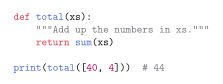
\lstinline|code| is the inline form, like \verb.
minted
minted takes the language as an argument. In a TeX installation it needs Python and the -shell-escape option; in Scissor LaTeX it works without either.
minted with a language
\begin{minted}{rust}
fn main() {
    let answer = 40 + 4;
    println!("{}", answer);
}
\end{minted}
Inline: \mintinline{rust}{let x = 44;}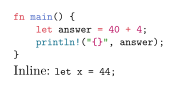
What is read
| Command | In Scissor LaTeX | Notes |
|---|---|---|
verbatim, verbatim* | Works | |
\verb, \verb* | Works | |
lstlisting | Partly | language= is read; every other option (numbers, caption, frame, basicstyle, firstline ...) is ignored. |
\lstinline | Works | No syntax colours inline. |
\lstset{...} | Left out | A language set here is not used; give language= on each listing. |
minted | Partly | The language is read; options such as linenos and frame are ignored. |
\mintinline{lang}{code} | Works | No syntax colours inline. |
Verbatim, BVerbatim (fancyvrb) | Partly | Shown as verbatim; options are ignored. |
\lstinputlisting{file}, \inputminted{lang}{file} | Not supported | Skipped with a message; paste the code into the document. |
\lstnewenvironment, \newminted | Not supported |
Syntax colours are available for common languages, among them Python, C, C++, Java, JavaScript, TypeScript, Rust, Go, Ruby, R, Julia, MATLAB, SQL, Bash, HTML, CSS, JSON, YAML, TeX and LaTeX. Language names are not case-sensitive, so Python and python are the same. A name that is not recognised gives plain monospaced code.
Code from a file
\lstinputlisting and \inputminted read code from another file in a TeX installation. Scissor LaTeX skips them and says so in the Problems tab:
\lstinputlisting is skipped
The script below is not shown:
\lstinputlisting[language=Python]{scripts/total.py}
Paste the code into an lstlisting environment instead.
Problems tab: 1 included file is not part of this conversion
What differs from a TeX installation
See listings and minted for the package pages. The full manuals are on CTAN: listings, minted and fancyvrb.
Questions and answers
How do I add a code block in LaTeX?
Wrap the code in \begin{verbatim} ... \end{verbatim}, or in lstlisting with [language=Python] for syntax colours.
Does minted work without shell escape?
In Scissor LaTeX, yes: minted environments are coloured without Python or -shell-escape. In a TeX installation minted still needs both.
Why are my listing line numbers missing?
Scissor LaTeX ignores numbers=left and the other layout options of listings. Only the language is read.
Every example on this page is typeset by Scissor LaTeX when the site is built. Last updated 2026-11-06.