


Scissor LaTeX documentation
Scissor LaTeX is a LaTeX editor that runs in your browser. These pages show how to write documents with it, which packages work, and where it differs from a TeX installation.
Start here
New to the editor? Read Your first LaTeX document, then follow Learn LaTeX step by step in order. Already know LaTeX? Go straight to the package reference and Differences from a TeX installation.
- Getting startedWhat the editor is, your first document, projects, Google Drive, offline use and export.
- Learn LaTeXWrite documents step by step: structure, text, math, tables, figures, references and citations.
- Charts and drawingsPlots with pgfplots and drawings with TikZ, drawn natively by the typesetter.
- TemplatesEvery starting template, including the conference look-alike layouts.
- Package referenceOne page per package: what works here, what does not, and what to write instead.
- Symbols referenceEvery math symbol the engine knows, rendered, with its command.
- Help and limitsTroubleshooting, common errors and the differences from a TeX installation.
Most used pages
- Math in LaTeX: the basics and Equations, alignment and numbering
- Tables in LaTeX and Figures and images
- Bibliographies and citations and Labels and cross-references
- Plots with pgfplots and Drawings with TikZ
- Conference look-alike templates: IEEE, ACM, NeurIPS, CVPR and more
- Greek letters, arrows and relation symbols
- Troubleshooting by symptom when something looks wrong
Every example is real
Each example on these pages is typeset by the same engines as the editor when the site is built. If an example stopped working, the site would not build. That means what you see next to the code is what you get in the editor.
Use Copy to take the code into a project of your own. You can use the examples in your own documents, without credit.
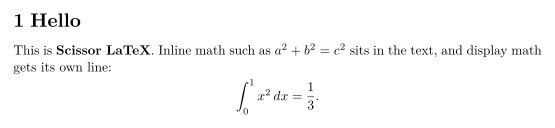
A small document
\section{Hello}
This is \textbf{Scissor LaTeX}. Inline math such as $a^2 + b^2 = c^2$
sits in the text, and display math gets its own line:
\[
  \int_0^1 x^2 \, dx = \frac{1}{3}.
\]
How it works, in one paragraph
No TeX program runs. Scissor LaTeX reads your LaTeX, converts it to Typst, and lays out the pages with Typst in your browser. Most everyday LaTeX works unchanged. Where a command or package is only partly supported, its page here says exactly what works and what to write instead. The page Differences from a TeX installation lists the limits in one place.
Every example on this page is typeset by Scissor LaTeX when the site is built. Last updated 2026-11-07.