


biblatex in Scissor LaTeX
The biblatex package works partly in Scissor LaTeX: \addbibresource, \cite, \parencite, \textcite, \autocite and \printbibliography work, but package options such as style=authoryear are ignored (citations are numbered unless you add \bibliographystyle), \footcite stays inline, and \fullcite and \citetitle are not supported.
What the package does
biblatex is the modern replacement for BibTeX styles. You name the .bib file with \addbibresource{refs.bib}, cite with commands such as \parencite and \textcite, and print the list with \printbibliography. The look is chosen with package options, for example \usepackage[style=authoryear]{biblatex}, and a TeX installation formats the entries with the program Biber.
What works here
| Command or option | In Scissor LaTeX | Notes |
|---|---|---|
\addbibresource{refs.bib} | Works | Every .bib file in the project is read, whatever the name. |
\printbibliography | Works | The heading is always "References". |
\printbibliography[title=..., heading=...] | Partly | The options are ignored. |
\cite, \parencite, \autocite, \smartcite | Works | Parenthetical; with the default style, a number in brackets. |
\textcite, \Textcite | Works | Author, then the number or year. |
\parencite[44]{key} | Works | The note goes inside the citation. |
\citeyear{key} | Works | The year only. |
\citeauthor{key} | Partly | Prints the same as \textcite. |
\footcite, \supercite | Partly | Printed inline as a normal citation. |
\fullcite, \citetitle | Not supported | Skipped with a message; the key is printed as text. |
style=, sorting=, backend=, maxnames= ... | Left out | Package options are ignored. |
\bibliographystyle{...} with biblatex | Works | Not biblatex syntax, but it is how you choose a style here. |
\DeclareFieldFormat, \defbibheading, \AtEveryBibitem ... | Left out | In the preamble they are ignored. In the body they are skipped with a message and their arguments are printed as text. |
Examples
A document with biblatex in its usual form:
\parencite, \textcite and \printbibliography
\documentclass{article}
\usepackage{biblatex}
\addbibresource{refs.bib}
\begin{document}
\textcite{doe2024} describe how to measure carefully.
Long tables are a subject of their own \parencite[44]{mustermann2021}.

\printbibliography
\end{document}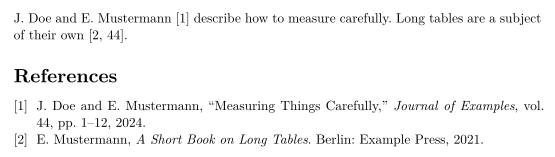
style=authoryear is ignored, so citations stay numbered. To get author-year citations, add a \bibliographystyle line with an author-year style such as apalike:
An author-year style through \bibliographystyle
\documentclass{article}
\usepackage[style=authoryear]{biblatex}
\addbibresource{refs.bib}
\bibliographystyle{apalike}
\begin{document}
Plots can explain themselves \parencite{mustermann2023}, as
\textcite{doe2024} also note.

\printbibliography
\end{document}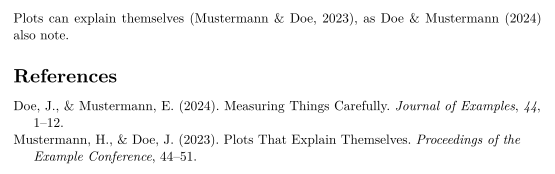
\footcite does not make a footnote; the citation stays in the line:
\footcite stays inline
\documentclass{article}
\usepackage{biblatex}
\addbibresource{refs.bib}
\begin{document}
Erika Mustermann wrote a short book on long tables.\footcite{mustermann2021}

\printbibliography
\end{document}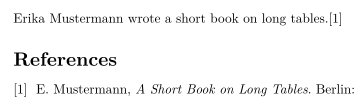
Compatibility
- From a TeX installation to here: citations and the reference list work, numbered unless you add
\bibliographystyle. Style options and bibliography customisation are not applied. - From here to a TeX installation: documents compile there with Biber, as long as you remove any
\bibliographystyleline you added for this editor.
The full manual is on CTAN: ctan.org/pkg/biblatex. See also Bibliographies and citations and natbib.
Questions and answers
Why does style=authoryear not work?
Scissor LaTeX does not read biblatex's package options. Add \bibliographystyle{apalike} (or another author-year name) to choose the style.
Do I need Biber?
No. Scissor LaTeX reads the .bib files itself each time it typesets, so there is no separate run.
Can I change the heading of the bibliography?
Not yet. \printbibliography[title=Sources] is accepted, but the heading stays "References".
Every example on this page is typeset by Scissor LaTeX when the site is built. Last updated 2026-11-06.