


Insert images and figures in LaTeX
Load graphicx, add the image file to your project and write \includegraphics[width=0.8\linewidth]{photo.png}. Put it in a figure environment with \caption{...} and \label{...} to give it a number you can refer to.
Add the image to the project
An image must be part of the project before the document can show it. Drop the file onto the editor, or use Upload in the Files panel (see Projects and files). Folders are fine: a file at figures/plot.png is included as \includegraphics{figures/plot.png}.
A figure with a caption
\includegraphics from the graphicx package places the image. Inside a figure environment it gets a number and a caption, and \label lets you refer to it with \ref.
A numbered figure with a caption and a reference
\begin{figure}[ht]
  \centering
  \includegraphics[width=0.6\linewidth]{figures-plot.png}
  \caption{Sales per week in the first five weeks.}
  \label{fig:sales}
\end{figure}

As Figure~\ref{fig:sales} shows, sales grew every week.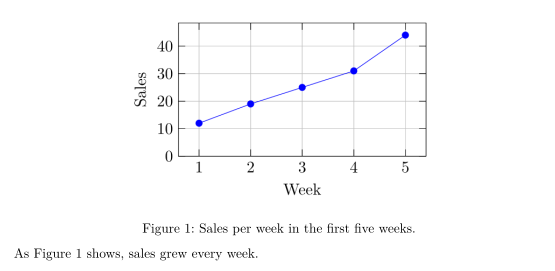
Put \label after \caption, so the label picks up the figure's number. The placement letters [ht] and how figures move are explained on Floats: placing figures and tables.
Image size
Give the width in the optional argument. Relative widths adapt to the page and the column, so they are the safest choice.
| Option | Example | In Scissor LaTeX |
|---|---|---|
width= | width=0.5\linewidth, width=\textwidth, width=6cm | Works |
height= | height=4cm | Ignored |
scale= | scale=0.5 | Ignored |
angle= | angle=90 | Ignored |
trim=, clip, keepaspectratio | Ignored |
The same SVG image at two widths
\begin{center}
  \includegraphics[width=4cm]{figures-diagram.svg}

  \includegraphics[width=0.8\linewidth]{figures-diagram.svg}
\end{center}Image formats
| Format | In Scissor LaTeX |
|---|---|
| PNG | Works |
| JPG / JPEG | Works |
| SVG | Works |
Works when you write the extension: \includegraphics{chart.pdf} | |
| EPS | Not supported: the whole document stops with "unknown image format" |
When you leave out the extension, as many documents do (\includegraphics{plot}), Scissor LaTeX looks for plot.png, plot.jpg, plot.jpeg and plot.svg, in that order. A PDF is only found with its extension.
A PDF image, included with its extension
\begin{figure}[h]
  \centering
  \includegraphics[width=0.55\linewidth]{figures-chart.pdf}
  \caption{Visitors per day.}
\end{figure}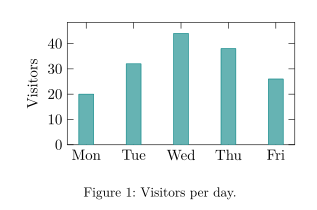
To use an EPS file, convert it to PDF (or SVG) first, for example with a graphics program, and change the file name in \includegraphics.
Missing images
If the project does not have the file, Scissor LaTeX draws a dashed box with the file name where the image would be, and the Problems tab lists the missing files. The Files panel offers to upload them.
A missing image becomes a dashed box
\begin{figure}[h]
  \centering
  \includegraphics[width=0.6\linewidth]{figures/survey-map.png}
  \caption{Map of the survey area.}
\end{figure}
Problems tab: Images not in the project: figures/survey-map.png
\graphicspath{{figures/}} is ignored, so write the folder in each \includegraphics, as in the example above.
Captions above or below
For a figure with an image, the caption is always printed below the image, wherever you write \caption. (For tables, the caption goes where you write it; see Tables.)
Several images in one figure
Images in Scissor LaTeX are always set on a line of their own. Two images in one figure are therefore stacked, even when their widths would fit side by side.
Two images in one figure are stacked
\begin{figure}[h]
  \centering
  \includegraphics[width=0.4\linewidth]{figures-plot.png}
  \hfill
  \includegraphics[width=0.4\linewidth]{figures-chart.pdf}
  \caption{Sales per week (top) and visitors per day (bottom).}
\end{figure}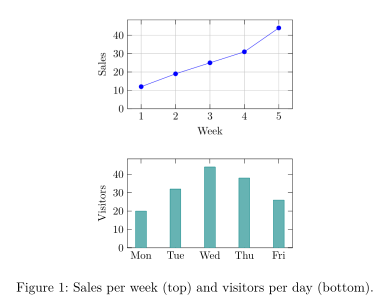
Side by side with minipage
In a TeX installation, the usual way to put two figures side by side is two minipage boxes in one figure, each with its own image and text. Scissor LaTeX reads minipage but does not keep its width: the content of each box is set at full width, one box under the other. The images and the text all appear, in the right order, so the document is complete; only the layout differs.
Two minipages: stacked here, side by side in a TeX installation
\begin{figure}[h]
  \centering
  \begin{minipage}{0.45\linewidth}
    \centering
    \includegraphics[width=0.4\linewidth]{figures-plot.png}

    Sales per week
  \end{minipage}\hfill
  \begin{minipage}{0.45\linewidth}
    \centering
    \includegraphics[width=0.4\linewidth]{figures-chart.pdf}

    Visitors per day
  \end{minipage}
  \caption{Sales and visitors in week 44.}
\end{figure}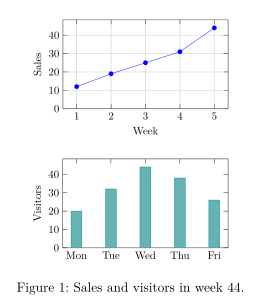
The same holds for subfigure from subcaption, with one more catch: each part also takes a figure number of its own (see caption and subcaption). If two pictures must sit next to each other in the PDF, combine them into one image file before you upload it, or draw both in one TikZ picture or pgfplots group.
Drawings and plots
Plots and diagrams don't need to be image files: pgfplots and TikZ code is drawn directly by the typesetter. See Plots with pgfplots and Drawings with TikZ.
What differs from a TeX installation
More details on the graphicx page and the caption and subcaption page. The full package manual is at ctan.org/pkg/graphicx.
Questions and answers
How do I insert an image in LaTeX?
Add the file to your project, load \usepackage{graphicx} and write \includegraphics[width=0.8\linewidth]{file.png} where the image should go.
How do I change the size of an image in LaTeX?
Use the width option, for example width=0.5\linewidth for half the text width. In Scissor LaTeX, height and scale are ignored.
Can I use SVG or PDF images?
Yes. SVG works directly. PDF works when you include the file with its .pdf extension.
Every example on this page is typeset by Scissor LaTeX when the site is built. Last updated 2026-11-06.