


Footnotes in LaTeX
Write \footnote{Your note.} right after the word or punctuation mark the note belongs to; LaTeX puts a raised number there and the note at the bottom of the page.
A first footnote
\footnote{...} goes directly after the text it explains, with no space before it. The number is counted for you.
Two footnotes
The survey asked 44 people.\footnote{All of them volunteers.}
Most answered within a week,\footnote{The last answer came after 19 days.}
so the results were ready early.
Put the footnote after a full stop or comma when it belongs to the whole sentence, and directly after a word when it belongs to that word only.
Formatting inside a footnote
A footnote can hold formatting, math, links and citations, like normal text.
Math and a link in a footnote
The growth was quadratic.\footnote{That is, $f(n) = a n^2 + b$ with $a > 0$;
see \url{https://example.com/growth} for the data.}
Referring to a footnote
A \label inside the footnote text lets you print the footnote's number with \ref, for example to say "see footnote 2".
\label inside a footnote
The first claim.\footnote{A short note.}
The second claim.\footnote{A longer note.\label{fn:long}}
As footnote~\ref{fn:long} explains, the second claim needs care.
Footnotes in tables
A \footnote inside a tabular works: the number appears in the cell and the note at the bottom of the page.
A footnote in a table cell
\begin{tabular}{lr}
Name & Points \\
Erika Mustermann & 44\footnote{After a recount.} \\
John Doe & 38 \\
\end{tabular}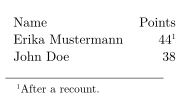
\footnotemark, \footnotetext and \thanks
In LaTeX, \footnotemark prints only the number and \footnotetext later supplies the text, which is a way around places where \footnote is not allowed. Scissor LaTeX allows \footnote everywhere, so you rarely need the pair. If you use it, note that the two halves are not joined:
| Command | In Scissor LaTeX | Notes |
|---|---|---|
\footnote{text} | Works | Numbered in order through the document. |
\footnote[44]{text} | Partly | The note is printed; the number you give is ignored and the counting continues. |
\footnotemark | Left out | No mark is printed. |
\footnotetext{text} | Partly | Becomes a footnote of its own, with its mark where \footnotetext is written. |
\thanks{text} | Partly | Printed in the conference layouts (IEEE, ACM, NeurIPS ...). In article, report and book the text is left out. |
\footnotetext becomes its own footnote
A sentence with a mark.\footnotemark{} The mark is not printed,
and the text appears here instead.\footnotetext{The text of the mark.}
What differs from a TeX installation
The footmisc manual is on CTAN: ctan.org/pkg/footmisc. For references to other numbered things, see Labels and cross-references.
See also Text styles, Tables and Differences.
Questions and answers
How do I add a footnote in LaTeX?
Write \footnote{text} right after the word or sentence it belongs to. The number and the note at the bottom of the page are added for you.
Can I put a footnote in a table?
Yes. In Scissor LaTeX \footnote works inside a tabular, and the note is placed at the bottom of the page.
Why does my \thanks note not appear?
In article, report and book, Scissor LaTeX leaves the \thanks text out. Use a footnote in the text instead, or a conference layout, which prints it.
Every example on this page is typeset by Scissor LaTeX when the site is built. Last updated 2026-11-06.