


Algorithm packages in Scissor LaTeX
The algorithm packages work partly in Scissor LaTeX: the algorithm environment works with a numbered caption and \label; algorithmic's upper-case commands (\STATE, \FOR) are read only in conference layouts; algpseudocode (\State, \For) and algorithm2e (\KwIn, \For{}{}) are not supported, so put the steps in a verbatim block instead.
What the packages do
Pseudocode in LaTeX usually takes two packages. algorithm gives a numbered environment with a caption, "Algorithm 1: ...", that floats like a figure. A second package writes the steps: algorithmic (commands in upper case, \STATE, \IF, \ENDIF), algpseudocode from the algorithmicx bundle (mixed case, \State, \If, \EndIf), or algorithm2e, which brings its own algorithm environment and commands such as \KwIn and \For{condition}{body}.
What works here
| Package | Feature | In Scissor LaTeX |
|---|---|---|
| algorithm | \begin{algorithm}, \caption, \label, \ref | Works: "Algorithm N", caption below, does not float. |
| algorithm | [H], [t], [h] placement | Left out: the algorithm stays where you write it. |
| algorithm | \listofalgorithms | Not supported: skipped with a message. |
| algorithmic | \STATE, \IF, \FOR, \WHILE, \RETURN ... | Partly: read in documents with a conference layout, without line numbers. Elsewhere they are unknown. |
| algpseudocode | \State, \If, \For, \Function, \Return ... | Not supported: the command names are skipped and the steps run together in one line. |
| algorithm2e | \KwIn, \KwOut, \For{..}{..}, \eIf, \; | Not supported: skipped with a message; the steps run together. |
Inside algorithm, the content is centred, as in a figure. A verbatim block is centred as a whole, with its lines left-aligned and indented as typed, which makes it the most reliable way to show steps here.
Examples
Steps in verbatim, with a number and a reference:
algorithm with verbatim steps
\begin{algorithm}
\caption{Find the largest value}
\label{alg:max}
\begin{verbatim}
best := xs[1]
for i := 2 to n:
    if xs[i] > best:
        best := xs[i]
return best
\end{verbatim}
\end{algorithm}
Algorithm~\ref{alg:max} looks at each value once.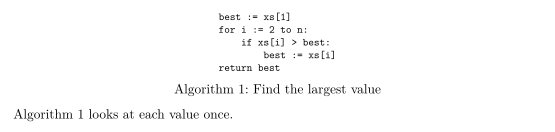
algorithm2e commands are skipped, so the lines run together. The Problems tab lists the commands it did not know:
algorithm2e is not supported
\begin{algorithm}
\caption{Sum of a list}
\KwIn{numbers $a_1, \dots, a_n$}
$s \gets 0$\;
\For{$i \gets 1$ \KwTo $n$}{$s \gets s + a_i$\;}
\Return{$s$}\;
\end{algorithm}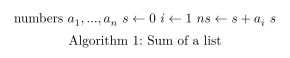
Problems tab: Skipped 4 unknown commands: \KwIn, \For, \KwTo, \Return
The Algorithms and pseudocode page shows algorithmic in a conference layout and algpseudocode next to each other.
Compatibility
- From a TeX installation to here: algorithms keep their number and caption. Steps written with algpseudocode or algorithm2e run together; rewrite them in
verbatim, or with algorithmic in a conference layout. - From here to a TeX installation:
algorithmwithverbatimsteps compiles everywhere and looks the same, except that the algorithm may float to the top of a page.
The manuals are on CTAN: algorithms (algorithm and algorithmic), algorithmicx (algpseudocode) and algorithm2e.
See also Algorithms, listings and Conference layouts.
Questions and answers
Which algorithm package should I use in Scissor LaTeX?
Use algorithm for the number and caption, and write the steps in a verbatim block. That works in every document here and in every TeX installation.
Why are my algorithm lines joined into one?
The steps use algpseudocode or algorithm2e commands, which Scissor LaTeX does not read. Their names are skipped, so the text of all steps ends up in one line.
Every example on this page is typeset by Scissor LaTeX when the site is built. Last updated 2026-11-06.