


Saving to Google Drive
Click Drive at the top of the editor (or press Ctrl+S once a project is in Drive) to save the whole project to a folder in your Google Drive. To open a project, choose Open from Google Drive or Open a folder from Google Drive when you start a new project.
Your projects stay yours
Scissor LaTeX saves every project in your browser's storage on this device. Google Drive is optional: use it to keep a copy, to move a project to another computer, or to open files that already live in your Drive.
The editor talks to Google directly from your browser. There is no server of ours in between, and Google's sign-in scripts are only loaded the first time you use a Drive button.
The permission it asks for
When you first use Drive, Google asks you to allow access. Scissor LaTeX asks for the narrowest permission Google offers, called drive.file. It covers only:
- files and folders that Scissor LaTeX creates in your Drive, and
- files you pick yourself in Google's file picker.
The rest of your Drive stays invisible to the editor. The access key Google hands out is kept in the memory of the open tab and is gone when you close it.
Saving a project
Click Drive at the top of the editor, or choose Google Drive in the Export dialog.
- The first time, Scissor LaTeX makes a folder called Scissor LaTeX in your Drive, and inside it a folder named after your project.
- Every file of the project is uploaded. Folders in the project, such as
chapters/orfigures/, become subfolders. - A note says when it is done, with a button to open the folder in Drive.
Later saves update the same files in place and skip files that have not changed. When you rename the project, its Drive folder is renamed too. If you delete a file from the project, the copy that Scissor LaTeX put in Drive goes to the Drive trash on the next save, where you can still restore it.
Once a project is in Drive, Ctrl+S (Cmd+S on a Mac) saves it on this device and in Drive at once. The status bar then reads Saved on this device · in Drive.
A project with a .bib file: both files go to Drive
\documentclass{article}
\usepackage{natbib}
\begin{document}
\section*{Reading list}
Start with \citet{doe2024}, then read
the book by \citet{mustermann2021}.
\bibliographystyle{plainnat}
\bibliography{refs}
\end{document}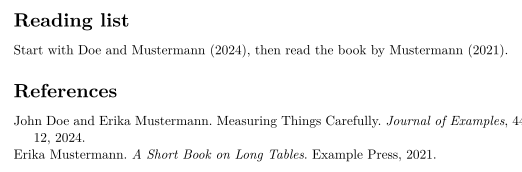
Opening files and folders from Drive
When you start a new project, you can open:
- Open from Google Drive: pick one or more
.tex,.biband image files. They become a new project. - Open a folder from Google Drive: pick a folder. Its files and subfolders, down to six levels, become a project, and the editor picks the main file.
In an open project, the Files panel has Drive and Drive folder to add files to it.
Google Docs, Sheets and Slides cannot be opened as LaTeX; they are left out and counted. Build files such as .aux and .log are left out too.
A project opened from a Drive folder remembers that folder. Saving it later updates the files where they are and puts new files in the matching subfolders, instead of making a second copy.
Missing files
When a document refers to images or other files that are not in the project, the Files panel lists them and offers Add from Drive. The picker opens in the Drive folder the project came from, so you can select the missing files there. See Projects and files.
An image file saved alongside the .tex file
\begin{figure}[h]
  \centering
  \includegraphics[width=0.6\linewidth]{figures-plot.png}
  \caption{Sales per week.}
\end{figure}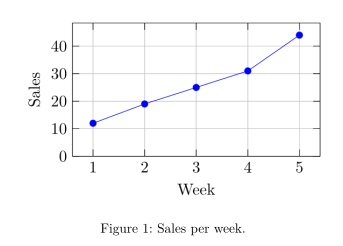
Files that you may only view
If you open a file that someone shared with you as view-only, the editor cannot change it in Drive. When you save, it puts a copy in your project folder instead.
See also Projects and files, Working offline and What is Scissor LaTeX?.
Questions and answers
Can Scissor LaTeX see all my Google Drive files?
No. It uses the drive.file permission, which only covers files it created and files you pick in Google's picker.
Does the editor save to Drive automatically?
No. It saves on your device as you type. Click Drive or press Ctrl+S (Cmd+S on a Mac) to update the copy in Drive.
What happens to my Drive copy if I delete the project in the editor?
Nothing. Deleting a project only removes it from this device; the folder in your Drive stays.
Every example on this page is typeset by Scissor LaTeX when the site is built. Last updated 2026-11-06.