


Troubleshooting by symptom
Start from what you see: no pages at all means an EPS image stops the whole document, red source means one formula could not be read, and missing text, ?? or [key?] point to an unknown command, a label or a citation; the sections below give the fix for each.
Find your symptom
Scissor LaTeX does not stop at the first problem as a TeX installation does. It typesets as much as it can, so most problems show up as something odd in the preview rather than as an error. Find what you see in the table, then read the section it points to.
| What you see | Most likely cause | Section |
|---|---|---|
| No new pages, an error at the top | An EPS image stops the whole document. | No pages at all |
| A formula shown as red source code | The formula contains a command the math converter does not know. | Red formulas |
| A word or a whole passage is missing | An unknown command was skipped, or an unknown environment unwrapped. | Missing text |
A bold ?? | A \ref to a label that does not exist. | Question marks |
A red [key?] | A citation key that is in no .bib file. | Question marks |
| A grey dashed box | An image that is not in the project. | Grey boxes |
| Fonts or spacing ignore the preamble | Line spacing and fonts come from the class, not from layout packages; margins follow geometry. | Some layout settings are ignored |
| A chapter or file does not start where you expect | Page breaks in a row make one break. | Page breaks |
| It looks fine here but fails in a TeX installation | Scissor LaTeX accepts things that LaTeX rejects. | Fine here, fails elsewhere |
Check the Problems tab under the preview first in every case. It lists skipped commands, packages that are not available, formulas that could not be read, missing files, missing citations, labels that do not exist and .bib entries that could not be read. It does not list unknown environments, so look at the pages too.
No pages at all
When the whole document fails, the preview keeps no new pages and the error names what went wrong. One cause is known: an EPS image included with its extension. The error says unknown image format. Convert the file to PDF, PNG or SVG and change the name in \includegraphics.
Math commands no longer stop the document: \partial, \langle, \oplus, \hbar and Vmatrix, which did in earlier versions, typeset, and a formula that cannot be read is shown in red. See When the whole document does not typeset.
An EPS image stops the whole document
\begin{figure}[h]
  \centering
  \includegraphics[width=0.4\linewidth]{trouble-figure.eps}
  \caption{A drawing saved as EPS.}
\end{figure}
The document does not typeset. The editor shows: unknown image format
To find the line in a long document, look at the line number in the error, or comment out half of the document with % and see whether the pages come back. Repeat with the half that still fails.
Red formulas
A red formula shows its own source in red, and the Problems tab names it with its line and the reason. The rest of the document is fine. The cause is a math command the converter cannot read, such as \abs from physics, \SI from siunitx or \symbf. Replace the command, or define it yourself with \newcommand in the preamble: your own macros are expanded before the formula is read, so they always work.
A missing command, defined in the document
\newcommand{\abs}[1]{\left\lvert #1 \right\rvert}
The distance is $\abs{x - 44}$, and $\abs{\frac{a}{b}} \le 1$.
A $ without its partner turns the rest of its paragraph into a formula: the words run together in italics, without spaces. The next blank line ends it, so the damage stays in one paragraph. If a sentence suddenly looks like this, look for an unclosed $ where the italics start.
An unclosed brace works the other way round: \textbf{ or \emph{ without its } keeps going past the blank line, so everything after it to the end of the document is bold or italic. Look for the missing } where the change starts.
An unclosed $ runs to the end of the paragraph
The value $x = 44 is given in the table.

The next paragraph is not affected.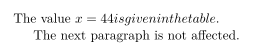
The table of common replacements is on Common errors, and the symbols that work are in the Symbols reference.
Missing text
A command Scissor LaTeX does not know is skipped: its name disappears, the text in its braces stays, and the Problems tab says "Skipped N unknown commands" with the names. If a word is missing, the command was probably a macro that printed text, such as a name or a unit, defined in a package that is not available. Define it yourself:
Defining a command from an unavailable package
\newcommand{\projectname}{Scissor Survey 44}
The results of \projectname{} are in the appendix.
An unknown environment is removed without a message, and its content stays as normal text. If a box, a frame or a coloured block from a package is simply not there, that is why. See Your own commands for \newcommand and \newenvironment.
?? and [key?]
A bold ?? is a \ref, \eqref or \cref to a label that does not exist; the Problems tab lists those labels. Check the spelling of both halves. Three cases are special here:
- The label must come after the thing it names: after
\caption, not before it. - A label on a formula that is shown in red names nothing, so a reference to it prints
??.
A red [key?] is a citation whose key is in no .bib file of the project. The Problems tab lists the keys. Check the spelling (keys are case sensitive) and that the .bib file is uploaded; every .bib file in the project is used.
One key that exists and one that does not
\documentclass{article}
\begin{document}
As shown by \cite{doe2024}, and contrary to \cite{doe2044}.
\bibliographystyle{plain}
\bibliography{refs}
\end{document}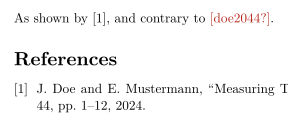
Problems tab: Citations not found in the .bib file: doe2044
More on this in Labels and cross-references and Bibliographies.
Grey boxes
A grey dashed box with a file name stands for an image that is not in the project. Upload the file with the same path, or fix the path. Without an extension, Scissor LaTeX looks for .png, .jpg, .jpeg and .svg; a PDF figure must be written with .pdf. \graphicspath is ignored, so write the folder in each \includegraphics. See Figures and images.
A dashed box inside a TikZ or pgfplots picture means the drawing engine could not read the picture; the Problems tab says why. See Drawings with TikZ.
Some layout settings are ignored
Line spacing, headers and footers, and the body font come from the document class and its options. setspace, fancyhdr, titlesec, fontspec and font packages are accepted but do not change the pages. This is by design for now, not a mistake in your preamble. The paper, the orientation and the margins do follow geometry, and size switches such as \small work.
setspace is accepted but changes nothing
\documentclass[11pt,a4paper]{article}
\usepackage[margin=2cm]{geometry}
\usepackage{setspace}
\doublespacing
\begin{document}
The margins of 2 cm come from geometry. The line spacing comes from
\texttt{article} at \texttt{11pt}: setspace is read and ignored.
{\small This sentence is set smaller.}
\end{document}
What you can change: the paper size and orientation (class options or geometry), the margins (geometry), the font size (10pt, 11pt, 12pt) and twocolumn as class options, or a conference template. See Page layout and Document classes.
Page breaks
\include starts and ends a page around its file, and \chapter starts a new page in a report or book. Page breaks in a row, from \include, \clearpage, \newpage, \cleardoublepage or \chapter, make one break here, so they leave no empty page. See Projects with several files.
Fine here, fails elsewhere
Because Scissor LaTeX keeps going where LaTeX stops, a document can look right here and still fail in a TeX installation. Before you send a document to a journal or a coauthor, check for these:
| Here | In a TeX installation |
|---|---|
x_1 outside math prints literally | "Missing $ inserted" |
A lone & in text prints literally | "Misplaced alignment tab character &" |
| An unclosed environment is closed for you | "\begin{...} ended by \end{document}" |
\begin{theorem} works without \newtheorem | "Environment theorem undefined" |
Unicode math such as ∂ works | Needs XeLaTeX or LuaLaTeX with unicode-math, or \DeclareUnicodeCharacter |
| An unknown command is skipped | "Undefined control sequence" |
Text that typesets here but not in LaTeX
Fish & chips for 44 people, and x_1 written outside math.The fixed version, Fish \& chips and $x_1$, works in both places.
Still stuck
- Common errors and how to fix them: every message of the Problems tab.
- When the whole document does not typeset: what stops everything, and what no longer does.
- Differences from a TeX installation: all the limits in one place.
See also Unsupported packages and Keyboard shortcuts.
Questions and answers
Why is my LaTeX preview blank?
An EPS image stops the whole document. The error at the top names it. Convert the image to PDF, PNG or SVG and the pages come back.
Why are some words missing from my document?
A command that Scissor LaTeX does not know was skipped, and its name disappeared. The Problems tab lists the names; define the command yourself with \newcommand.
Why does my LaTeX document show question marks?
?? is a reference to a label that does not exist, and [key?] is a citation key that is in no .bib file. Check the spelling of the label or key.
Why are my line spacing and fonts ignored?
Line spacing and fonts come from the document class and its options. Packages such as setspace and fontspec are accepted but do not change the pages. Margins and the paper size do follow geometry.
Every example on this page is typeset by Scissor LaTeX when the site is built. Last updated 2026-11-07.