


multicol in Scissor LaTeX
The multicol package works mostly in Scissor LaTeX: \begin{multicols}{3} sets its text in three columns (two to six work), the optional heading spans the columns and \columnbreak starts the next column. The columns are filled one after the other instead of balanced, so end them with \columnbreak where you want.
What the package does
multicol gives you the multicols environment, which sets part of a page in two or more balanced columns: \begin{multicols}{3} ... \end{multicols}. An optional argument puts a heading across all columns, and \columnbreak forces the next column.
What works here
| Feature | In Scissor LaTeX | Notes |
|---|---|---|
\begin{multicols}{n} ... \end{multicols} | Mostly | Two to six columns. Each column is filled before the next one starts; the columns are not balanced. |
multicols* | Mostly | As multicols. |
\begin{multicols}{2}[\section{...}] | Works | The heading spans the columns. |
\columnbreak | Works | Starts the next column. |
\columnsep | Partly | Set the gap with \usepackage[columnsep=1cm]{geometry}; \setlength{\columnsep} is ignored. |
\columnseprule | Left out | No rule between the columns. |
\documentclass[twocolumn]{article} | Works | The whole document in two columns. See Page layout. |
In the conference and journal layouts, multicols keeps its text in one column, as before.
Examples
Three columns with a heading across them, ended with \columnbreak:
Three columns and \columnbreak
\begin{multicols}{3}[\section{Notes}]
Erika Mustermann wrote the first part of these notes, about the
setup of the 44 test runs.
\columnbreak

John Doe wrote the second part, about the results.
\columnbreak

Hans Mustermann wrote the last part, about the next study.
\end{multicols}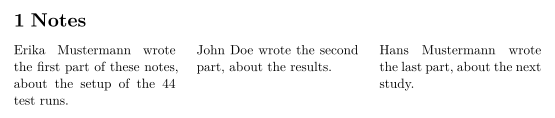
Without \columnbreak, the first column fills before the second begins, so a short text stays in the first column. A heading written before the environment works in both places:
Heading before multicols
\section{Notes}
\begin{multicols}{2}
The heading above spans the page, as it would in a TeX installation.
\columnbreak

This paragraph starts the second column.
\end{multicols}
For a document in two columns, use the class option:
The twocolumn class option
\documentclass[twocolumn]{article}
\title{Two Columns}
\author{Erika Mustermann}
\begin{document}
\maketitle
\section{Introduction}
This document is set in two columns with the \texttt{twocolumn}
option of the class. Every paragraph flows from the left column to
the right one. Lorem ipsum dolor sit amet, consectetuer adipiscing
elit. Ut purus elit, vestibulum ut, placerat ac, adipiscing vitae,
felis. Curabitur dictum gravida mauris. Nam arcu libero, nonummy
eget, consectetuer id, vulputate a, magna.
\section{Method}
John Doe measured 44 samples. Donec vehicula augue eu neque.
Pellentesque habitant morbi tristique senectus et netus et malesuada
fames ac turpis egestas. Mauris ut leo.
\end{document}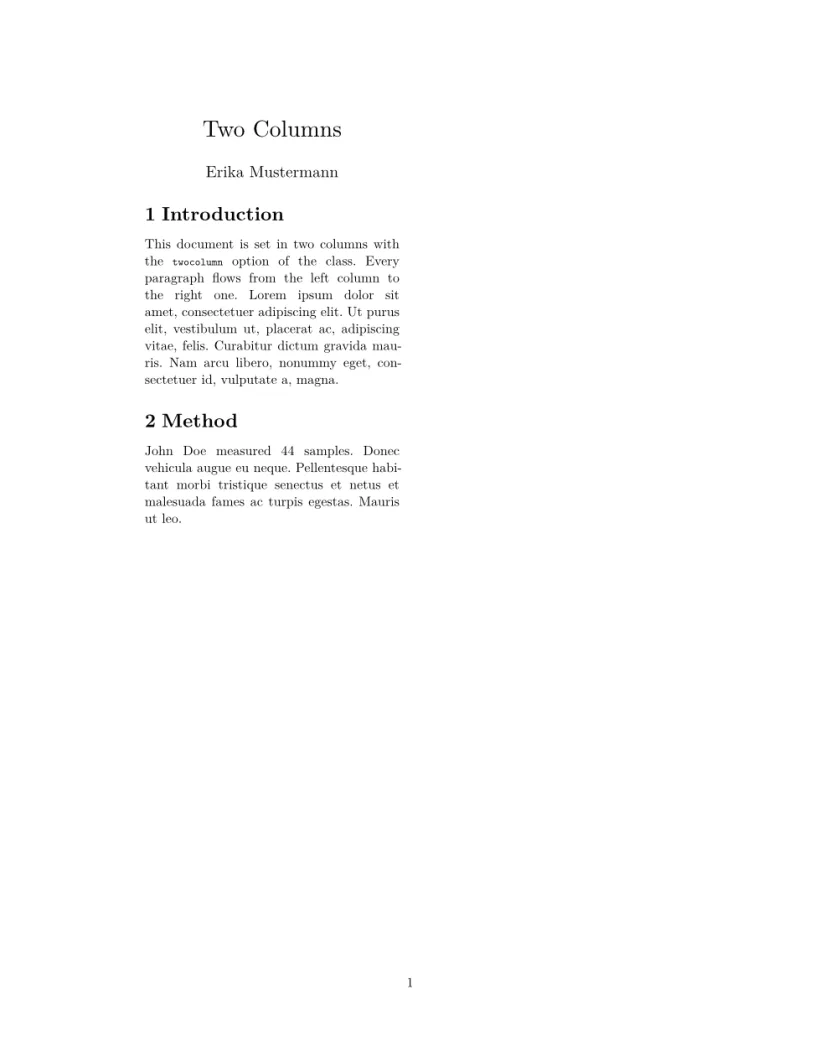
Compatibility
- From a TeX installation to here: text in
multicolsgets its columns, but they are not balanced: add\columnbreakwhere a column should end. - From here to a TeX installation: documents compile there unchanged, with balanced columns.
The full manual is on CTAN: ctan.org/pkg/multicol. See also Page layout, margins and paper size.
See also Page layout, enumitem, paralist and Unsupported packages.
Questions and answers
How do I get two columns in Scissor LaTeX?
Use \documentclass[twocolumn]{article} for the whole document, or \begin{multicols}{2} for part of a page.
Why is all my text in the first column?
Columns are filled one after the other here, not balanced. Put \columnbreak where the next column should start.
Every example on this page is typeset by Scissor LaTeX when the site is built. Last updated 2026-11-07.