


CVPR LaTeX template (also ICCV and WACV)
The official CVPR author kit is at github.com/cvpr-org/author-kit. Scissor LaTeX has a free look-alike for drafting in your browser, with no account: start from the CVPR template, or load \usepackage[review]{cvpr} in a two-column article, for the review copy with line numbers and anonymous authors, the rebuttal or the camera-ready layout. The same .tex compiles with the official kit.
Open the CVPR template in the editor Free, in your browser, no account
The template
The CVPR template is a computer-vision paper about semantic segmentation with three authors, a full-width chart comparing model families, a per-class booktabs table, cleveref references and numbered citations. Open the CVPR template in the editor to see all of it. It starts in the camera-ready layout with page numbers; change one option for the review copy.
Turning it on
The kit is a package on a two-column article:
\documentclass[10pt,twocolumn,letterpaper]{article}
\usepackage[review]{cvpr}
\usepackage{iccv} and \usepackage{wacv} switch on the same layout, since the three conferences share one kit. The page is always Letter and two columns, set in TeX Gyre Termes (a free Times substitute, downloaded the first time).
Modes
| Line | Mode | Authors | Line numbers | Page numbers |
|---|---|---|---|---|
\usepackage[review]{cvpr} | review copy | hidden | yes, in both outer margins | yes |
\usepackage{cvpr} | camera-ready | shown | no | no |
\usepackage[pagenumbers]{cvpr} | camera-ready, for example for arXiv | shown | no | yes |
\usepackage[rebuttal]{cvpr} | one-page rebuttal | hidden | yes | yes |
In review mode the authors are replaced by "Anonymous CVPR submission" and the paper ID, and a header with the conference name, the year, the paper ID and "CONFIDENTIAL REVIEW COPY" runs along the top of each page. Set the ID with \def\paperID{..}; until then it shows stars. The legacy switch \cvprfinalcopy from older kits still gives the camera-ready mode.
Review copy: anonymous, with line numbers
\documentclass[10pt,twocolumn,letterpaper]{article}
\usepackage[review]{cvpr}
\usepackage{amsmath}

\def\paperID{44}
\def\confName{CVPR}
\def\confYear{2026}

\title{Boundary-Aware Refinement for Lightweight Segmentation}
\author{Erika Mustermann\\
Example University\\
{\tt\small erika.mustermann@example.org}
\and
John Doe\\
Institute of Example Studies\\
{\tt\small john.doe@example.org}}

\begin{document}
\maketitle

\begin{abstract}
Small segmentation networks blur object boundaries. We add a refinement head that
works on a thin band around predicted edges and costs little extra computation.
\end{abstract}

\section{Introduction}
\label{sec:intro}
Lightweight models are fast but lose detail at boundaries, where most errors occur.
On 44 classes, the band covers less than a tenth of the pixels.
\end{document}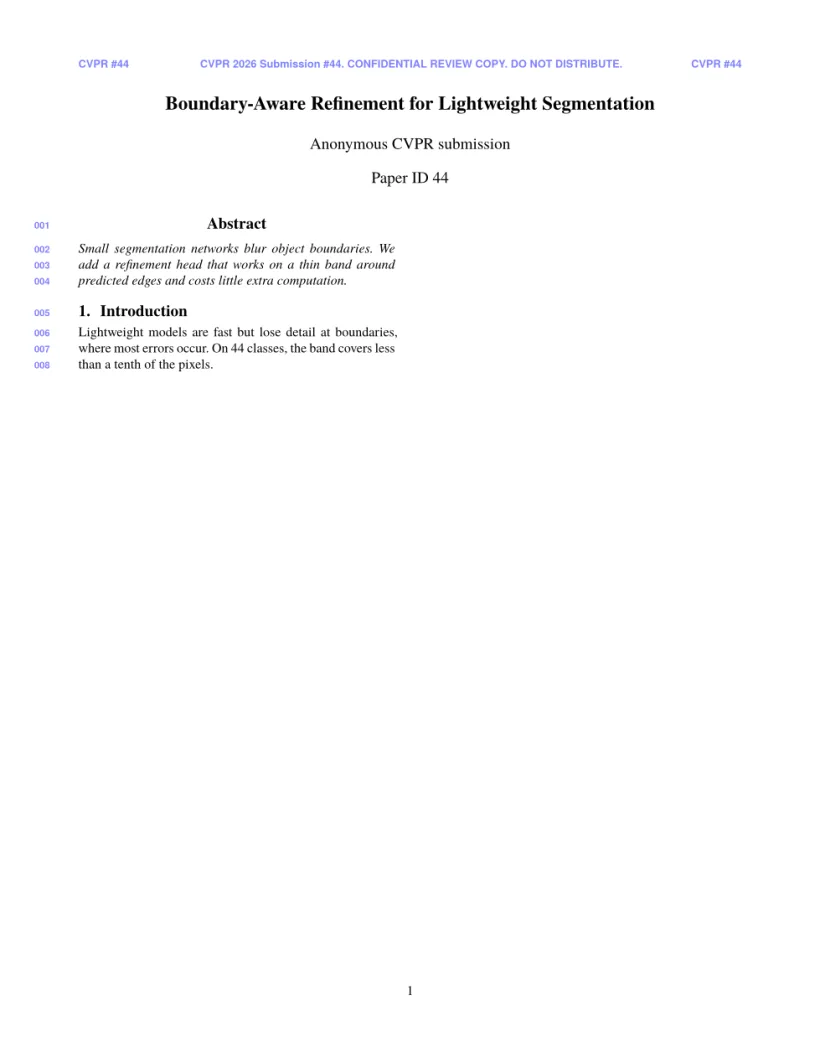
Problems tab: Layout in the style of the CVPR author kit (anonymous review mode). Not official. To compile elsewhere, add cvpr.sty from github.com/cvpr-org/author-kit.
Kit commands
| Command | What it does | In Scissor LaTeX |
|---|---|---|
\def\confName{CVPR}, \def\confYear{2026} | the conference name and year in the review notices | Works; change them for ICCV or WACV |
\def\paperID{..} | your paper ID on the review copy | Works: shown under the title and in the header |
{\tt\small ..} in \author | an e-mail line under a name | Works |
\and | the next author | Works |
strip environment (cuted) | full-width material in a two-column page | Works |
\maketitlesupplementary | the title block of the supplementary material, without authors | Works |
\cvprfinalcopy, \def\cvprPaperID{..} | the camera-ready switch and paper ID of older kits | Work: camera-ready mode, and the paper ID as above |
With \usepackage[colorlinks, ..]{hyperref}, as the template has, links, references and citations are coloured in the kit's cvprblue. \cref and \Cref from cleveref give "Sec. 1" and "Tab. 1" with the \crefname lines of the template.
Bibliography
The template uses \bibliographystyle{ieeenat_fullname}, which Scissor LaTeX sets as numbered references. See bibliographies.
What differs from cvpr.sty
To submit, get the kit from github.com/cvpr-org/author-kit and put its files next to your .tex file; it compiles unchanged. See conference look-alike templates for the other layouts, and floats for figure*.
Questions and answers
How do I switch from the review copy to the camera-ready paper?
Change \usepackage[review]{cvpr} to \usepackage{cvpr}, or to \usepackage[pagenumbers]{cvpr} if you also want page numbers. The preview updates at once.
Can I use this template for ICCV or WACV?
Yes. Write \usepackage[review]{iccv} or \usepackage[review]{wacv} and set \confName and \confYear; the layout is the same.
Is this the official CVPR template?
No. It is a look-alike for drafting. Use the official author kit for submission; your .tex file works with it unchanged.
Every example on this page is typeset by Scissor LaTeX when the site is built. Last updated 2026-11-06.