


LaTeX document classes: article, report, book
Any class name is accepted; article, report and book are laid out like the standard classes, KOMA-Script and memoir map to the closest of them, conference and journal classes such as IEEEtran, revtex4-2 or elsarticle get look-alike layouts, and every other class is set as an article.
What a class does
The first line of a LaTeX document, \documentclass{...}, picks the class. The class decides the overall layout: whether there are chapters, how the title looks, the margins and the default font size. Options in square brackets adjust it (see Page layout).
How Scissor LaTeX reads the class
| Class | Laid out as | Notes |
|---|---|---|
article | article | Sections, no chapters. |
report | report | \chapter starts a new page with "Chapter N". |
book | book | As report; \frontmatter, \mainmatter and \backmatter are ignored. |
scrartcl, scrreprt, scrbook (KOMA-Script) | article, report, book | Headings and the title are set in sans serif, as KOMA-Script does by default. |
memoir | book | memoir's own commands are mostly not read. |
amsbook, standalone and other classes | article | The class name is accepted; its own commands may be reported as unknown. |
letter, scrlttr2 | article | \opening, \closing, \signature and \address are not read. |
beamer | article | No slides: frames become ordinary text. |
IEEEtran with conference, acmart with sigconf, llncs | conference look-alike | See Conference look-alike templates. |
revtex4-2, elsarticle, sn-jnl, amsart, IEEEtran (journal), acmart (acmsmall, manuscript ...), aa, iopjournal, mdpi, aastex701 | journal look-alike | See Journal look-alike templates. |
\documentclass never fails: an unknown class is set as an article.
article
article is the class for papers, reports without chapters and most short documents. It numbers sections as 1, 1.1, 1.1.1.
An article with a title block
\documentclass{article}
\title{Measuring Rainfall}
\author{Erika Mustermann}
\date{}
\begin{document}
\maketitle
\section{Introduction}
Rain gauges were read every morning for 44 days.
\subsection{Sites}
Two sites were used.
\end{document}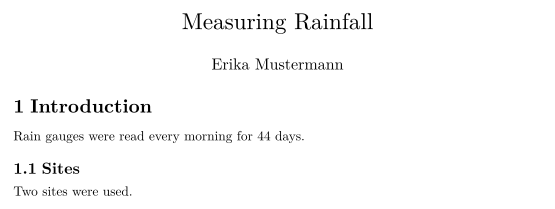
report and book
report and book add \chapter. Each chapter starts on a new page with a large "Chapter N" heading, and sections inside are numbered 1.1, 1.2 and so on.
A report with two chapters
\documentclass{report}
\begin{document}
\chapter{Introduction}
This report has two chapters. Each one starts on a new page.
\section{Background}
The first section of the first chapter is numbered 1.1.
\chapter{Results}
The second chapter starts here.
\end{document}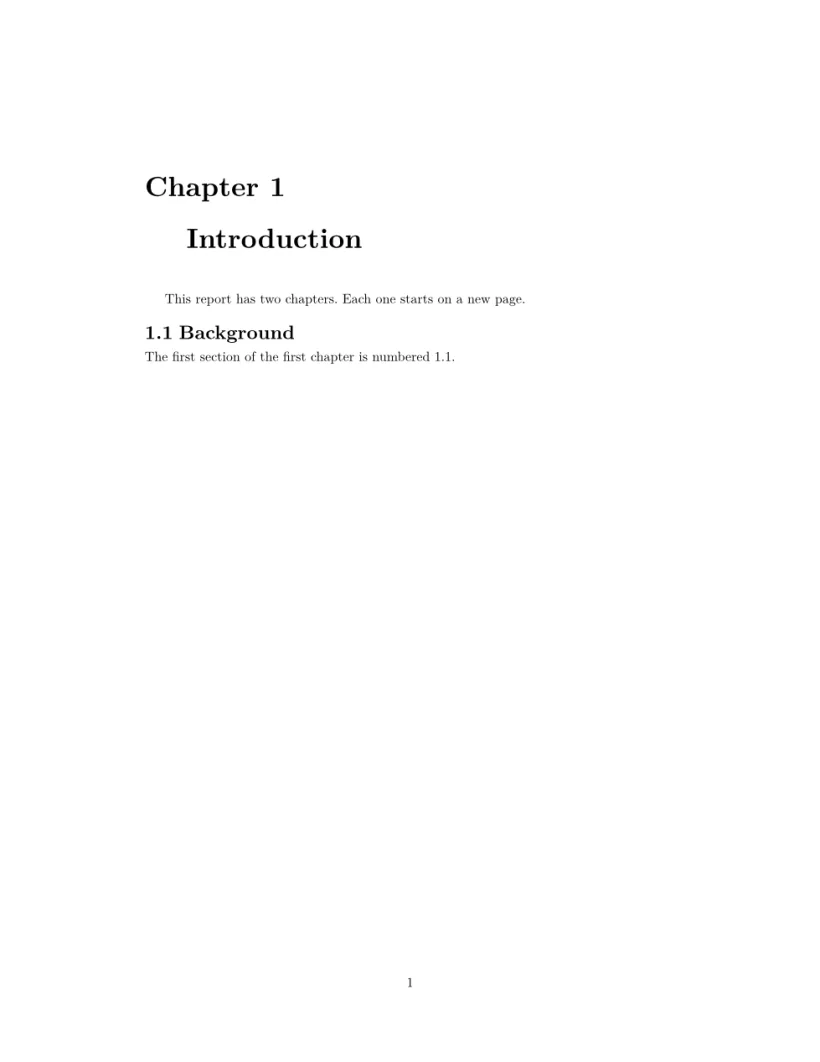
| Feature | In Scissor LaTeX |
|---|---|
\chapter, \chapter* | Works; a new page and a large heading. |
\part | Partly: set like a chapter, with a "Chapter N" heading, and counted as one, so the chapters after it are numbered one higher. Leave \part out if the numbering matters. |
\frontmatter, \mainmatter, \backmatter | Ignored; page and chapter numbering continue. |
openright, twoside options | Ignored; chapters start on the next page, not the next right-hand page. |
KOMA-Script
The KOMA-Script classes scrartcl, scrreprt and scrbook are read as article, report and book. Like KOMA-Script, Scissor LaTeX sets their headings and title in a sans-serif font, while the body text stays serif. The class option headings=normal keeps the headings serif.
scrartcl: headings in sans serif
\documentclass{scrartcl}
\begin{document}
\section{Overview}
The heading above is set in a sans-serif font, the body text
in the usual serif font.
\end{document}
KOMA-Script's \addsec and \addchap are read as \section and \chapter, so they are numbered here; write \section* and \chapter* for unnumbered headings that work in both places. Settings made with \KOMAoptions or \setkomafont are ignored.
letter
The letter class is accepted, but its letter commands are not read: \opening and \closing are reported as unknown commands and their text runs on in one paragraph, while \address and \signature are dropped. For a letter, start from the Letter template in the editor, which builds the letter from ordinary article commands; see Starting templates.
The letter class: \opening and \closing are not read
\documentclass{letter}
\begin{document}
\begin{letter}{John Doe}
\opening{Dear John,}
Thank you for the 44 photographs.
\closing{Best regards,}
\end{letter}
\end{document}
Problems tab: Skipped 2 unknown commands: \opening, \closing
beamer
Slides are not supported. A beamer document typesets as article text: the title of \begin{frame}{Title} stays as a line of text, \frametitle and \titlepage are reported as unknown, and lists and formulas come out as in an article. That is enough to check the content of a talk, not to present it.
A beamer frame set as text
\documentclass{beamer}
\begin{document}
\begin{frame}
\frametitle{Results}
\begin{itemize}
  \item 44 samples
  \item two sites
\end{itemize}
\end{frame}
\end{document}
Problems tab: Skipped 1 unknown command: \frametitle
Conference and journal classes
IEEEtran, acmart and llncs, and packages such as neurips_2026, icml2026 or cvpr, switch to layouts that look like those formats: columns, fonts, title block and reference style. They are look-alikes made for drafting, not the formats' own files. Each has a page: IEEE conference, ACM sigconf, Springer LNCS, NeurIPS, ICML, ICLR, CVPR, ICCV, WACV and ACL, EMNLP, NAACL. The Problems tab says which layout is used. See Conference look-alike templates.
Journal classes work the same way: revtex4-2 (APS and AIP), elsarticle, sn-jnl, amsart, IEEEtran without the conference option, the journal formats of acmart, aa, iopjournal, mdpi and aastex701 each switch to a journal look-alike. See Journal look-alike templates.
What differs from a TeX installation
The KOMA-Script and memoir manuals are on CTAN: koma-script and memoir.
Questions and answers
What is the difference between article, report and book?
article has no chapters and is meant for shorter documents. report and book add \chapter, each starting on a new page. In a TeX installation book is also two-sided; Scissor LaTeX lays out report and book the same way.
Can I make slides with beamer in Scissor LaTeX?
No. A beamer document typesets as plain text so you can check its content, but frames do not become slides.
Can I use my university's thesis class?
The class name is accepted and the document is set as a report or article, depending on the class. Its own commands may be skipped. The Thesis template in the editor is a good starting point.
Every example on this page is typeset by Scissor LaTeX when the site is built. Last updated 2026-11-06.