


Learn LaTeX step by step
Start with the structure of a document, then text and lists, then math and equations, then tables and figures. Each page here has short examples you can open in the editor and change.
How to use this section
Each page covers one topic and builds on the ones before it. Read them in order if LaTeX is new to you, or jump to the topic you need. Every example on these pages is typeset by the editor itself: copy it into a project to try it, change it and see the result at once.
Where Scissor LaTeX behaves differently from a TeX installation, the page says so in a box headed Limits in Scissor LaTeX, with what to write instead.
A suggested path
- The frame. Document structure explains the class, the preamble and the body.
- Text. Text styles, Paragraphs and spacing, Lists and Sections and contents.
- Math. Math basics, then Equations and alignment, Matrices and Theorems and proofs.
- Tables and pictures. Tables, Figures and images and Floats.
- Connecting the parts. Cross-references, Footnotes and Bibliographies.
- Making it yours. Your own commands, Document classes, Page layout and Projects with several files.
Everything together
This short document uses something from most of the pages in this section: a title, an abstract, sections, a list, a numbered equation with a reference, a theorem with a proof, and a table.
A short paper that uses the basics
\documentclass{article}
\usepackage{amsmath,amsthm,booktabs}
\newtheorem{theorem}{Theorem}
\title{Sums of Odd Numbers}
\author{Erika Mustermann}
\date{November 2026}
\begin{document}
\maketitle
\begin{abstract}
We show that the first $n$ odd numbers add up to $n^2$.
\end{abstract}

\section{The claim}
Adding odd numbers one by one gives:
\begin{itemize}
  \item $1 = 1$,
  \item $1 + 3 = 4$,
  \item $1 + 3 + 5 = 9$.
\end{itemize}
The pattern suggests
\begin{equation}
  \sum_{k=1}^{n} (2k - 1) = n^2 . \label{eq:odd}
\end{equation}

\begin{theorem}
Equation~\eqref{eq:odd} holds for every $n \geq 1$.
\end{theorem}
\begin{proof}
For $n = 1$ both sides are 1. Adding the next odd
number $2n + 1$ to $n^2$ gives $(n+1)^2$.
\end{proof}

\section{A check}
\begin{tabular}{rr}
\toprule
$n$ & Sum \\
\midrule
4  & 16 \\
44 & 1936 \\
\bottomrule
\end{tabular}
\end{document}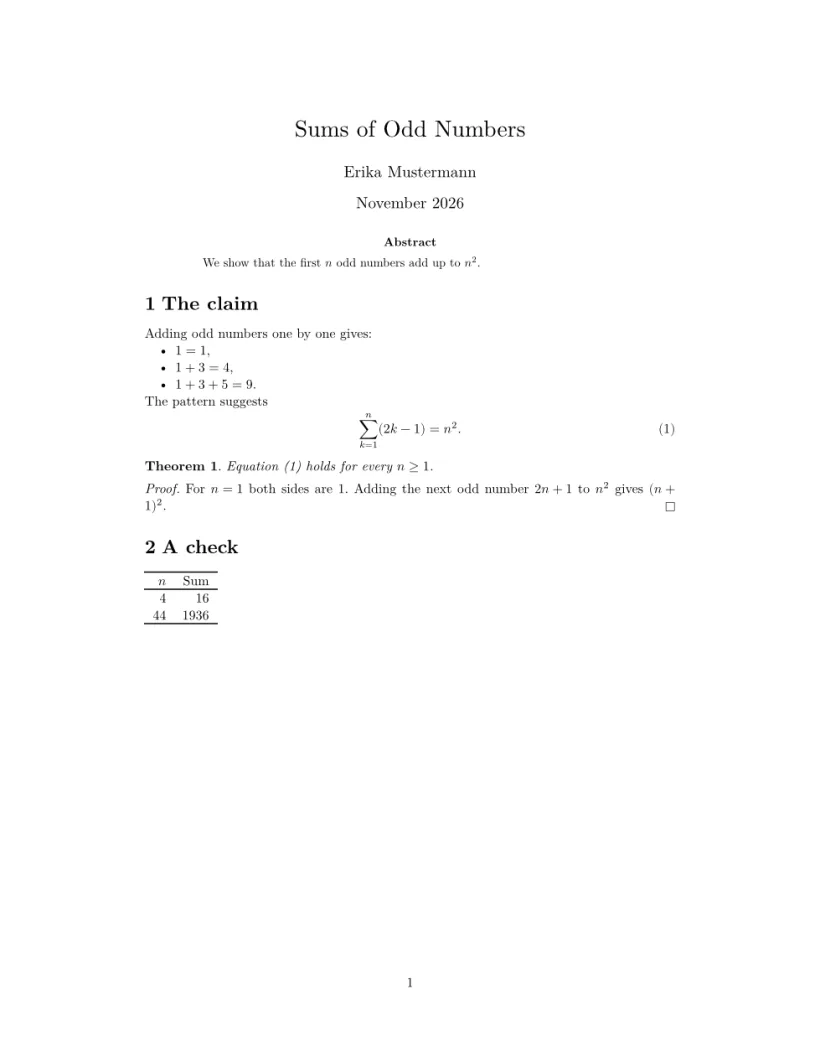
Pages in this section
- Document structureA LaTeX document has two parts. The preamble, from
\documentclassto\begin{document}, sets up the document; the body, between\begin{document}and\end{document}, holds what is printed. - Bold, italic and other text stylesWrap the text in
\textbf{...}for bold,\emph{...}or\textit{...}for italic and\texttt{...}for a typewriter font. Underline with\underline{...}and strike through with\sout{...}from theulempackage. - Paragraphs, line breaks and spacingLeave a blank line in the source to start a new paragraph, and end a line with
\\to break it inside a paragraph. Spaces between words come from the typesetter;~keeps two words together and\,adds a thin space. - Lists: itemize, enumerate, descriptionUse
itemizefor bullet points andenumeratefor a numbered list, with\itembefore each entry. For terms with explanations, usedescriptionand put the term in brackets:\item[Term]. - Sections and table of contentsWrite
\section{Title},\subsection{Title}and\subsubsection{Title}where each part starts; they are numbered for you.\tableofcontentsprints a table of contents with page numbers from those headings. - Math in LaTeX: the basicsPut short formulas in the text between
$ ... $, and give larger ones their own line with\[ ... \]. Inside,^raises and_lowers,\frac{a}{b}makes a fraction and\sqrt{x}a square root. - Align equations in LaTeX: align, gather, casesUse the
equationenvironment for one numbered formula, andalignfor several lines aligned at&. Put\label{eq:name}inside and\eqref{eq:name}in the text prints the number in parentheses. - LaTeX equations in Word, Google Docs and PowerPointWrite the equation in LaTeX, then bring it over in a format the app accepts. The free LaTeX equation editor of Scissor LaTeX copies the equation as MathML, and LaTeX to PNG and LaTeX to SVG make images, all in your browser without an account. A PNG image can be inserted in Word, Google Docs, Google Slides and PowerPoint; Microsoft's help says current Office versions also insert SVG files, and Word for Microsoft 365 can type equations in LaTeX itself. We have not tested every app and version, so check the result in yours.
- Matrices in LaTeX: pmatrix, bmatrix, vmatrixInside math, use
\begin{pmatrix} ... \end{pmatrix}for a matrix in parentheses, with&between the entries of a row and\\between rows.bmatrixgives square brackets andvmatrixvertical bars for a determinant. - Theorems and proofs in LaTeX with amsthmDeclare each kind in the preamble with
\newtheorem{theorem}{Theorem}, then write\begin{theorem} ... \end{theorem}in the body. Theproofenvironment fromamsthmprints "Proof." and ends with a small square. - Tables in LaTeXWrite the rows in a
tabularenvironment, with&between cells and\\at the end of each row, and put it in atablefloat when it needs a caption and a number. - Insert images and figures in LaTeXLoad
graphicx, add the image file to your project and write\includegraphics[width=0.8\linewidth]{photo.png}. Put it in afigureenvironment with\caption{...}and\label{...}to give it a number you can refer to. - LaTeX figure placement: [h], [t], [H] and floatsIn an ordinary document Scissor LaTeX keeps every figure and table where you write it in the source, whatever placement letters you give; only the conference layouts move floats to the top or bottom of a page.
- Cross-references in LaTeX: \label and \refPut
\label{key}right after the thing you want to refer to (after\section{...}, after\caption{...}, inside an equation) and write\ref{key}where you want its number; Scissor LaTeX fills in the number when it typesets. - Footnotes in LaTeXWrite
\footnote{Your note.}right after the word or punctuation mark the note belongs to; LaTeX puts a raised number there and the note at the bottom of the page. - LaTeX bibliography with BibTeX, natbib and biblatexPut your sources in a
.bibfile in the project, cite them with\cite{key}(or\citep,\citet,\parencite,\textcite), and write\bibliography{...}or\printbibliographywhere the list of references should go. - Colours in LaTeXLoad
xcolorand use\textcolor{red}{...}or\color{blue}; in Scissor LaTeX colours show in formulas, TikZ drawings and pgfplots charts, while ordinary body text always stays black. - Links and URLs in LaTeXLoad
hyperref, then write\url{https://...}to show an address or\href{https://...}{link text}to link words; both become clickable links in the PDF. - Page layout, margins and paper sizePaper size, font size and columns come from the
\documentclassoptions, such as\documentclass[a4paper,11pt,twocolumn]{article}; margins, orientation and any other page size come from thegeometrypackage, such as\usepackage[a5paper,landscape,margin=1.5cm]{geometry}. Scissor LaTeX applies both. - LaTeX document classes: article, report, bookAny class name is accepted;
article,reportandbookare laid out like the standard classes, KOMA-Script and memoir map to the closest of them, conference and journal classes such asIEEEtran,revtex4-2orelsarticleget look-alike layouts, and every other class is set as anarticle. - Projects with several filesKeep the preamble and
\begin{document}inmain.texand pull in the other files with\input{chapters/intro}or\include{chapters/intro}; Scissor LaTeX joins them into one document before it typesets. - Your own commands with \newcommandWrite
\newcommand{\name}{replacement}in the preamble, with[n]for arguments#1to#n; from then on\nameis replaced by its definition, in text and in math. - Other languages and fontsScissor LaTeX typesets text in any language: type the text in UTF-8 and Scissor LaTeX picks a font that has the script. Fonts can only be switched between serif and sans serif; babel, polyglossia and fontspec settings are ignored, and hyphenation and names such as "Figure" stay English.
- Code listings in LaTeXPut the code in a
verbatim,lstlistingormintedenvironment, or use\verb|...|inline; Scissor LaTeX sets it in a monospaced font exactly as typed and colours the syntax when you name the language. - Algorithms and pseudocodeWrap the pseudocode in an
algorithmenvironment with a\captionto get "Algorithm 1"; inside it, Scissor LaTeX reads algorithmic's upper-case commands (\STATE,\FOR) only in conference layouts, so for other documents put the steps in averbatimblock. - Common errors and how to fix themMost problems do not stop the document: unknown commands are skipped and listed in the Problems tab, a formula that cannot be read is shown in red and named there, and missing images or citations are marked in place; only an EPS image stops the whole document.
Questions and answers
How long does it take to learn LaTeX?
The basics on the first few pages are enough to write a simple report in an afternoon. Math, tables and references take a little longer, and you can learn them when you first need them.
Do I need to install LaTeX to follow these pages?
No. Every example opens in the editor in your browser. Your documents stay standard LaTeX, so they also compile in a TeX installation later.
Every example on this page is typeset by Scissor LaTeX when the site is built. Last updated 2026-11-07.