


multirow in Scissor LaTeX
The multirow package works partly in Scissor LaTeX. \multirow{2}{*}{text} is accepted and its text appears, but the cell does not span the rows: the text sits in the first row and the rows below keep their empty cells.
What the package does
multirow lets one cell of a table span several rows. \multirow{3}{*}{Group A} puts "Group A" in a cell three rows tall, vertically centred, and you leave the cells below it empty.
What works here
| Command | In Scissor LaTeX | Notes |
|---|---|---|
\multirow{n}{*}{text} | Partly | The text appears in the first of the rows; it is not centred across them. |
\multirow{n}{width}{text} | Partly | As above; the width is ignored. |
\multirow[t]{...}, [b] and the other optional arguments | Left out | Read and ignored. |
\multicolumn{n}{c}{text} (LaTeX itself) | Works | Cells spanning columns work. |
Examples
A grouped table. The group name sits in the first row of its group:
\multirow: the text sits in the first row
\begin{tabular}{|l|l|r|}
\hline
\multirow{2}{*}{Group A} & Erika Mustermann & 44 \\
                         & Hans Mustermann  & 38 \\
\hline
\multirow{2}{*}{Group B} & John Doe         & 41 \\
                         & Jane Doe         & 35 \\
\hline
\end{tabular}
With booktabs rules, a group name in the first row of its group reads naturally:
Groups with booktabs
\begin{tabular}{llr}
\toprule
Group & Name & Points \\
\midrule
\multirow{2}{*}{A} & Erika Mustermann & 44 \\
                   & Hans Mustermann  & 38 \\
\midrule
\multirow{2}{*}{B} & John Doe         & 41 \\
                   & Jane Doe         & 35 \\
\bottomrule
\end{tabular}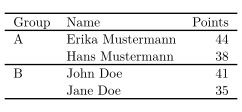
Cells that span columns work with \multicolumn:
\multicolumn spans columns
\begin{tabular}{|l|c|c|}
\hline
 & \multicolumn{2}{c|}{Score} \\
\hline
Name & Test 1 & Test 2 \\
\hline
Erika Mustermann & 44 & 47 \\
\hline
\end{tabular}Compatibility
- From a TeX installation to here: tables with
\multirowtypeset, with the label in the first row of its group. - From here to a TeX installation: documents compile there unchanged, and labels are centred across their rows.
The full manual is on CTAN: ctan.org/pkg/multirow. For tables in general, see Tables in LaTeX and booktabs.
Questions and answers
How do I merge cells vertically in Scissor LaTeX?
Write \multirow as usual. The text appears in the first row of the group instead of the middle, and the document still compiles in a TeX installation with the label centred.
Every example on this page is typeset by Scissor LaTeX when the site is built. Last updated 2026-11-06.