


Conference LaTeX templates: IEEE, ACM, CVPR, NeurIPS, ICML
Scissor LaTeX has free look-alike templates for nine paper formats: IEEE, CVPR, ACM sigconf, Springer LNCS, NeurIPS, ICML, ICLR, ACL and the arxiv.sty preprint style. When your document uses the venue's class or style file, such as IEEEtran, acmart, llncs or \usepackage{neurips_2026}, the editor lays it out in that format, with review and final modes where the format has them.
What these templates are
Conferences publish author kits: a class or style file that sets the page, fonts, title block and headings. Scissor LaTeX cannot run those files, so it recognises the class or package line instead and switches to its own layout in the same style. Your .tex stays standard: with the official kit files next to it, the same file compiles in a TeX installation.
The nine layouts
| Format | Line that switches it on | Modes | Page |
|---|---|---|---|
| arXiv preprint (arxiv.sty) | \usepackage{arxiv} | none | Letter, one column |
| IEEE conference | \documentclass[conference]{IEEEtran} | none | Letter (or A4), two columns |
| CVPR (also ICCV, WACV) | \usepackage[review]{cvpr} | review, rebuttal, final, pagenumbers | Letter, two columns |
| ACM sigconf | \documentclass[sigconf]{acmart} | review, anonymous, nonacm | Letter, two columns |
| Springer LNCS | \documentclass[runningheads]{llncs} | none | Letter (or A4), one column |
| NeurIPS | \usepackage{neurips_2026} | submission, preprint, final | Letter, one column |
| ICML | \usepackage{icml2026} | submission, preprint, accepted | Letter, two columns |
| ICLR | \usepackage{iclr2026_conference,times} | submission, final (\iclrfinalcopy) | Letter, one column |
| ACL (also NAACL, EMNLP ...) | \usepackage[review]{acl} | review, preprint, final | A4, two columns |
The year in a package name is read from the name: neurips_2025, icml2025 or iclr2027_conference work too, and the notices show that year.
What the layout sets
When a kit is found, the format decides the paper size, the number of columns and the font size, whatever the \documentclass options say. It also sets:
- the fonts: free look-alikes (TeX Gyre Termes for Times, Libertinus for ACM's Libertine, Latin Modern for LNCS), downloaded the first time a document needs them;
- the title block, author layout and abstract style of the format;
- heading numbers and styles, caption labels ("Fig. 1." for IEEE, "Figure 1:" for most others);
- line numbers, running heads, notices and anonymous author blocks in the modes that have them;
- the default bibliography style of the format.
Every kit document shows one note in the Problems tab that names the layout and mode, and where to get the official files.
Any kit line switches the layout: here NeurIPS in preprint mode
\documentclass{article}
\usepackage[preprint]{neurips_2026}
\title{Adaptive Step Sizes under Heavy-Tailed Noise}
\author{Erika Mustermann \\ Example University \And John Doe \\ Institute of Example Studies}
\begin{document}
\maketitle
\begin{abstract}
We propose a step-size rule that stays stable when the gradient noise has heavy tails.
\end{abstract}
\section{Introduction}
Stochastic gradient methods need a step size, and a fixed one is either too cautious
early on or unstable later.
\end{document}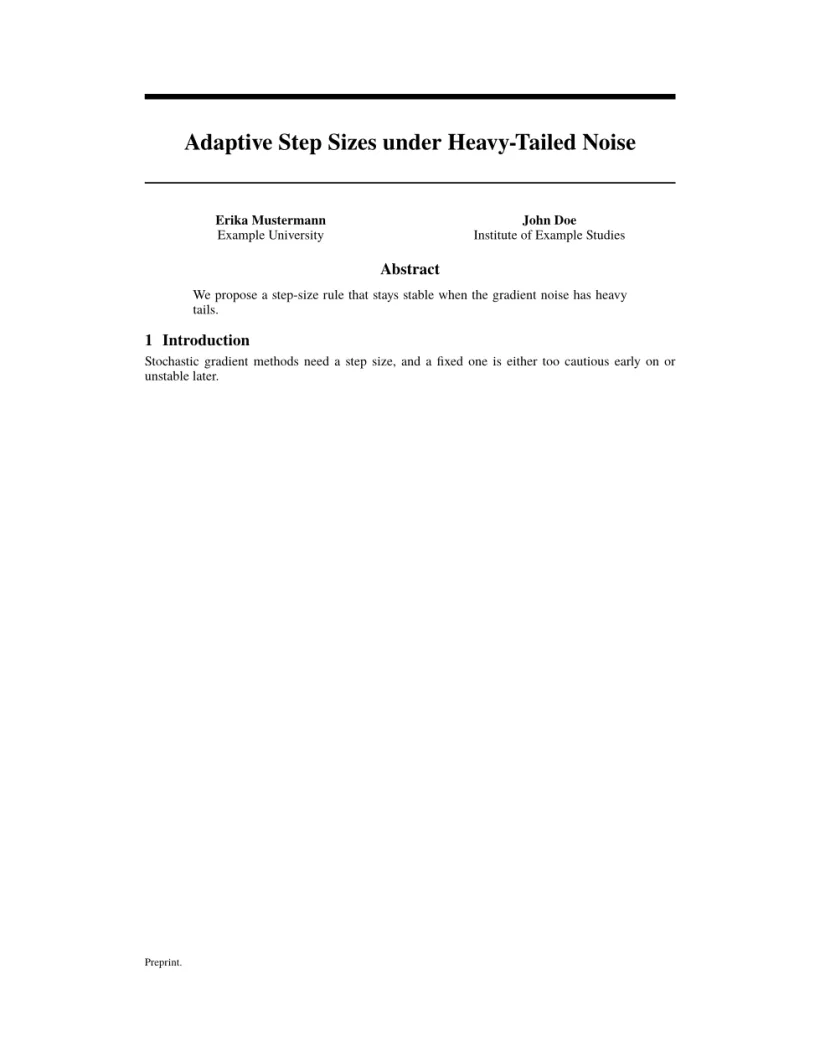
Problems tab: Layout in the style of the NeurIPS style (preprint mode). Not official. To compile elsewhere, add the NeurIPS style file from neurips.cc.
Review, preprint and final modes
Most kits have a mode for anonymous review (authors hidden, line numbers on), and one for the final paper. You switch with a package or class option, exactly as with the official kit; the preview updates as soon as you change it.
The same kind of paper in ACL review mode
\documentclass[11pt]{article}
\usepackage[review]{acl}
\usepackage{times}
\title{Label-Efficient Text Classification}
\author{Erika Mustermann \\ Example University \And John Doe \\ Institute of Example Studies}
\begin{document}
\maketitle
\begin{abstract}
We calibrate class prototypes with a handful of labelled examples per class.
\end{abstract}
\section{Introduction}
Labelled data is expensive, so we start from 44 examples per class.
\end{document}
Problems tab: Layout in the style of the ACL style (anonymous review mode). Not official. To compile elsewhere, add acl.sty from github.com/acl-org/acl-style-files.
What is the same in every layout
All of LaTeX that Scissor LaTeX supports works inside a kit document: math, tables, figures, pgfplots charts, citations, cross-references. figure* and table* span both columns in the two-column formats. See the Learn LaTeX guides.
Also see
- Starting templates for the general templates.
- Journal look-alike templates for APS, AIP, Elsevier, Springer Nature, AMS, IEEE Transactions, ACM journals, A&A, IOP, MDPI, PLOS ONE and AAS.
- Bibliographies and citations for how
\bibliographystylenames map to styles.
Questions and answers
Are these the official conference templates?
No. They are look-alike layouts for drafting and previewing. For submission, download the official kit; your .tex file works with it unchanged.
Can I use a conference class that is not listed?
Yes, but it is set as a plain article (or report/book), and its own commands may be skipped with a message.
Why does my IEEE paper ignore the a4paper option?
It does not: [conference,a4paper] gives A4 in IEEE. Other kits fix the paper themselves; ACL, for example, is always A4 and NeurIPS always Letter.
Every example on this page is typeset by Scissor LaTeX when the site is built. Last updated 2026-11-06.