


IEEE LaTeX template (IEEEtran conference)
The official IEEE conference template is the IEEEtran class, from CTAN or your conference. Scissor LaTeX has a free look-alike for drafting in your browser, with no account: start from the IEEE template, or write \documentclass[conference]{IEEEtran}, and two-column pages appear as you type. The same .tex compiles with the official class.
Open the IEEE template in the editor Free, in your browser, no account
The template
The IEEE conference template is a short wireless-communications paper with three authors, Index Terms, a log-scale pgfplots chart of bit error rates, a booktabs table and numbered references. Open the IEEE conference template in the editor to see all of it.
Turning it on
IEEEtran is a document class, so the switch is the first line:
\documentclass[conference]{IEEEtran}Scissor LaTeX then uses the conference layout: Letter paper, two columns, Times-like text (TeX Gyre Termes, downloaded the first time), a large title across both columns, author blocks side by side, and no page numbers. Add a4paper to the options for A4. Without the conference option (for example \documentclass[journal]{IEEEtran}) the document gets the IEEE Transactions journal layout instead; see journal look-alike templates.
Author blocks, abstract and Index Terms
\documentclass[conference]{IEEEtran}
\usepackage{amsmath}

\title{Pilot Allocation for Dense Uplink Cells with 44 Antennas}
\author{\IEEEauthorblockN{Erika Mustermann}
\IEEEauthorblockA{\textit{Department of Electrical Engineering} \\
Example University\\
Musterstadt, Germany \\
erika.mustermann@example.org}
\and
\IEEEauthorblockN{John Doe}
\IEEEauthorblockA{\textit{Institute of Example Studies} \\
Exampleton, USA \\
john.doe@example.org}}

\begin{document}
\maketitle

\begin{abstract}
We assign pilot sequences to users so that contamination between neighbouring cells stays low,
and compare three schemes by simulation.
\end{abstract}

\begin{IEEEkeywords}
massive MIMO, pilot contamination, uplink
\end{IEEEkeywords}

\section{Introduction}
A base station with $M = 44$ antennas estimates each user's channel from a pilot.

\subsection{System model}
The received pilot signal is $\mathbf{y} = \sqrt{p}\,\mathbf{h} + \mathbf{n}$.
\end{document}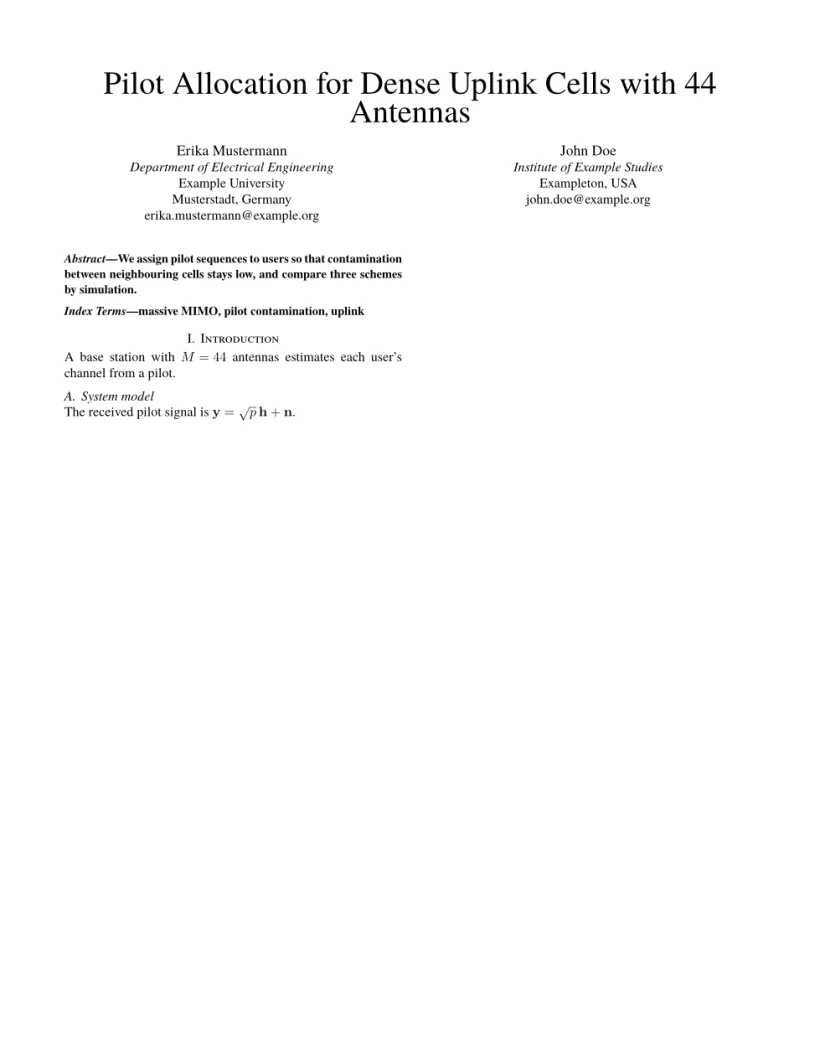
Problems tab: Layout in the style of the IEEE conference format (final mode). Not official. To compile elsewhere, add IEEEtran.cls from ctan.org/pkg/ieeetran.
Commands of the class
| Command | What it does | In Scissor LaTeX |
|---|---|---|
\IEEEauthorblockN{..} | an author's name | Works: one column per author |
\IEEEauthorblockA{..} | the affiliation lines under the name, split at \\ | Works |
\and | the next author block | Works |
\IEEEauthorrefmark{1} | a superscript mark on a name | Works |
IEEEkeywords environment | the "Index Terms" line after the abstract | Works |
\IEEEPARstart{T}{his} | a drop cap (journals) | Prints plain "This" |
\IEEEoverridecommandlockouts | lets \thanks work in the title | Accepted, has no effect here |
\IEEEmembership{..} | a membership line after a name | Kept as text |
IEEEbiography | author biographies (journals) | Skipped |
The layout also follows the IEEE conventions you would see in a real build:
- sections are numbered with Roman numerals ("I. Introduction"), subsections with letters ("A. System model");
- a reference to a subsection shows the full form, such as "Section I-A";
- figure captions read "Fig. 1." and go below the figure; table captions read "TABLE I" and go above;
- the abstract is a run-in paragraph in bold, starting with an italic "Abstract—".
Bibliography
The template uses \bibliographystyle{IEEEtran} with a .bib file, which Scissor LaTeX sets as numbered references in citation order. \usepackage{cite} is accepted, so \cite{a,b,c} works as usual. See bibliographies.
Wide figures and tables
In two columns, figure and table take one column. Use figure* or table* for a float that spans both columns, and give it [t] to put it at the top of the page, where IEEE papers usually have wide floats. Pictures inside figure* get the full text width. See floats.
What differs from IEEEtran
To submit, get IEEEtran.cls from CTAN (ieeetran), where the full class manual is too, or from your conference's template page. It is also part of TeX Live and MiKTeX. Your .tex file compiles with it unchanged. See conference look-alike templates for the other layouts.
Questions and answers
Is this the official IEEE template?
No. It is a look-alike layout for drafting and previewing in the browser. Use the official IEEEtran class for submission; the same .tex file works with it.
How do I get A4 paper in an IEEE paper?
Write \documentclass[conference,a4paper]{IEEEtran}. Without a4paper the page is US Letter.
Why does my IEEE paper have no page numbers?
The IEEE conference format has none in the camera-ready paper; IEEE adds them when it publishes the proceedings. Scissor LaTeX follows that.
Every example on this page is typeset by Scissor LaTeX when the site is built. Last updated 2026-11-06.