


minted in Scissor LaTeX
The minted package works partly in Scissor LaTeX: \begin{minted}{python} and \mintinline work without Python or -shell-escape, with syntax colours from a fixed scheme; options such as linenos, \setminted, \usemintedstyle, the listing caption, \mint and \inputminted are not supported.
What the package does
minted colours source code with the Pygments library. You write \begin{minted}{python} ... \end{minted}, or \mintinline{python}{code} inside a sentence. Options such as linenos and frame=lines change the layout, \setminted sets them for the whole document, and \usemintedstyle picks a colour theme. In a TeX installation, minted needs Python with Pygments, and the document must be compiled with -shell-escape.
What works here
| Feature | In Scissor LaTeX | Notes |
|---|---|---|
\begin{minted}{lang} ... \end{minted} | Works | Coloured, without Python or shell escape. |
\mintinline{lang}{code} | Works | Monospaced, without colours. |
Options: [linenos, frame=lines, bgcolor=...] | Left out | Ignored without a message. |
\setminted{...}, \usemintedstyle{...} | Left out | Ignored without a message; the colours are fixed. |
listing environment with \caption | Partly | The code is shown and the caption is printed as plain text, without "Listing 1"; a \ref to it shows "??". |
\mint{lang}|code| | Not supported | Skipped with a message; the language and code are printed as plain text. |
\inputminted{lang}{file} | Not supported | Skipped with a message. |
\newminted, \newmintinline | Not supported | Skipped with a message, and the arguments are printed. |
The language names are the same as for listings: Python, C, C++, Java, JavaScript, Rust, Go, R, MATLAB, SQL, Bash, HTML, TeX and many more, in upper or lower case.
Examples
A minted block with a language:
minted with JavaScript
\begin{minted}{javascript}
// greet a list of people
const people = ["Erika", "Hans", "John"];
for (const name of people) {
  console.log(`Hello, ${name}!`);
}
\end{minted}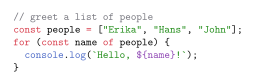
Options are accepted and ignored, so this block has no line numbers or frame here:
linenos and frame are ignored
\begin{minted}[linenos, frame=lines]{rust}
fn main() {
    let total: u32 = (1..=8).sum();
    println!("{}", total + 8); // 44
}
\end{minted}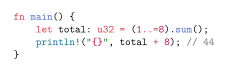
For a numbered caption, use a figure instead of minted's listing environment. Here the caption reads "Listing 1", and \ref gives the number:
A captioned minted block inside a figure
\begin{figure}[h]
\begin{minted}{python}
print(sum(range(44)))
\end{minted}
\caption{Adding the numbers below 44}
\label{lst:sum}
\end{figure}
Listing~\ref{lst:sum} prints 946.
Compatibility
- From a TeX installation to here: every minted block is shown with colours. Options and styles are not applied; replace
\mintwith\mintinlineand paste code from\inputmintedfiles into the document. - From here to a TeX installation: minted blocks compile there when Python, Pygments and
-shell-escapeare available. Afigurearound a minted block is captioned "Figure 1" there.
The full manual is on CTAN: ctan.org/pkg/minted. See also Code listings in LaTeX.
Questions and answers
Does minted work without shell escape?
Here, yes. Scissor LaTeX colours minted blocks itself, so neither Python nor -shell-escape is needed. In a TeX installation both are still required.
Should I use minted or listings?
Both work the same here: the language is read and the other options are ignored. If the document must also compile elsewhere without shell escape, listings is the safer choice.
Every example on this page is typeset by Scissor LaTeX when the site is built. Last updated 2026-11-06.