


Your first LaTeX document
Start with \documentclass{article}, put your text between \begin{document} and \end{document}, and the editor shows the typeset page as you type.
Create a project
Open the editor and choose New project. Pick Blank to start from an empty document, or one of the templates if you want a ready-made structure. The project is saved on your device as you type.
The editor has two halves: your LaTeX source on one side, the typeset pages on the other. You can switch between Source, Split and PDF at the top.
The smallest document
Every LaTeX document has the same frame. The first line names the document class, and the text goes between \begin{document} and \end{document}.
The smallest complete document
\documentclass{article}
\begin{document}
Hello, world! This is my first document.
\end{document}
Type a few words into the body and watch the page change. There is no Compile button: the pages update a moment after you stop typing. If you want to typeset right away, press Ctrl+Enter (Cmd+Enter on a Mac).
Add a title
The commands \title, \author and \date go before \begin{document}, in the part called the preamble. \maketitle in the body prints them. Separate several authors with \and.
A title, two authors and a date
\documentclass{article}
\title{A Week of Weather}
\author{Erika Mustermann \and John Doe}
\date{6 November 2026}
\begin{document}
\maketitle
We recorded the temperature every morning at eight.
\end{document}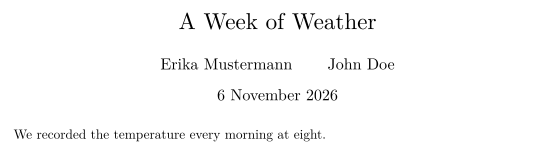
Sections and paragraphs
Split your text with \section{...} and \subsection{...}. They are numbered for you. A blank line in the source starts a new paragraph; a single line break does not.
Sections, paragraphs and a little math
\documentclass{article}
\begin{document}
\section{Method}
We measured the temperature with two
thermometers and took the mean.

The second paragraph starts after a blank line.

\subsection{Results}
The mean was $12.4\,^{\circ}\mathrm{C}$, which is
\textbf{lower} than the week before.
\end{document}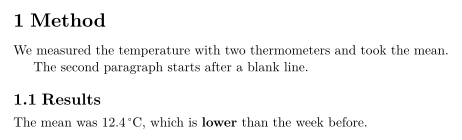
Comments and special characters
A % starts a comment: the rest of the line is ignored. To print a percent sign, write \%. The same goes for the other characters LaTeX uses for itself.
| You want | Write |
|---|---|
| % | \% |
| & | \& |
| # | \# |
| $ | \$ |
| _ | \_ |
| { and } | \{ and \} |
| \ | \textbackslash |
A comment and escaped characters
% This line is a comment and does not appear.
Prices rose by 4\% in Q1 \& Q2. % so did costs
Item \#44 costs \$12.
When something goes wrong
The Problems tab next to the pages lists what the editor could not use: unknown commands, formulas it cannot read, missing images, citations without an entry and labels that do not exist. Click a message to jump to its line.
Most problems do not stop the document. An unknown command is skipped and its text kept; a formula the editor cannot read is shown in red. When the whole document fails, the last good pages stay on screen until you fix the error. See Common errors and how to fix them.
Next steps
- Document structure: the preamble, packages and the abstract.
- Bold, italic and other text styles.
- Math in LaTeX: the basics.
Questions and answers
Why does my line break not show in the PDF?
LaTeX joins lines of the source into one paragraph. Leave a blank line to start a new paragraph, or end a line with \\ to break it inside a paragraph.
Where do I put \usepackage?
In the preamble: after \documentclass and before \begin{document}.
Do I need to press a button to compile?
No. The pages update as you type. Ctrl+Enter (Cmd+Enter on a Mac) typesets at once.
Every example on this page is typeset by Scissor LaTeX when the site is built. Last updated 2026-11-06.