


babel and polyglossia in Scissor LaTeX
The babel and polyglossia packages work partly in Scissor LaTeX: both load without errors and text in any language and script typesets from UTF-8, but the language settings are not applied: hyphenation stays English, names such as "Figure" and "References" stay English, \today prints nothing, and shorthands such as "a are not read.
What the packages do
babel (for pdfLaTeX) and polyglossia (for XeLaTeX and LuaLaTeX) adapt a document to a language. They load the hyphenation patterns, translate the fixed names ("Abbildung" instead of "Figure" in German), format \today in the local way, and add shorthands such as "a for ä in German or \og ... \fg for French quotation marks. You switch languages with \selectlanguage{...}, or for a few words with \foreignlanguage{...}{...}.
What works here
| Feature | In Scissor LaTeX | Notes |
|---|---|---|
\usepackage[ngerman]{babel}, \usepackage{polyglossia} | Works | Accepted without a message. |
| Text in the language, typed in UTF-8 | Works | All scripts, see Other languages and fonts. |
| Hyphenation | Left out | English rules for every language. |
| Names: "Figure", "Table", "Contents", "References", "Proof" | Left out | Always English. |
\today | Left out | Prints nothing. |
\selectlanguage{...}, \setdefaultlanguage{...}, \setotherlanguage{...} | Left out | Accepted, no effect. |
\foreignlanguage{lang}{text} | Works | The text is kept. |
\begin{otherlanguage}{lang} | Partly | The text is kept, but the language name is printed in front of it. |
\textenglish{...}, \textgerman{...} (polyglossia) | Partly | The text is kept; the command is reported as unknown. |
Shorthands: "a, "s (ngerman) | Not supported | Printed as a quotation mark and the letter. Type ä and ß instead. |
\og ... \fg (french) | Not supported | Skipped with a message; the quotation marks are missing. |
Examples
With ngerman, the text is German but the caption name stays English:
babel ngerman: names stay English
\documentclass{article}
\usepackage[ngerman]{babel}
\begin{document}
\section{Einleitung}
Erika Mustermann hat 44 Proben gewogen; die Ergebnisse stehen
in Tabelle~\ref{tab:proben}.
\begin{table}[h]
  \centering
  \caption{Gewicht der Proben}
  \label{tab:proben}
  \begin{tabular}{lr}
    Probe & Gewicht \\
    A & 12\,g \\
    B & 15\,g \\
  \end{tabular}
\end{table}
\end{document}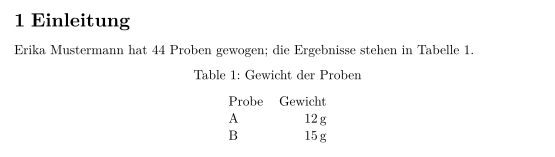
Type special letters directly instead of using babel's shorthands, and write the date yourself:
Umlauts typed directly, the date written out
\documentclass{article}
\usepackage[ngerman]{babel}
\begin{document}
Berlin, 4.~November 2026

Grüße an Hans Mustermann: Die Maße der Straße sind korrekt.
Auf Französisch: \foreignlanguage{french}{«~À bientôt~»}.
\end{document}
The otherlanguage environment keeps its text but also prints the language name. Use \foreignlanguage or leave the switch out:
otherlanguage prints the language name
\begin{otherlanguage}{english}
Good morning, John Doe.
\end{otherlanguage}Compatibility
- From a TeX installation to here: text in every language is kept. Shorthands such as
"aand\ogneed to be replaced with the typed characters, and names and dates are English or missing. - From here to a TeX installation: documents compile there, and babel or polyglossia then translate names and hyphenate correctly. If you want the local date format there, replace the typed date with
\today.
The full manuals are on CTAN: babel and polyglossia. See also Other languages and fonts and fonts and encodings.
Questions and answers
Why does my German document say "Figure" instead of "Abbildung"?
Scissor LaTeX does not apply babel's translated names yet. The caption text itself is yours and stays German; only the word in front of the number is English.
Why does \today print nothing?
The date from \today is not filled in. Write the date as text.
Can I write Arabic or Hebrew with babel or polyglossia?
The text typesets from UTF-8 without either package. The words are shaped right to left, but the paragraphs stay left to right; see Other languages and fonts.
Every example on this page is typeset by Scissor LaTeX when the site is built. Last updated 2026-11-06.