


listings in Scissor LaTeX
The listings package works partly in Scissor LaTeX: lstlisting keeps the code exactly as typed and colours it when you give language= on the environment, and \lstinline works; \lstset, line numbers, frames, captions and labels are ignored, and \lstinputlisting is skipped.
What the package does
listings typesets source code. The lstlisting environment keeps line breaks and spaces, and with language=Python (or C, Java, SQL ...) it sets keywords, comments and strings in different styles. Options add line numbers, frames, captions and colours, either per listing or for the whole document with \lstset. \lstinline is the inline form, and \lstinputlisting reads code from a file.
What works here
| Feature | In Scissor LaTeX | Notes |
|---|---|---|
\begin{lstlisting} ... \end{lstlisting} | Works | Monospaced, exactly as typed. |
[language=Python] on the environment | Works | Syntax colours from a fixed scheme. |
[language={[Sharp]C}] and other dialects | Works | The dialect in brackets is read along with the name. |
\lstinline|code|, \lstinline{code} | Works | Monospaced, without colours. |
numbers=left, frame=single, basicstyle, keywordstyle, backgroundcolor | Left out | Ignored without a message. |
caption=, label= | Left out | No caption is printed, and a \ref to the label shows "??". |
\lstset{...}, \lstdefinestyle, style= | Left out | Ignored, including a language= set there. |
\lstinputlisting{file} | Not supported | Skipped with a message. |
\lstlistoflistings, \lstnewenvironment | Not supported | Skipped with a message. |
Language names are not case-sensitive. Colours are available for common languages such as Python, C, C++, C#, Java, JavaScript, Rust, Go, R, MATLAB, SQL, Bash, HTML and TeX. A name that is not recognised, such as Fortran, gives plain monospaced code without a message.
Examples
Give the language on each listing:
lstlisting with language=Python
\begin{lstlisting}[language=Python]
def mean(values):
    # average of a list of numbers
    return sum(values) / len(values)

print(mean([40, 44, 48]))
\end{lstlisting}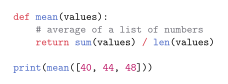
A language set with \lstset is not used, so this listing has no colours. Layout options such as numbers and frame are ignored too:
\lstset is ignored
\documentclass{article}
\usepackage{listings}
\lstset{language=SQL, numbers=left, frame=single}
\begin{document}
\begin{lstlisting}
SELECT name FROM staff WHERE id = 44;
\end{lstlisting}
\begin{lstlisting}[language=SQL]
SELECT name FROM staff WHERE id = 44;
\end{lstlisting}
\end{document}
Inline code with \lstinline takes any delimiter, like \verb:
\lstinline in a sentence
The loop \lstinline|for i in range(44):| runs 44 times, and
\lstinline{total += i} adds up the numbers.
A captioned listing inside a figure
\begin{figure}[h]
\begin{lstlisting}[language=Python]
print(sum(range(44)))
\end{lstlisting}
\caption{Adding the numbers below 44}
\label{lst:sum}
\end{figure}
The code in Listing~\ref{lst:sum} prints 946.
Compatibility
- From a TeX installation to here: the code of every
lstlistingis shown. Movelanguage=from\lstsetonto each listing to get colours, and paste code from\lstinputlistingfiles into the document. - From here to a TeX installation: documents compile there unchanged, and your options then apply.
The full manual is on CTAN: ctan.org/pkg/listings. See also Code listings in LaTeX and minted.
Questions and answers
Why are my listings not coloured?
The language is probably set with \lstset, which is ignored here. Write [language=Python] (or your language) after \begin{lstlisting}.
Can I show line numbers?
Not yet. numbers=left is accepted and ignored.
Every example on this page is typeset by Scissor LaTeX when the site is built. Last updated 2026-11-06.