


Export PDF, HTML and Markdown
Click Export at the top of the editor and pick a format. PDF gives you the typeset pages; Web page (HTML) and Markdown give you the text for the web or for notes; .zip gives you every file of the project.
The Export dialog
Export at the top right of the editor opens a dialog with six choices. Every export is made on your device; nothing is uploaded, except what you save to your own Google Drive.
| Export | What you get |
|---|---|
| The typeset document, exactly as in the preview | |
| Project (.zip) | Every file of the project, with its folders, to open in any LaTeX editor or TeX installation |
| Main .tex file | The source of the main file only |
| Web page (HTML) | One HTML file, with equations as MathML |
| Markdown | One .md file, with equations as LaTeX between $ signs |
| Google Drive | The whole project saved to your Drive (see Saving to Google Drive) |
A document to export
\documentclass{article}
\begin{document}
\section{Results}
The mean of the 44 samples is
\begin{equation}
  \bar{x} = \frac{1}{n} \sum_{i=1}^{n} x_i .
\end{equation}
\begin{itemize}
  \item The \textbf{largest} value was 9.1.
  \item The \emph{smallest} value was 0.4.
\end{itemize}
\end{document}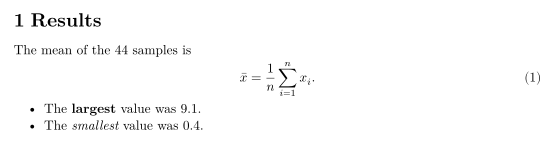
The PDF has the same pages as the preview, with selectable text, embedded fonts and working links. Making it takes a moment for long documents; a note shows while it runs.
The PDF toolbar above the pages also has a download button and a print button. Printing uses your browser's print dialog, so you can also print to a PDF file from there.
Project (.zip) and .tex
Export Project (.zip) when you want to move a project to another editor, send it to a co-author or keep a backup. It contains every file, with the same folders, and nothing else.
Main .tex file downloads only the main file. If your project has more than one .tex file, the dialog reminds you to use the .zip instead, so that no chapter is left behind.
Web page (HTML)
The HTML export is one self-contained page: headings, paragraphs, lists, tables, footnotes and links, with a small built-in style sheet. Equations become MathML, which current browsers display without any script. Files pulled in with \input and \include are put in place first.
Markdown
The Markdown export is meant for notes apps, wikis and README files. Headings become # lines (the top level used in the document gets one #), bold and italic become ** and *, lists and tables become Markdown lists and pipe tables, and footnotes become [^1] notes. Equations stay LaTeX, between $ ... $ inline and $$ ... $$ on their own lines, which most Markdown tools with math support can show.
For the example above, the Markdown export gives:
# Results

The mean of the 44 samples is

$$
\bar{x} = \frac{1}{n} \sum_{i=1}^{n} x_i .
$$

- The **largest** value was 9.1.
- The *smallest* value was 0.4.
The same limits as for HTML apply: no numbers, no bibliography, pictures as source.
A table in each format
Tables are exported to every format. In the PDF they look as in the preview; in HTML they become <table> elements; in Markdown, pipe tables with the column alignment kept.
This table exports to PDF, HTML and Markdown
\begin{tabular}{lr}
\toprule
Sample & Mass (g) \\
\midrule
A & 4.4 \\
B & 12.0 \\
\bottomrule
\end{tabular}
See also Your first document, Working offline and Keyboard shortcuts.
Questions and answers
How do I download my LaTeX document as a PDF?
Click Export and choose PDF, or use the download button in the toolbar above the pages. The PDF is made in your browser.
Why does my HTML export show eq:mean instead of (1)?
The HTML and Markdown exports do not number equations, sections or figures. References show the label name as a link to the item.
Can I open the exported .zip in another LaTeX editor?
Yes. The .zip has every file and folder of the project as you see them in the Files panel.
Every example on this page is typeset by Scissor LaTeX when the site is built. Last updated 2026-11-06.