


placeins, afterpage and endfloat in Scissor LaTeX
placeins is accepted and \FloatBarrier does nothing, which is fine in ordinary documents because Scissor LaTeX keeps every figure and table where you write it. \afterpage is skipped with a note and its content runs at once, so \afterpage{\clearpage} breaks the page right there, and endfloat does not move floats to the end.
What the packages do
In a TeX installation, LaTeX moves figures and tables (floats) to where they fit best, which can be pages away from where they are written. These packages control that:
placeinsgives\FloatBarrier: no float written before it may appear after it. With thesectionoption, every\sectionacts as a barrier.flaftermakes sure a float never appears before the place where it is written.afterpageruns a command at the next page break:\afterpage{\clearpage}empties the float queue there.endfloatmoves all figures and tables to the end of the document, as some journals ask for submissions.
What works here
| Command | In Scissor LaTeX | Notes |
|---|---|---|
\usepackage{placeins}, options section, above, below | Works | Accepted without a message. |
\FloatBarrier | Left out | Not needed: in ordinary documents, floats are never moved, so none can pass the barrier. |
\usepackage{flafter} | Works | Accepted; floats already stay at the place where they are written. |
\afterpage{...} | Not supported | Skipped with a Problems note. Its content is run at once, so \afterpage{\clearpage} starts a new page at that point instead of at the next page break. |
\usepackage{endfloat} | Left out | Floats stay in the text instead of moving to the end. \processdelayedfloats is skipped with a note. |
Floats stay in place in article, report, book and every other ordinary class. In the conference layouts, where [t] and [b] move floats, \FloatBarrier is ignored too; see Floats.
Examples
A figure written in a section stays in that section, with or without \FloatBarrier:
\FloatBarrier is accepted; the figure stays in place
\section{Measurements}
Erika Mustermann took 44 samples.
\begin{figure}[t]
  \centering
  \fbox{A plot of the samples}
  \caption{The samples.}
\end{figure}
\FloatBarrier
\section{Discussion}
The figure above stays in its section.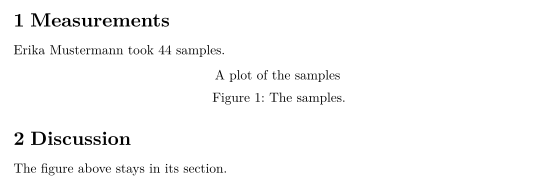
Compatibility
- From a TeX installation to here: documents typeset with every figure in place, so barriers are not needed. Remove
\afterpage{\clearpage}if the page break it causes here is in the way. With endfloat, the floats stay in the text. - From here to a TeX installation: documents compile there unchanged, and floats may then move. Add
\FloatBarrierbefore a section that must not receive figures from earlier ones.
The full manuals are on CTAN: placeins, afterpage, flafter and endfloat. See also Floats and float and wrapfig.
Questions and answers
How do I keep figures inside their section?
In a TeX installation, load \usepackage[section]{placeins} or write \FloatBarrier before the next section. Here figures already stay where you write them, and both are accepted.
Why does \afterpage{\clearpage} start a new page immediately?
\afterpage is not supported, so its content is run where it stands, and \clearpage starts a new page there. Since floats are not held back here, the line is not needed and can be removed.
Every example on this page is typeset by Scissor LaTeX when the site is built. Last updated 2026-11-07.