


用 BibTeX、natbib 和 biblatex 制作 LaTeX 参考文献
把文献放进项目中的 .bib 文件,用 \cite{key}(或 \citep、\citet、\parencite、\textcite)引用它们,并在参考文献列表应出现的位置写 \bibliography{...} 或 \printbibliography。
.bib 文件
.bib 文件中每条文献对应一个条目。每个条目都有一个类型(@article、@book、@inproceedings、@misc ...)、一个用于引用它的键,以及作者、标题和年份等字段。本页的示例使用下面这个文件 refs.bib:
@article{doe2024,
  author  = {John Doe and Erika Mustermann},
  title   = {Measuring Things Carefully},
  journal = {Journal of Examples},
  year    = {2024},
  volume  = {44},
  pages   = {1--12}
}

@book{mustermann2021,
  author    = {Erika Mustermann},
  title     = {A Short Book on Long Tables},
  publisher = {Example Press},
  address   = {Berlin},
  year      = {2021}
}
像添加其他文件一样把它添加到项目中。Scissor LaTeX 会读取项目中的每个 .bib 文件并把它们合并,所以 \bibliography{refs} 或 \addbibresource{refs.bib} 中的文件名不必与之一致。如果想先整理、排序 .bib 文件并去除重复条目,请使用 BibTeX 格式化工具;引用键清理工具可以让各个键保持统一。
纯 BibTeX:\cite 和 \bibliography
经典的做法是在正文中写 \cite{key},再在列表应出现的位置写 \bibliographystyle{...} 和 \bibliography{...}。
使用数字样式的 \cite
Careful measuring is discussed by \cite{doe2024}, and long tables
in \cite[p.~44]{mustermann2021}.

\bibliographystyle{plain}
\bibliography{refs}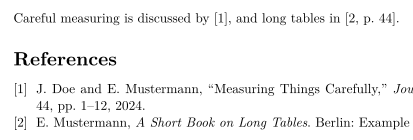
列表中只列出你引用过的文献。要列出一条没有引用的文献,请写 \nocite{key};\nocite{*} 会列出 .bib 文件中的所有条目,和在 TeX 发行版中一样。
natbib:作者-年份引用
使用 natbib 和 plainnat 这样的作者-年份样式时,\citet 生成文中引用(“Doe and Mustermann (2024)”),\citep 生成括号引用。
使用 plainnat 的 \citet 和 \citep
\citet{doe2024} measured carefully. Tables can be long
\citep{mustermann2021}, and plots can explain themselves
\citep[p.~44]{mustermann2023}.

\bibliographystyle{plainnat}
\bibliography{refs}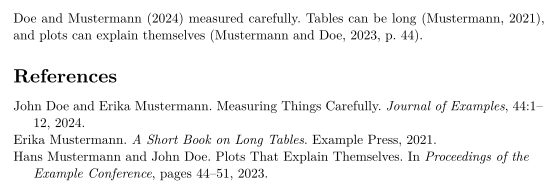
biblatex:\parencite 和 \textcite
使用 biblatex 时,先加载宏包,用 \addbibresource 指定 .bib 文件,再用 \printbibliography 输出列表。
使用 \parencite 和 \textcite 的 biblatex
\documentclass{article}
\usepackage{biblatex}
\addbibresource{refs.bib}
\begin{document}
\textcite{doe2025} keeps notes on typesetting.
Plots can explain themselves \parencite{mustermann2023}.

\printbibliography
\end{document}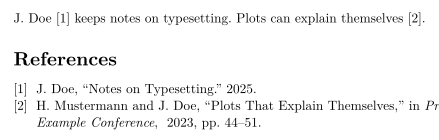
引用命令
| 命令 | 在 Scissor LaTeX 中 | 说明 |
|---|---|---|
\cite{key}, \cite{a,b} | 可用 | 多个键会各自输出一个引用,并排显示。 |
\cite[p.~44]{key} | 可用 | 键之后的附注(“p. 44”)放在引用内部。 |
\citep, \parencite, \autocite | 可用 | 括号引用;数字样式输出一个编号。 |
\citep[see][p.~44]{key} | 部分可用 | 前置附注(“see”)输出在括号前面,而不是括号里面。 |
\citet, \textcite | 可用 | 文中引用:先是作者,然后是年份或编号。 |
\citeauthor{key} | 部分可用 | 输出与 \citet 相同,而不是只输出作者姓名。 |
\citeyear{key} | 可用 | 只输出年份。 |
\citealt, \citealp, \citenum | 部分可用 | 按普通的 \cite 输出。 |
\footcite{key} | 部分可用 | 作为普通引用在行内输出,而不是放进脚注。 |
\nocite{key} | 可用 | 列入参考文献,但正文中不出现引用。 |
\nocite{*} | 可用 | 列出 .bib 文件中的所有条目。 |
参考文献样式
\bibliographystyle{...} 中的名称决定样式。Scissor LaTeX 会把常见的 BibTeX 样式名映射到相近的样式:
| \bibliographystyle{…} | 在 Scissor LaTeX 中的结果 |
|---|---|
apalike, apa, apacite, authoryear | APA: author and year |
natbib, plainnat, abbrvnat, acl_natbib | Author and year, as natbib (plainnat) |
unsrtnat | Numbers in citation order, as unsrtnat |
ieeenat_fullname, ieee_fullname | IEEE: numbers in citation order |
splncs04, splncs03, splncs | Springer LNCS: numbers |
ACM-Reference-Format | ACM: numbers |
chicago, chicago-author-date | Chicago: author and date |
mla | MLA: author and page |
ieeetr, IEEEtran, ieee, plain, abbrv, unsrt, plainurl, abbrvurl, unsrturl, siam, acm | IEEE: numbers in citation order |
nature | Nature: superscript numbers |
vancouver | Vancouver: numbers |
harvard, agsm, dcu | Harvard: author and year |
apsrev4-2, apsrev4-1, apsrev, apsrmp4-2, apsrmp4-1, sn-aps | american-physics-society |
aipnum4-2, aipnum4-1, aipnum | american-institute-of-physics |
aipauth4-2, aipauth4-1 | Author and year, as natbib (plainnat) |
elsarticle-num, elsarticle-num-names, model1-num-names | elsevier-with-titles |
elsarticle-harv, model2-names | elsevier-harvard |
sn-mathphys-num, sn-mathphys | springer-mathphys |
sn-mathphys-ay, sn-basic, sn-vancouver-ay | springer-basic-author-date |
sn-vancouver-num, sn-vancouver | springer-vancouver |
sn-nature | Nature: superscript numbers |
sn-apacite, sn-apa | APA: author and year |
sn-chicago | Chicago: author and date |
amsplain, amsplainurl | AMS |
aa, aa-note, aa_url, aasjournalv7, aasjournal, aasjournal7, apj | APJ |
iopart-num, iopart | institute-of-physics-numeric |
mdpi | multidisciplinary-digital-publishing-institute |
plos2025, plos2015, plos2009 | plos |
icml…, iclr… (with a year) | Author and year, as natbib (plainnat) |
journal styles that number references (…-num, apsrev…, JHEP, aip…, achemso, siam…) | IEEE: numbers in citation order |
journal author-year styles (aasjournal…, …-harv, mnras, aa, agu, ametsoc) | Author and year, as natbib (plainnat) |
any other name (alpha, a project .bst …) | IEEE: numbers in citation order, with a note in the Problems tab |
plain、abbrv、unsrt 以及其他经典的编号样式都使用 IEEE 样式:方括号中的编号,按文献首次被引用的顺序排列。任何不在表中的名称,例如 alpha 或 amsalpha(其标签形如 [Knu84]),或你自己的 .bst 文件,都使用同样的编号样式,“问题”标签页会给出提示:“Bibliography style alpha is not available; using numbered references [1] instead”。会议版式会选择各自的样式。
缺失的文献和 thebibliography
不在任何 .bib 文件中的键会以红色的 [key?] 显示,“问题”标签页也会列出它:
不在 .bib 文件中的键
This is in the file \cite{doe2024}, this is not \cite{nobody2020}.

\bibliography{refs}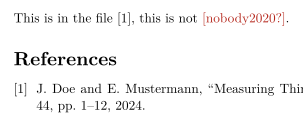
“问题”标签页: Citations not found in the .bib file: nobody2020
.bib 文件中无法读取的条目,例如缺少右花括号或键重复的条目,会被单独略去:“问题”标签页会注明它及其行号,例如“Skipped .bib entries: doe2023 (line 12, a closing brace is missing)”,其他条目照常引用。
手写的 thebibliography 列表会作为列表输出,但其中 \bibitem 的键无法被引用。要引用这些条目,请把它们移到 .bib 文件中。
与 TeX 发行版的区别
关于这些宏包,请参阅 natbib 和 biblatex。完整手册可在 CTAN 上找到:natbib、biblatex。
常见问题
如何在 LaTeX 中添加参考文献?
在项目中添加一个 .bib 文件,用 \cite{key} 引用条目,并在列表应出现的位置写 \bibliography{refs}(使用 biblatex 时写 \printbibliography)。
为什么我的引用显示为 [key?]?
项目的任何 .bib 文件中都没有这个键。请检查拼写,并确认 .bib 文件已经添加到项目中。“问题”标签页会列出每个缺失的键。
\citet 和 \citep 有什么区别?
\citet 用于作为句子一部分的引用(“Doe and Mustermann (2024) show ...”)。\citep 把整个引用放在括号中。
需要运行 BibTeX 吗?
不需要。Scissor LaTeX 每次排版时都会自己读取 .bib 文件,所以引用和参考文献列表始终是最新的。
本页的每个示例都在构建网站时由 Scissor LaTeX 排版。 最后更新:2026-11-07