


BibTeX、natbib、biblatex による LaTeX の参考文献
文献をプロジェクト内の .bib ファイルにまとめ、\cite{key}(または \citep、\citet、\parencite、\textcite)で引用し、参考文献の一覧を置きたい場所に \bibliography{...} か \printbibliography と書きます。
.bib ファイル
.bib ファイルには、文献ごとに 1 つのエントリを書きます。各エントリには、種類(@article、@book、@inproceedings、@misc など)、引用に使うキー、そして著者、タイトル、年などのフィールドがあります。このページの例では、次の refs.bib ファイルを使います。
@article{doe2024,
  author  = {John Doe and Erika Mustermann},
  title   = {Measuring Things Carefully},
  journal = {Journal of Examples},
  year    = {2024},
  volume  = {44},
  pages   = {1--12}
}

@book{mustermann2021,
  author    = {Erika Mustermann},
  title     = {A Short Book on Long Tables},
  publisher = {Example Press},
  address   = {Berlin},
  year      = {2021}
}
このファイルは、ほかのファイルと同じようにプロジェクトに追加します。Scissor LaTeX はプロジェクト内のすべての .bib ファイルを読み込んで統合するため、\bibliography{refs} や \addbibresource{refs.bib} のファイル名が一致している必要はありません。先に .bib ファイルを整え、並べ替え、重複を除くには BibTeX フォーマッタを使ってください。引用キークリーナーを使えば、キーの表記をそろえられます。
素の BibTeX:\cite と \bibliography
昔ながらの方法では、本文中に \cite{key} と書き、一覧を置く場所に \bibliographystyle{...} と \bibliography{...} を書きます。
番号式のスタイルでの \cite
Careful measuring is discussed by \cite{doe2024}, and long tables
in \cite[p.~44]{mustermann2021}.

\bibliographystyle{plain}
\bibliography{refs}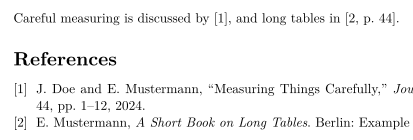
一覧に載るのは、引用した文献だけです。引用しない文献を載せるには \nocite{key} と書きます。\nocite{*} と書くと、TeX のインストール環境と同じく、.bib ファイルのすべてのエントリが一覧に載ります。
natbib:著者年方式の引用
natbib と plainnat などの著者年方式のスタイルを使うと、\citet は文中の引用(「Doe and Mustermann (2024)」)を、\citep はかっこ付きの引用を出力します。
plainnat での \citet と \citep
\citet{doe2024} measured carefully. Tables can be long
\citep{mustermann2021}, and plots can explain themselves
\citep[p.~44]{mustermann2023}.

\bibliographystyle{plainnat}
\bibliography{refs}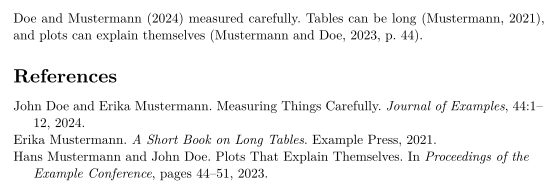
biblatex:\parencite と \textcite
biblatex では、パッケージを読み込み、\addbibresource で .bib ファイルを指定し、\printbibliography で一覧を出力します。
\parencite と \textcite を使った biblatex
\documentclass{article}
\usepackage{biblatex}
\addbibresource{refs.bib}
\begin{document}
\textcite{doe2025} keeps notes on typesetting.
Plots can explain themselves \parencite{mustermann2023}.

\printbibliography
\end{document}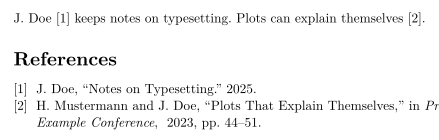
引用のコマンド
| コマンド | Scissor LaTeX では | 備考 |
|---|---|---|
\cite{key}、\cite{a,b} | 使える | 複数のキーは、それぞれ 1 つずつ引用として並べて出力される。 |
\cite[p.~44]{key} | 使える | キーの後の注記(「p. 44」)は引用の中に入る。 |
\citep、\parencite、\autocite | 使える | かっこ付き。番号式のスタイルでは番号を出力する。 |
\citep[see][p.~44]{key} | 一部のみ | 前に付ける注記(「see」)は、かっこの中ではなく前に出力される。 |
\citet、\textcite | 使える | 文中の引用:著者の後に年または番号。 |
\citeauthor{key} | 一部のみ | 名前だけでなく、\citet と同じものを出力する。 |
\citeyear{key} | 使える | 年のみ。 |
\citealt、\citealp、\citenum | 一部のみ | 普通の \cite として出力される。 |
\footcite{key} | 一部のみ | 脚注ではなく、本文中に普通の引用として出力される。 |
\nocite{key} | 使える | 本文で引用せずに一覧に載る。 |
\nocite{*} | 使える | .bib ファイルのすべてのエントリを一覧に載せる。 |
参考文献のスタイル
\bibliographystyle{...} の名前でスタイルが決まります。Scissor LaTeX は、よく使われる BibTeX のスタイル名を似たスタイルに対応させています。
| \bibliographystyle{…} | Scissor LaTeX での結果 |
|---|---|
apalike, apa, apacite, authoryear | APA: author and year |
natbib, plainnat, abbrvnat, acl_natbib | Author and year, as natbib (plainnat) |
unsrtnat | Numbers in citation order, as unsrtnat |
ieeenat_fullname, ieee_fullname | IEEE: numbers in citation order |
splncs04, splncs03, splncs | Springer LNCS: numbers |
ACM-Reference-Format | ACM: numbers |
chicago, chicago-author-date | Chicago: author and date |
mla | MLA: author and page |
ieeetr, IEEEtran, ieee, plain, abbrv, unsrt, plainurl, abbrvurl, unsrturl, siam, acm | IEEE: numbers in citation order |
nature | Nature: superscript numbers |
vancouver | Vancouver: numbers |
harvard, agsm, dcu | Harvard: author and year |
apsrev4-2, apsrev4-1, apsrev, apsrmp4-2, apsrmp4-1, sn-aps | american-physics-society |
aipnum4-2, aipnum4-1, aipnum | american-institute-of-physics |
aipauth4-2, aipauth4-1 | Author and year, as natbib (plainnat) |
elsarticle-num, elsarticle-num-names, model1-num-names | elsevier-with-titles |
elsarticle-harv, model2-names | elsevier-harvard |
sn-mathphys-num, sn-mathphys | springer-mathphys |
sn-mathphys-ay, sn-basic, sn-vancouver-ay | springer-basic-author-date |
sn-vancouver-num, sn-vancouver | springer-vancouver |
sn-nature | Nature: superscript numbers |
sn-apacite, sn-apa | APA: author and year |
sn-chicago | Chicago: author and date |
amsplain, amsplainurl | AMS |
aa, aa-note, aa_url, aasjournalv7, aasjournal, aasjournal7, apj | APJ |
iopart-num, iopart | institute-of-physics-numeric |
mdpi | multidisciplinary-digital-publishing-institute |
plos2025, plos2015, plos2009 | plos |
icml…, iclr… (with a year) | Author and year, as natbib (plainnat) |
journal styles that number references (…-num, apsrev…, JHEP, aip…, achemso, siam…) | IEEE: numbers in citation order |
journal author-year styles (aasjournal…, …-harv, mnras, aa, agu, ametsoc) | Author and year, as natbib (plainnat) |
any other name (alpha, a project .bst …) | IEEE: numbers in citation order, with a note in the Problems tab |
plain、abbrv、unsrt などの番号式の定番スタイルは、IEEE のスタイルを使います。角かっこ内の番号で、文献が最初に引用された順に並びます。表にない名前、たとえば alpha や amsalpha(ラベルが [Knu84] のようになるもの)や自作の .bst ファイルは、同じ番号式のスタイルになり、問題タブにその旨が表示されます:「Bibliography style alpha is not available; using numbered references [1] instead」。学会風のレイアウトは独自のスタイルを選びます。
見つからない文献と thebibliography
どの .bib ファイルにもないキーは赤で [key?] と出力され、問題タブに一覧表示されます。
.bib ファイルにないキー
This is in the file \cite{doe2024}, this is not \cite{nobody2020}.

\bibliography{refs}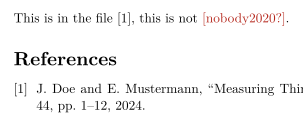
「問題」タブ: Citations not found in the .bib file: nobody2020
閉じ波かっこが欠けている、キーが 2 回使われているなど、読み取れない .bib ファイルのエントリは、そのエントリだけが省かれます。問題タブには「Skipped .bib entries: doe2023 (line 12, a closing brace is missing)」のように行番号付きで表示され、ほかのエントリは通常どおり引用されます。
手書きの thebibliography の一覧はリストとして出力されますが、その \bibitem のキーは引用できません。引用するには、エントリを .bib ファイルに移してください。
TeX のインストール環境との違い
パッケージについては natbib と biblatex をご覧ください。完全なマニュアルは CTAN にあります:natbib、biblatex。
よくある質問
LaTeX で参考文献を追加するにはどうすればよいですか?
プロジェクトに .bib ファイルを追加し、\cite{key} でエントリを引用して、一覧を表示したい場所に \bibliography{refs}(biblatex なら \printbibliography)と書きます。
引用が [key?] と表示されるのはなぜですか?
そのキーがプロジェクトのどの .bib ファイルにもありません。綴りを確認し、.bib ファイルがプロジェクトに追加されているかを確認してください。問題タブには、見つからないキーがすべて表示されます。
\citet と \citep の違いは何ですか?
\citet は文の一部になる引用(「Doe and Mustermann (2024) show ...」)に使います。\citep は引用全体をかっこに入れます。
BibTeX を実行する必要はありますか?
いいえ。Scissor LaTeX は組版のたびに .bib ファイルを自分で読み込むので、引用と参考文献の一覧は常に最新です。
このページの例はすべて、サイトのビルド時に Scissor LaTeX で組版されています。 最終更新:2026-11-07