


BibTeX, natbib और biblatex से LaTeX बिब्लियोग्राफ़ी
अपने सोर्स प्रोजेक्ट की एक .bib फ़ाइल में रखें, उन्हें \cite{key} (या \citep, \citet, \parencite, \textcite) से साइट करें, और जहाँ रेफ़रेंस की सूची आनी चाहिए वहाँ \bibliography{...} या \printbibliography लिखें।
.bib फ़ाइल
.bib फ़ाइल में हर सोर्स की एक एंट्री होती है। हर एंट्री का एक प्रकार (@article, @book, @inproceedings, @misc ...), एक की जिससे आप उसे साइट करते हैं, और ऑथर, टाइटल और साल जैसे फ़ील्ड होते हैं। इस पेज के उदाहरण यह फ़ाइल, refs.bib, इस्तेमाल करते हैं:
@article{doe2024,
  author  = {John Doe and Erika Mustermann},
  title   = {Measuring Things Carefully},
  journal = {Journal of Examples},
  year    = {2024},
  volume  = {44},
  pages   = {1--12}
}

@book{mustermann2021,
  author    = {Erika Mustermann},
  title     = {A Short Book on Long Tables},
  publisher = {Example Press},
  address   = {Berlin},
  year      = {2021}
}
फ़ाइल को किसी भी दूसरी फ़ाइल की तरह अपने प्रोजेक्ट में जोड़ें। Scissor LaTeX प्रोजेक्ट की हर .bib फ़ाइल पढ़ता है और उन्हें मिला देता है, इसलिए \bibliography{refs} या \addbibresource{refs.bib} में फ़ाइल का नाम मेल खाना ज़रूरी नहीं। पहले किसी .bib फ़ाइल को साफ़ करने, सॉर्ट करने और डुप्लिकेट हटाने के लिए BibTeX फ़ॉर्मैटर इस्तेमाल करें; साइटेशन की क्लीनर की को एक जैसा बनाता है।
सादा BibTeX: \cite और \bibliography
पारंपरिक तरीक़ा है टेक्स्ट में \cite{key}, फिर जहाँ सूची आनी है वहाँ \bibliographystyle{...} और \bibliography{...}।
नंबर वाली स्टाइल के साथ \cite
Careful measuring is discussed by \cite{doe2024}, and long tables
in \cite[p.~44]{mustermann2021}.

\bibliographystyle{plain}
\bibliography{refs}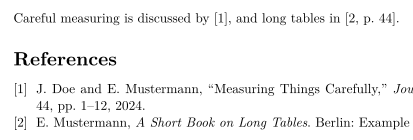
सूची में सिर्फ़ वे सोर्स आते हैं जिन्हें आप साइट करते हैं। जिसे आप साइट नहीं करते उसे सूची में डालने के लिए \nocite{key} लिखें; \nocite{*} .bib फ़ाइलों की हर एंट्री सूची में डालता है, जैसे TeX इंस्टॉलेशन में।
natbib: ऑथर-साल साइटेशन
natbib और plainnat जैसी ऑथर-साल स्टाइल के साथ, \citet टेक्स्ट वाला साइटेशन देता है ("Doe and Mustermann (2024)") और \citep कोष्ठक वाला।
plainnat के साथ \citet और \citep
\citet{doe2024} measured carefully. Tables can be long
\citep{mustermann2021}, and plots can explain themselves
\citep[p.~44]{mustermann2023}.

\bibliographystyle{plainnat}
\bibliography{refs}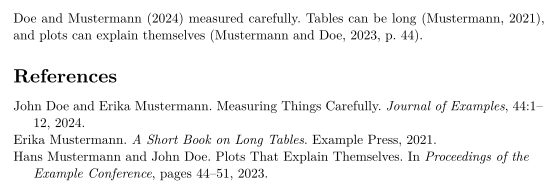
biblatex: \parencite और \textcite
biblatex इस्तेमाल करने वाले पैकेज लोड करते हैं, \addbibresource से .bib फ़ाइल का नाम देते हैं और \printbibliography से सूची प्रिंट करते हैं।
\parencite और \textcite के साथ biblatex
\documentclass{article}
\usepackage{biblatex}
\addbibresource{refs.bib}
\begin{document}
\textcite{doe2025} keeps notes on typesetting.
Plots can explain themselves \parencite{mustermann2023}.

\printbibliography
\end{document}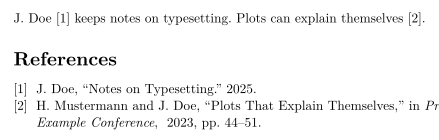
साइटेशन कमांड
| कमांड | Scissor LaTeX में | नोट |
|---|---|---|
\cite{key}, \cite{a,b} | काम करता है | कई की होने पर हर एक का एक साइटेशन, अगल-बगल प्रिंट होता है। |
\cite[p.~44]{key} | काम करता है | की के बाद का नोट ("p. 44") साइटेशन के अंदर जाता है। |
\citep, \parencite, \autocite | काम करता है | कोष्ठक वाला; नंबर वाली स्टाइल एक नंबर प्रिंट करती हैं। |
\citep[see][p.~44]{key} | आंशिक | पहले वाला नोट ("see") कोष्ठक के अंदर नहीं, उनके आगे प्रिंट होता है। |
\citet, \textcite | काम करता है | टेक्स्ट वाला: ऑथर, फिर साल या नंबर। |
\citeauthor{key} | आंशिक | सिर्फ़ नाम नहीं, \citet जैसा ही प्रिंट करता है। |
\citeyear{key} | काम करता है | सिर्फ़ साल। |
\citealt, \citealp, \citenum | आंशिक | सादे \cite की तरह प्रिंट होते हैं। |
\footcite{key} | आंशिक | फ़ुटनोट में नहीं, टेक्स्ट के अंदर सादे साइटेशन की तरह प्रिंट होता है। |
\nocite{key} | काम करता है | टेक्स्ट में साइटेशन के बिना सूची में आता है। |
\nocite{*} | काम करता है | .bib फ़ाइलों की हर एंट्री सूची में डालता है। |
रेफ़रेंस स्टाइल
\bibliographystyle{...} में लिखा नाम स्टाइल चुनता है। Scissor LaTeX आम BibTeX स्टाइल नामों को मिलती-जुलती स्टाइल से जोड़ता है:
| \bibliographystyle{…} | Scissor LaTeX में परिणाम |
|---|---|
apalike, apa, apacite, authoryear | APA: author and year |
natbib, plainnat, abbrvnat, acl_natbib | Author and year, as natbib (plainnat) |
unsrtnat | Numbers in citation order, as unsrtnat |
ieeenat_fullname, ieee_fullname | IEEE: numbers in citation order |
splncs04, splncs03, splncs | Springer LNCS: numbers |
ACM-Reference-Format | ACM: numbers |
chicago, chicago-author-date | Chicago: author and date |
mla | MLA: author and page |
ieeetr, IEEEtran, ieee, plain, abbrv, unsrt, plainurl, abbrvurl, unsrturl, siam, acm | IEEE: numbers in citation order |
nature | Nature: superscript numbers |
vancouver | Vancouver: numbers |
harvard, agsm, dcu | Harvard: author and year |
apsrev4-2, apsrev4-1, apsrev, apsrmp4-2, apsrmp4-1, sn-aps | american-physics-society |
aipnum4-2, aipnum4-1, aipnum | american-institute-of-physics |
aipauth4-2, aipauth4-1 | Author and year, as natbib (plainnat) |
elsarticle-num, elsarticle-num-names, model1-num-names | elsevier-with-titles |
elsarticle-harv, model2-names | elsevier-harvard |
sn-mathphys-num, sn-mathphys | springer-mathphys |
sn-mathphys-ay, sn-basic, sn-vancouver-ay | springer-basic-author-date |
sn-vancouver-num, sn-vancouver | springer-vancouver |
sn-nature | Nature: superscript numbers |
sn-apacite, sn-apa | APA: author and year |
sn-chicago | Chicago: author and date |
amsplain, amsplainurl | AMS |
aa, aa-note, aa_url, aasjournalv7, aasjournal, aasjournal7, apj | APJ |
iopart-num, iopart | institute-of-physics-numeric |
mdpi | multidisciplinary-digital-publishing-institute |
plos2025, plos2015, plos2009 | plos |
icml…, iclr… (with a year) | Author and year, as natbib (plainnat) |
journal styles that number references (…-num, apsrev…, JHEP, aip…, achemso, siam…) | IEEE: numbers in citation order |
journal author-year styles (aasjournal…, …-harv, mnras, aa, agu, ametsoc) | Author and year, as natbib (plainnat) |
any other name (alpha, a project .bst …) | IEEE: numbers in citation order, with a note in the Problems tab |
plain, abbrv, unsrt और दूसरी नंबर वाली पारंपरिक स्टाइल IEEE स्टाइल इस्तेमाल करती हैं: स्क्वेयर ब्रैकेट में नंबर, उसी क्रम में जिसमें सोर्स पहली बार साइट होते हैं। जो नाम टेबल में नहीं है, जैसे alpha या amsalpha (जिनके लेबल [Knu84] जैसे दिखते हैं) या आपकी अपनी .bst फ़ाइल, वह भी यही नंबर वाली स्टाइल इस्तेमाल करता है, और समस्याएँ टैब यह बताता है: "Bibliography style alpha is not available; using numbered references [1] instead"। कॉन्फ़्रेंस लेआउट अपनी स्टाइल खुद चुनते हैं।
गायब सोर्स और thebibliography
जो की किसी .bib फ़ाइल में नहीं है, वह लाल रंग में [key?] के रूप में प्रिंट होती है, और समस्याएँ टैब उसे गिनाता है:
ऐसी की जो .bib फ़ाइल में नहीं है
This is in the file \cite{doe2024}, this is not \cite{nobody2020}.

\bibliography{refs}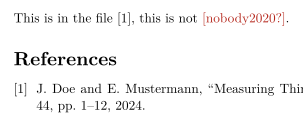
समस्याएँ टैब: Citations not found in the .bib file: nobody2020
.bib फ़ाइल की जो एंट्री पढ़ी नहीं जा सकती, जैसे जिसमें बंद करने वाला ब्रेस गायब हो या जिसकी की दो बार इस्तेमाल हुई हो, सिर्फ़ वही छोड़ दी जाती है: समस्याएँ टैब उसकी लाइन के साथ उसका नाम बताता है, जैसे "Skipped .bib entries: doe2023 (line 12, a closing brace is missing)", और बाकी एंट्री हमेशा की तरह साइट होती हैं।
हाथ से लिखी thebibliography सूची एक सूची की तरह प्रिंट होती है, पर उसकी \bibitem की साइट नहीं की जा सकतीं। उन्हें साइट करने के लिए एंट्री को एक .bib फ़ाइल में ले जाएँ।
TeX इंस्टॉलेशन से क्या अलग है
पैकेजों के लिए देखें natbib और biblatex। पूरे मैनुअल CTAN पर हैं: natbib, biblatex।
सवाल और जवाब
LaTeX में बिब्लियोग्राफ़ी कैसे जोड़ें?
प्रोजेक्ट में एक .bib फ़ाइल जोड़ें, \cite{key} से एंट्री साइट करें, और जहाँ सूची दिखनी चाहिए वहाँ \bibliography{refs} (या biblatex के साथ \printbibliography) लिखें।
मेरा साइटेशन [key?] क्यों दिखाता है?
की प्रोजेक्ट की किसी .bib फ़ाइल में नहीं है। स्पेलिंग जाँचें, और यह भी जाँचें कि .bib फ़ाइल प्रोजेक्ट में जोड़ी गई है। समस्याएँ टैब हर गायब की गिनाता है।
\citet और \citep में क्या फ़र्क है?
\citet उन साइटेशन के लिए है जो वाक्य का हिस्सा हैं ("Doe and Mustermann (2024) show ...")। \citep पूरे साइटेशन को कोष्ठक में रखता है।
क्या मुझे BibTeX चलाना होगा?
नहीं। Scissor LaTeX हर बार टाइपसेट करते समय .bib फ़ाइलें खुद पढ़ता है, इसलिए साइटेशन और रेफ़रेंस सूची हमेशा अप-टू-डेट रहती हैं।
इस पेज का हर उदाहरण साइट बनते समय Scissor LaTeX टाइपसेट करता है। पिछला अपडेट: 2026-11-07।