


BibTeX, natbib, biblatex로 만드는 LaTeX 참고문헌
출처를 프로젝트의 .bib 파일에 넣고 \cite{key}(또는 \citep, \citet, \parencite, \textcite)로 인용한 다음, 참고문헌 목록이 들어갈 자리에 \bibliography{...}나 \printbibliography를 쓰세요.
.bib 파일
.bib 파일에는 출처마다 항목이 하나씩 들어갑니다. 각 항목에는 유형(@article, @book, @inproceedings, @misc ...), 인용할 때 쓰는 키, 그리고 저자, 제목, 연도 같은 필드가 있습니다. 이 페이지의 예제는 다음 refs.bib 파일을 사용합니다.
@article{doe2024,
  author  = {John Doe and Erika Mustermann},
  title   = {Measuring Things Carefully},
  journal = {Journal of Examples},
  year    = {2024},
  volume  = {44},
  pages   = {1--12}
}

@book{mustermann2021,
  author    = {Erika Mustermann},
  title     = {A Short Book on Long Tables},
  publisher = {Example Press},
  address   = {Berlin},
  year      = {2021}
}
다른 파일과 마찬가지로 이 파일을 프로젝트에 추가하세요. Scissor LaTeX는 프로젝트의 모든 .bib 파일을 읽어 합치므로, \bibliography{refs}나 \addbibresource{refs.bib}의 파일 이름이 꼭 일치하지 않아도 됩니다. .bib 파일을 먼저 정리하고 정렬하고 중복을 없애려면 BibTeX 포매터를 쓰세요. 인용 키 정리 도구는 키를 일관되게 맞춰 줍니다.
기본 BibTeX: \cite와 \bibliography
전통적인 방법은 본문에 \cite{key}를 쓰고, 목록이 들어갈 자리에 \bibliographystyle{...}와 \bibliography{...}를 쓰는 것입니다.
번호 스타일의 \cite
Careful measuring is discussed by \cite{doe2024}, and long tables
in \cite[p.~44]{mustermann2021}.

\bibliographystyle{plain}
\bibliography{refs}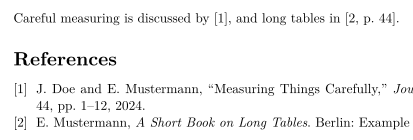
인용한 출처만 목록에 실립니다. 인용하지 않은 출처를 실으려면 \nocite{key}를 쓰세요. TeX 설치 환경과 마찬가지로 \nocite{*}는 .bib 파일의 모든 항목을 싣습니다.
natbib: 저자-연도 인용
natbib과 plainnat 같은 저자-연도 스타일을 쓰면, \citet은 문장 속 인용("Doe and Mustermann (2024)")을, \citep은 괄호 인용을 만듭니다.
plainnat의 \citet과 \citep
\citet{doe2024} measured carefully. Tables can be long
\citep{mustermann2021}, and plots can explain themselves
\citep[p.~44]{mustermann2023}.

\bibliographystyle{plainnat}
\bibliography{refs}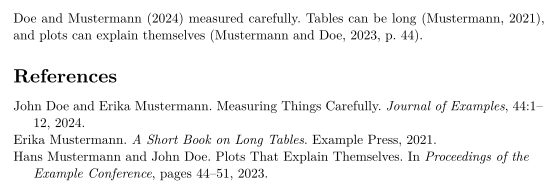
biblatex: \parencite와 \textcite
biblatex를 쓴다면 패키지를 불러오고, \addbibresource로 .bib 파일을 지정한 다음, \printbibliography로 목록을 출력합니다.
\parencite와 \textcite를 쓴 biblatex
\documentclass{article}
\usepackage{biblatex}
\addbibresource{refs.bib}
\begin{document}
\textcite{doe2025} keeps notes on typesetting.
Plots can explain themselves \parencite{mustermann2023}.

\printbibliography
\end{document}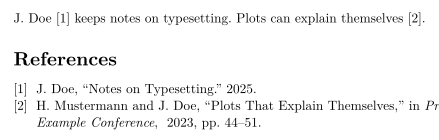
인용 명령
| 명령 | Scissor LaTeX에서 | 참고 |
|---|---|---|
\cite{key}, \cite{a,b} | 동작함 | 키가 여러 개면 각각 인용이 하나씩 나란히 출력됩니다. |
\cite[p.~44]{key} | 동작함 | 키 뒤의 메모("p. 44")는 인용 안에 들어갑니다. |
\citep, \parencite, \autocite | 동작함 | 괄호 인용이며, 번호 스타일에서는 번호가 출력됩니다. |
\citep[see][p.~44]{key} | 일부 | 앞쪽 메모("see")는 괄호 안이 아니라 괄호 앞에 출력됩니다. |
\citet, \textcite | 동작함 | 문장 속 인용: 저자 다음에 연도나 번호가 옵니다. |
\citeauthor{key} | 일부 | 이름만이 아니라 \citet과 똑같이 출력됩니다. |
\citeyear{key} | 동작함 | 연도만 출력됩니다. |
\citealt, \citealp, \citenum | 일부 | 일반 \cite로 출력됩니다. |
\footcite{key} | 일부 | 각주가 아니라 본문 안에 일반 인용으로 출력됩니다. |
\nocite{key} | 동작함 | 본문에 인용 없이 목록에 실립니다. |
\nocite{*} | 동작함 | .bib 파일의 모든 항목을 싣습니다. |
참고문헌 스타일
\bibliographystyle{...}의 이름이 스타일을 고릅니다. Scissor LaTeX는 흔히 쓰이는 BibTeX 스타일 이름을 비슷한 스타일에 대응시킵니다.
| \bibliographystyle{…} | Scissor LaTeX 결과 |
|---|---|
apalike, apa, apacite, authoryear | APA: author and year |
natbib, plainnat, abbrvnat, acl_natbib | Author and year, as natbib (plainnat) |
unsrtnat | Numbers in citation order, as unsrtnat |
ieeenat_fullname, ieee_fullname | IEEE: numbers in citation order |
splncs04, splncs03, splncs | Springer LNCS: numbers |
ACM-Reference-Format | ACM: numbers |
chicago, chicago-author-date | Chicago: author and date |
mla | MLA: author and page |
ieeetr, IEEEtran, ieee, plain, abbrv, unsrt, plainurl, abbrvurl, unsrturl, siam, acm | IEEE: numbers in citation order |
nature | Nature: superscript numbers |
vancouver | Vancouver: numbers |
harvard, agsm, dcu | Harvard: author and year |
apsrev4-2, apsrev4-1, apsrev, apsrmp4-2, apsrmp4-1, sn-aps | american-physics-society |
aipnum4-2, aipnum4-1, aipnum | american-institute-of-physics |
aipauth4-2, aipauth4-1 | Author and year, as natbib (plainnat) |
elsarticle-num, elsarticle-num-names, model1-num-names | elsevier-with-titles |
elsarticle-harv, model2-names | elsevier-harvard |
sn-mathphys-num, sn-mathphys | springer-mathphys |
sn-mathphys-ay, sn-basic, sn-vancouver-ay | springer-basic-author-date |
sn-vancouver-num, sn-vancouver | springer-vancouver |
sn-nature | Nature: superscript numbers |
sn-apacite, sn-apa | APA: author and year |
sn-chicago | Chicago: author and date |
amsplain, amsplainurl | AMS |
aa, aa-note, aa_url, aasjournalv7, aasjournal, aasjournal7, apj | APJ |
iopart-num, iopart | institute-of-physics-numeric |
mdpi | multidisciplinary-digital-publishing-institute |
plos2025, plos2015, plos2009 | plos |
icml…, iclr… (with a year) | Author and year, as natbib (plainnat) |
journal styles that number references (…-num, apsrev…, JHEP, aip…, achemso, siam…) | IEEE: numbers in citation order |
journal author-year styles (aasjournal…, …-harv, mnras, aa, agu, ametsoc) | Author and year, as natbib (plainnat) |
any other name (alpha, a project .bst …) | IEEE: numbers in citation order, with a note in the Problems tab |
plain, abbrv, unsrt를 비롯한 고전적인 번호 스타일은 IEEE 스타일을 씁니다. 대괄호 안의 번호가 출처가 처음 인용된 순서대로 붙습니다. 표에 없는 이름, 예를 들어 레이블이 [Knu84]처럼 생긴 alpha나 amsalpha, 또는 직접 만든 .bst 파일은 같은 번호 스타일을 쓰며, 문제 탭에 "Bibliography style alpha is not available; using numbered references [1] instead"처럼 그 사실이 표시됩니다. 학회 레이아웃은 자체 스타일을 고릅니다.
없는 출처와 thebibliography
어떤 .bib 파일에도 없는 키는 빨간색 [key?]로 출력되며, 문제 탭에 나열됩니다.
.bib 파일에 없는 키
This is in the file \cite{doe2024}, this is not \cite{nobody2020}.

\bibliography{refs}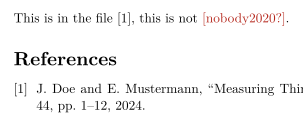
문제 탭: Citations not found in the .bib file: nobody2020
닫는 중괄호가 빠졌거나 키가 두 번 쓰인 항목처럼 읽을 수 없는 .bib 항목은 그 항목만 빠집니다. 문제 탭에 "Skipped .bib entries: doe2023 (line 12, a closing brace is missing)"처럼 해당 줄과 함께 표시되며, 나머지 항목은 평소처럼 인용됩니다.
직접 쓴 thebibliography 목록은 목록으로 출력되지만, 그 \bibitem 키는 인용할 수 없습니다. 인용하려면 항목을 .bib 파일로 옮기세요.
TeX 설치 환경과 다른 점
패키지는 natbib과 biblatex를 참고하세요. 전체 설명서는 CTAN에 있습니다: natbib, biblatex.
질문과 답변
LaTeX에 참고문헌은 어떻게 추가하나요?
프로젝트에 .bib 파일을 추가하고, \cite{key}로 항목을 인용한 다음, 목록이 나타날 자리에 \bibliography{refs}(biblatex라면 \printbibliography)를 쓰세요.
왜 인용이 [key?]로 표시되나요?
그 키가 프로젝트의 어떤 .bib 파일에도 없기 때문입니다. 철자를 확인하고, .bib 파일이 프로젝트에 추가되었는지 확인하세요. 문제 탭에 없는 키가 모두 나열됩니다.
\citet과 \citep은 어떻게 다른가요?
\citet은 문장의 일부가 되는 인용("Doe and Mustermann (2024) show ...")에 씁니다. \citep은 인용 전체를 괄호에 넣습니다.
BibTeX를 실행해야 하나요?
아니요. Scissor LaTeX는 조판할 때마다 .bib 파일을 직접 읽으므로, 인용과 참고문헌 목록이 항상 최신 상태입니다.
이 페이지의 모든 예제는 사이트를 빌드할 때 Scissor LaTeX로 조판됩니다. 마지막 업데이트: 2026-11-07