


บรรณานุกรม LaTeX ด้วย BibTeX, natbib และ biblatex
ใส่แหล่งข้อมูลไว้ในไฟล์ .bib ในโปรเจกต์ อ้างอิงด้วย \cite{key} (หรือ \citep, \citet, \parencite, \textcite) แล้วเขียน \bibliography{...} หรือ \printbibliography ตรงที่ต้องการให้รายการอ้างอิงปรากฏ
ไฟล์ .bib
ไฟล์ .bib เก็บหนึ่งรายการต่อหนึ่งแหล่งข้อมูล แต่ละรายการมีประเภท (@article, @book, @inproceedings, @misc ...) คีย์ที่ใช้ในการอ้างอิง และฟิลด์ต่าง ๆ เช่น ผู้แต่ง ชื่อเรื่อง และปี ตัวอย่างในหน้านี้ใช้ไฟล์ refs.bib นี้:
@article{doe2024,
  author  = {John Doe and Erika Mustermann},
  title   = {Measuring Things Carefully},
  journal = {Journal of Examples},
  year    = {2024},
  volume  = {44},
  pages   = {1--12}
}

@book{mustermann2021,
  author    = {Erika Mustermann},
  title     = {A Short Book on Long Tables},
  publisher = {Example Press},
  address   = {Berlin},
  year      = {2021}
}
เพิ่มไฟล์นี้ลงในโปรเจกต์เหมือนไฟล์อื่น ๆ Scissor LaTeX อ่านไฟล์ .bib ทุกไฟล์ในโปรเจกต์และรวมเข้าด้วยกัน ชื่อไฟล์ใน \bibliography{refs} หรือ \addbibresource{refs.bib} จึงไม่จำเป็นต้องตรงกัน หากต้องการจัดระเบียบ เรียงลำดับ และลบรายการซ้ำในไฟล์ .bib ก่อน ให้ใช้ ตัวจัดรูปแบบ BibTeX ส่วน ตัวทำความสะอาดคีย์อ้างอิง ช่วยทำให้คีย์สม่ำเสมอ
BibTeX แบบธรรมดา: \cite และ \bibliography
วิธีดั้งเดิมคือใช้ \cite{key} ในเนื้อหา แล้วใช้ \bibliographystyle{...} และ \bibliography{...} ตรงที่ต้องการให้รายการปรากฏ
\cite กับรูปแบบตัวเลข
Careful measuring is discussed by \cite{doe2024}, and long tables
in \cite[p.~44]{mustermann2021}.

\bibliographystyle{plain}
\bibliography{refs}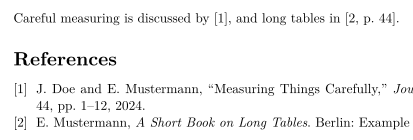
จะแสดงเฉพาะแหล่งข้อมูลที่คุณอ้างอิงเท่านั้น หากต้องการแสดงรายการที่ไม่ได้อ้างอิง ให้เขียน \nocite{key} ส่วน \nocite{*} จะแสดงทุกรายการในไฟล์ .bib เหมือนในการติดตั้ง TeX
natbib: การอ้างอิงแบบผู้แต่ง-ปี
เมื่อใช้ natbib กับรูปแบบผู้แต่ง-ปีอย่าง plainnat คำสั่ง \citet ให้การอ้างอิงแบบอยู่ในประโยค ("Doe and Mustermann (2024)") และ \citep ให้การอ้างอิงในวงเล็บ
\citet และ \citep กับ plainnat
\citet{doe2024} measured carefully. Tables can be long
\citep{mustermann2021}, and plots can explain themselves
\citep[p.~44]{mustermann2023}.

\bibliographystyle{plainnat}
\bibliography{refs}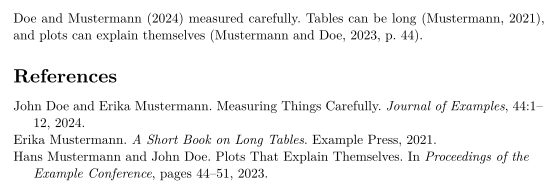
biblatex: \parencite และ \textcite
ผู้ใช้ biblatex จะโหลดแพ็กเกจ ระบุไฟล์ .bib ด้วย \addbibresource และพิมพ์รายการด้วย \printbibliography
biblatex กับ \parencite และ \textcite
\documentclass{article}
\usepackage{biblatex}
\addbibresource{refs.bib}
\begin{document}
\textcite{doe2025} keeps notes on typesetting.
Plots can explain themselves \parencite{mustermann2023}.

\printbibliography
\end{document}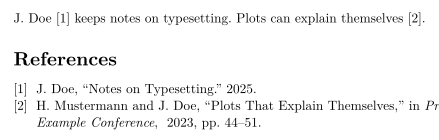
คำสั่งการอ้างอิง
| คำสั่ง | ใน Scissor LaTeX | หมายเหตุ |
|---|---|---|
\cite{key}, \cite{a,b} | ใช้ได้ | หลายคีย์จะพิมพ์การอ้างอิงแยกกันวางเรียงข้างกัน |
\cite[p.~44]{key} | ใช้ได้ | หมายเหตุหลังคีย์ ("p. 44") อยู่ภายในการอ้างอิง |
\citep, \parencite, \autocite | ใช้ได้ | แบบในวงเล็บ รูปแบบตัวเลขจะพิมพ์เป็นหมายเลข |
\citep[see][p.~44]{key} | ใช้ได้บางส่วน | หมายเหตุด้านหน้า ("see") พิมพ์อยู่หน้าวงเล็บ ไม่ได้อยู่ข้างใน |
\citet, \textcite | ใช้ได้ | แบบอยู่ในประโยค: ผู้แต่ง ตามด้วยปีหรือหมายเลข |
\citeauthor{key} | ใช้ได้บางส่วน | พิมพ์เหมือน \citet ไม่ใช่เฉพาะชื่อ |
\citeyear{key} | ใช้ได้ | เฉพาะปี |
\citealt, \citealp, \citenum | ใช้ได้บางส่วน | พิมพ์เป็น \cite ธรรมดา |
\footcite{key} | ใช้ได้บางส่วน | พิมพ์ในบรรทัดเป็นการอ้างอิงธรรมดา ไม่ได้อยู่ในเชิงอรรถ |
\nocite{key} | ใช้ได้ | แสดงในรายการโดยไม่มีการอ้างอิงในเนื้อหา |
\nocite{*} | ใช้ได้ | แสดงทุกรายการในไฟล์ .bib |
รูปแบบการอ้างอิง
ชื่อใน \bibliographystyle{...} เป็นตัวเลือกรูปแบบ Scissor LaTeX จับคู่ชื่อรูปแบบ BibTeX ที่พบบ่อยกับรูปแบบที่คล้ายกัน:
| \bibliographystyle{…} | ผลลัพธ์ใน Scissor LaTeX |
|---|---|
apalike, apa, apacite, authoryear | APA: author and year |
natbib, plainnat, abbrvnat, acl_natbib | Author and year, as natbib (plainnat) |
unsrtnat | Numbers in citation order, as unsrtnat |
ieeenat_fullname, ieee_fullname | IEEE: numbers in citation order |
splncs04, splncs03, splncs | Springer LNCS: numbers |
ACM-Reference-Format | ACM: numbers |
chicago, chicago-author-date | Chicago: author and date |
mla | MLA: author and page |
ieeetr, IEEEtran, ieee, plain, abbrv, unsrt, plainurl, abbrvurl, unsrturl, siam, acm | IEEE: numbers in citation order |
nature | Nature: superscript numbers |
vancouver | Vancouver: numbers |
harvard, agsm, dcu | Harvard: author and year |
apsrev4-2, apsrev4-1, apsrev, apsrmp4-2, apsrmp4-1, sn-aps | american-physics-society |
aipnum4-2, aipnum4-1, aipnum | american-institute-of-physics |
aipauth4-2, aipauth4-1 | Author and year, as natbib (plainnat) |
elsarticle-num, elsarticle-num-names, model1-num-names | elsevier-with-titles |
elsarticle-harv, model2-names | elsevier-harvard |
sn-mathphys-num, sn-mathphys | springer-mathphys |
sn-mathphys-ay, sn-basic, sn-vancouver-ay | springer-basic-author-date |
sn-vancouver-num, sn-vancouver | springer-vancouver |
sn-nature | Nature: superscript numbers |
sn-apacite, sn-apa | APA: author and year |
sn-chicago | Chicago: author and date |
amsplain, amsplainurl | AMS |
aa, aa-note, aa_url, aasjournalv7, aasjournal, aasjournal7, apj | APJ |
iopart-num, iopart | institute-of-physics-numeric |
mdpi | multidisciplinary-digital-publishing-institute |
plos2025, plos2015, plos2009 | plos |
icml…, iclr… (with a year) | Author and year, as natbib (plainnat) |
journal styles that number references (…-num, apsrev…, JHEP, aip…, achemso, siam…) | IEEE: numbers in citation order |
journal author-year styles (aasjournal…, …-harv, mnras, aa, agu, ametsoc) | Author and year, as natbib (plainnat) |
any other name (alpha, a project .bst …) | IEEE: numbers in citation order, with a note in the Problems tab |
plain, abbrv, unsrt และรูปแบบตัวเลขดั้งเดิมอื่น ๆ ใช้รูปแบบ IEEE: หมายเลขในวงเล็บเหลี่ยม เรียงตามลำดับที่แหล่งข้อมูลถูกอ้างอิงครั้งแรก ชื่อใดที่ไม่อยู่ในตาราง เช่น alpha หรือ amsalpha (ซึ่งมีป้ายกำกับแบบ [Knu84]) หรือไฟล์ .bst ของคุณเอง จะใช้รูปแบบตัวเลขเดียวกัน และแท็บปัญหาจะแจ้งว่า "Bibliography style alpha is not available; using numbered references [1] instead" เลย์เอาต์งานประชุมวิชาการจะเลือกรูปแบบของตัวเอง
แหล่งข้อมูลที่หายไปและ thebibliography
คีย์ที่ไม่อยู่ในไฟล์ .bib ใดเลยจะพิมพ์เป็น [key?] สีแดง และแท็บปัญหาจะแสดงรายการไว้:
คีย์ที่ไม่อยู่ในไฟล์ .bib
This is in the file \cite{doe2024}, this is not \cite{nobody2020}.

\bibliography{refs}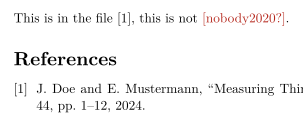
แท็บปัญหา: Citations not found in the .bib file: nobody2020
รายการในไฟล์ .bib ที่อ่านไม่ได้ เช่น รายการที่ขาดวงเล็บปีกกาปิด หรือคีย์ที่ใช้ซ้ำสองครั้ง จะถูกตัดออกเฉพาะรายการนั้น: แท็บปัญหาจะระบุชื่อพร้อมบรรทัด เช่น "Skipped .bib entries: doe2023 (line 12, a closing brace is missing)" และรายการอื่น ๆ ยังอ้างอิงได้ตามปกติ
รายการ thebibliography ที่เขียนด้วยมือจะพิมพ์ออกมาเป็นรายการ แต่คีย์ \bibitem ของมันไม่สามารถอ้างอิงได้ ให้ย้ายรายการไปไว้ในไฟล์ .bib เพื่ออ้างอิง
สิ่งที่ต่างจากการติดตั้ง TeX
สำหรับแพ็กเกจ ดู natbib และ biblatex คู่มือฉบับเต็มอยู่บน CTAN: natbib biblatex
คำถามและคำตอบ
จะเพิ่มบรรณานุกรมใน LaTeX ได้อย่างไร
เพิ่มไฟล์ .bib ลงในโปรเจกต์ อ้างอิงรายการด้วย \cite{key} แล้วเขียน \bibliography{refs} (หรือ \printbibliography เมื่อใช้ biblatex) ตรงที่ต้องการให้รายการปรากฏ
ทำไมการอ้างอิงของฉันจึงแสดงเป็น [key?]
คีย์นั้นไม่อยู่ในไฟล์ .bib ใดของโปรเจกต์ ตรวจสอบการสะกด และตรวจสอบว่าได้เพิ่มไฟล์ .bib ลงในโปรเจกต์แล้ว แท็บปัญหาจะแสดงคีย์ที่หายไปทั้งหมด
\citet กับ \citep ต่างกันอย่างไร
\citet ใช้สำหรับการอ้างอิงที่เป็นส่วนหนึ่งของประโยค ("Doe and Mustermann (2024) show ...") ส่วน \citep จะใส่การอ้างอิงทั้งหมดไว้ในวงเล็บ
ต้องรัน BibTeX หรือไม่
ไม่ต้อง Scissor LaTeX อ่านไฟล์ .bib เองทุกครั้งที่จัดหน้า การอ้างอิงและรายการอ้างอิงจึงเป็นปัจจุบันเสมอ
ทุกตัวอย่างในหน้านี้จัดหน้าโดย Scissor LaTeX ขณะสร้างเว็บไซต์ อัปเดตล่าสุด 2026-11-07