


用 BibTeX、natbib 和 biblatex 製作 LaTeX 參考文獻
把你的文獻放進專案中的 .bib 檔案,用 \cite{key}(或 \citep、\citet、\parencite、\textcite)引用它們,並在參考文獻清單應該出現的地方寫 \bibliography{...} 或 \printbibliography。
.bib 檔案
.bib 檔案中每一筆條目對應一份文獻。每筆條目都有一個類型(@article、@book、@inproceedings、@misc ...)、一個用來引用它的鍵,以及作者、標題和年份等欄位。本頁的範例使用下面這個檔案 refs.bib:
@article{doe2024,
  author  = {John Doe and Erika Mustermann},
  title   = {Measuring Things Carefully},
  journal = {Journal of Examples},
  year    = {2024},
  volume  = {44},
  pages   = {1--12}
}

@book{mustermann2021,
  author    = {Erika Mustermann},
  title     = {A Short Book on Long Tables},
  publisher = {Example Press},
  address   = {Berlin},
  year      = {2021}
}
像加入其他檔案一樣,把這個檔案加入你的專案。Scissor LaTeX 會讀取專案中的每一個 .bib 檔案並把它們合併,所以 \bibliography{refs} 或 \addbibresource{refs.bib} 中的檔名不必相符。如果要先整理、排序 .bib 檔案並移除重複條目,請使用 BibTeX 格式化工具;引用鍵整理工具則能讓鍵保持一致。
一般的 BibTeX:\cite 和 \bibliography
傳統的做法是在正文中寫 \cite{key},然後在清單應該出現的地方寫 \bibliographystyle{...} 和 \bibliography{...}。
使用數字格式的 \cite
Careful measuring is discussed by \cite{doe2024}, and long tables
in \cite[p.~44]{mustermann2021}.

\bibliographystyle{plain}
\bibliography{refs}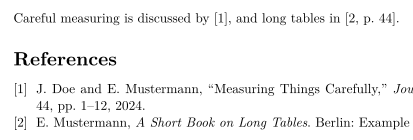
清單中只會列出你引用過的文獻。如果要列出沒有引用的文獻,請寫 \nocite{key};\nocite{*} 會列出 .bib 檔案中的每一筆條目,和 TeX 安裝環境一樣。
natbib:作者-年份引用
搭配 natbib 和 plainnat 這類作者-年份格式時,\citet 會產生敘述式引用(「Doe and Mustermann (2024)」),而 \citep 會產生括號式引用。
搭配 plainnat 的 \citet 和 \citep
\citet{doe2024} measured carefully. Tables can be long
\citep{mustermann2021}, and plots can explain themselves
\citep[p.~44]{mustermann2023}.

\bibliographystyle{plainnat}
\bibliography{refs}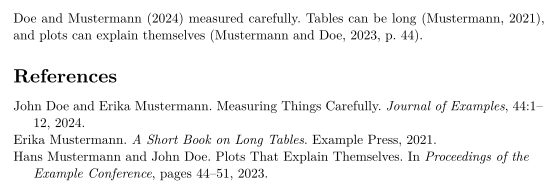
biblatex:\parencite 和 \textcite
biblatex 的使用者要載入套件,用 \addbibresource 指定 .bib 檔案,再用 \printbibliography 印出清單。
使用 \parencite 和 \textcite 的 biblatex
\documentclass{article}
\usepackage{biblatex}
\addbibresource{refs.bib}
\begin{document}
\textcite{doe2025} keeps notes on typesetting.
Plots can explain themselves \parencite{mustermann2023}.

\printbibliography
\end{document}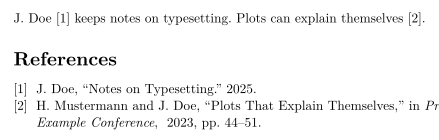
引用指令
| 指令 | 在 Scissor LaTeX 中 | 備註 |
|---|---|---|
\cite{key}、\cite{a,b} | 可以使用 | 多個鍵會各自印出一個引用,並排在一起。 |
\cite[p.~44]{key} | 可以使用 | 鍵後面的附註(「p. 44」)會放在引用裡面。 |
\citep、\parencite、\autocite | 可以使用 | 括號式;數字格式會印出編號。 |
\citep[see][p.~44]{key} | 部分支援 | 前置附註(「see」)會印在括號前面,而不是括號裡面。 |
\citet、\textcite | 可以使用 | 敘述式:先是作者,然後是年份或編號。 |
\citeauthor{key} | 部分支援 | 印出的內容和 \citet 相同,而不是只有作者名字。 |
\citeyear{key} | 可以使用 | 只有年份。 |
\citealt、\citealp、\citenum | 部分支援 | 印成一般的 \cite。 |
\footcite{key} | 部分支援 | 在正文中印成一般的引用,而不是放進註腳。 |
\nocite{key} | 可以使用 | 列入清單,但正文中沒有引用。 |
\nocite{*} | 可以使用 | 列出 .bib 檔案中的每一筆條目。 |
參考文獻格式
\bibliographystyle{...} 中的名稱決定格式。Scissor LaTeX 會把常見的 BibTeX 格式名稱對應到相似的格式:
| \bibliographystyle{…} | 在 Scissor LaTeX 中的結果 |
|---|---|
apalike, apa, apacite, authoryear | APA: author and year |
natbib, plainnat, abbrvnat, acl_natbib | Author and year, as natbib (plainnat) |
unsrtnat | Numbers in citation order, as unsrtnat |
ieeenat_fullname, ieee_fullname | IEEE: numbers in citation order |
splncs04, splncs03, splncs | Springer LNCS: numbers |
ACM-Reference-Format | ACM: numbers |
chicago, chicago-author-date | Chicago: author and date |
mla | MLA: author and page |
ieeetr, IEEEtran, ieee, plain, abbrv, unsrt, plainurl, abbrvurl, unsrturl, siam, acm | IEEE: numbers in citation order |
nature | Nature: superscript numbers |
vancouver | Vancouver: numbers |
harvard, agsm, dcu | Harvard: author and year |
apsrev4-2, apsrev4-1, apsrev, apsrmp4-2, apsrmp4-1, sn-aps | american-physics-society |
aipnum4-2, aipnum4-1, aipnum | american-institute-of-physics |
aipauth4-2, aipauth4-1 | Author and year, as natbib (plainnat) |
elsarticle-num, elsarticle-num-names, model1-num-names | elsevier-with-titles |
elsarticle-harv, model2-names | elsevier-harvard |
sn-mathphys-num, sn-mathphys | springer-mathphys |
sn-mathphys-ay, sn-basic, sn-vancouver-ay | springer-basic-author-date |
sn-vancouver-num, sn-vancouver | springer-vancouver |
sn-nature | Nature: superscript numbers |
sn-apacite, sn-apa | APA: author and year |
sn-chicago | Chicago: author and date |
amsplain, amsplainurl | AMS |
aa, aa-note, aa_url, aasjournalv7, aasjournal, aasjournal7, apj | APJ |
iopart-num, iopart | institute-of-physics-numeric |
mdpi | multidisciplinary-digital-publishing-institute |
plos2025, plos2015, plos2009 | plos |
icml…, iclr… (with a year) | Author and year, as natbib (plainnat) |
journal styles that number references (…-num, apsrev…, JHEP, aip…, achemso, siam…) | IEEE: numbers in citation order |
journal author-year styles (aasjournal…, …-harv, mnras, aa, agu, ametsoc) | Author and year, as natbib (plainnat) |
any other name (alpha, a project .bst …) | IEEE: numbers in citation order, with a note in the Problems tab |
plain、abbrv、unsrt 和其他傳統的編號格式都使用 IEEE 格式:方括號中的編號,依文獻第一次被引用的順序排列。任何不在表格中的名稱,例如 alpha 或 amsalpha(標籤看起來像 [Knu84]),或你自己的 .bst 檔案,都會使用同樣的編號格式,「問題」分頁也會說明這一點:「Bibliography style alpha is not available; using numbered references [1] instead」。仿研討會格式的版面會選擇自己的格式。
缺少的文獻與 thebibliography
不在任何 .bib 檔案中的鍵會以紅色的 [key?] 印出,「問題」分頁也會列出它:
不在 .bib 檔案中的鍵
This is in the file \cite{doe2024}, this is not \cite{nobody2020}.

\bibliography{refs}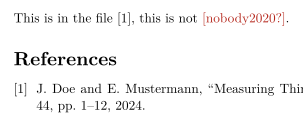
「問題」分頁: Citations not found in the .bib file: nobody2020
.bib 檔案中無法讀取的條目,例如缺少右大括號或重複使用同一個鍵的條目,只會單獨被略過:「問題」分頁會列出它的名稱和行號,例如「Skipped .bib entries: doe2023 (line 12, a closing brace is missing)」,其他條目則照常引用。
手寫的 thebibliography 清單會印成一份清單,但它的 \bibitem 鍵無法被引用。要引用這些條目,請把它們移到 .bib 檔案中。
與 TeX 安裝環境的差異
相關套件請見 natbib 和 biblatex。完整的使用手冊位於 CTAN:natbib、biblatex。
常見問題
怎麼在 LaTeX 中加入參考文獻?
把 .bib 檔案加入專案,用 \cite{key} 引用條目,並在清單應該出現的地方寫 \bibliography{refs}(使用 biblatex 時則寫 \printbibliography)。
為什麼我的引用顯示 [key?]?
這個鍵不在專案的任何 .bib 檔案中。請檢查拼字,並確認 .bib 檔案已經加入專案。「問題」分頁會列出每一個缺少的鍵。
\citet 和 \citep 有什麼不同?
\citet 用於作為句子一部分的引用(「Doe and Mustermann (2024) show ...」)。\citep 則把整個引用放在括號中。
需要執行 BibTeX 嗎?
不需要。Scissor LaTeX 每次排版時都會自己讀取 .bib 檔案,所以引用和參考文獻清單永遠是最新的。
本頁的每個範例都在建置網站時由 Scissor LaTeX 排版。 最後更新:2026-11-07