


multicol في Scissor LaTeX
تعمل حزمة multicol في معظمها في Scissor LaTeX: ينضّد \begin{multicols}{3} نصه في ثلاثة أعمدة (يعمل من عمودين إلى ستة)، ويمتد العنوان الاختياري عبر الأعمدة، ويبدأ \columnbreak العمود التالي. تُملأ الأعمدة واحدًا بعد الآخر بدل موازنتها، فأنهِها بـ \columnbreak حيث تريد.
ماذا تفعل الحزمة
تمنحك multicol البيئة multicols، التي تنضّد جزءًا من الصفحة في عمودين أو أكثر متوازنين: \begin{multicols}{3} ... \end{multicols}. ويضع وسيط اختياري عنوانًا يمتد عبر كل الأعمدة، ويفرض \columnbreak الانتقال إلى العمود التالي.
ما الذي يعمل هنا
| الميزة | في Scissor LaTeX | ملاحظات |
|---|---|---|
\begin{multicols}{n} ... \end{multicols} | في معظمه | من عمودين إلى ستة. يُملأ كل عمود قبل أن يبدأ التالي؛ ولا تُوازَن الأعمدة. |
multicols* | في معظمه | مثل multicols. |
\begin{multicols}{2}[\section{...}] | يعمل | يمتد العنوان عبر الأعمدة. |
\columnbreak | يعمل | يبدأ العمود التالي. |
\columnsep | جزئيًا | اضبط الفراغ بـ \usepackage[columnsep=1cm]{geometry}؛ ويُتجاهل \setlength{\columnsep}. |
\columnseprule | يُحذف | لا خط بين الأعمدة. |
\documentclass[twocolumn]{article} | يعمل | المستند كله في عمودين. راجع تخطيط الصفحة. |
في تخطيطات المؤتمرات والمجلات، تُبقي multicols نصها في عمود واحد كما كان من قبل.
أمثلة
ثلاثة أعمدة يمتد فوقها عنوان، وتنتهي بـ \columnbreak:
ثلاثة أعمدة و\columnbreak
\begin{multicols}{3}[\section{Notes}]
Erika Mustermann wrote the first part of these notes, about the
setup of the 44 test runs.
\columnbreak

John Doe wrote the second part, about the results.
\columnbreak

Hans Mustermann wrote the last part, about the next study.
\end{multicols}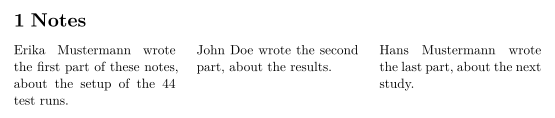
دون \columnbreak يمتلئ العمود الأول قبل أن يبدأ الثاني، فيبقى النص القصير في العمود الأول. والعنوان المكتوب قبل البيئة يعمل في المكانين:
العنوان قبل multicols
\section{Notes}
\begin{multicols}{2}
The heading above spans the page, as it would in a TeX installation.
\columnbreak

This paragraph starts the second column.
\end{multicols}
لمستند في عمودين، استخدم خيار الصنف:
خيار الصنف twocolumn
\documentclass[twocolumn]{article}
\title{Two Columns}
\author{Erika Mustermann}
\begin{document}
\maketitle
\section{Introduction}
This document is set in two columns with the \texttt{twocolumn}
option of the class. Every paragraph flows from the left column to
the right one. Lorem ipsum dolor sit amet, consectetuer adipiscing
elit. Ut purus elit, vestibulum ut, placerat ac, adipiscing vitae,
felis. Curabitur dictum gravida mauris. Nam arcu libero, nonummy
eget, consectetuer id, vulputate a, magna.
\section{Method}
John Doe measured 44 samples. Donec vehicula augue eu neque.
Pellentesque habitant morbi tristique senectus et netus et malesuada
fames ac turpis egestas. Mauris ut leo.
\end{document}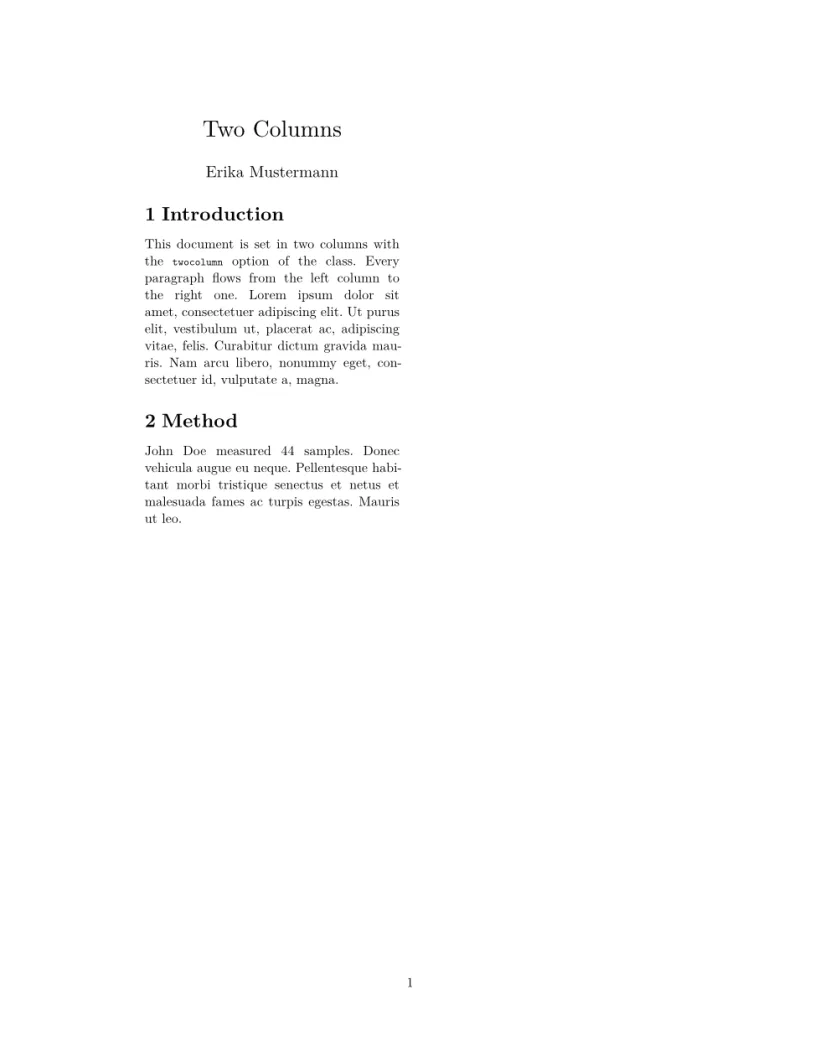
التوافق
- من تثبيت TeX إلى هنا: يحصل النص الموجود في
multicolsعلى أعمدته، لكنها غير متوازنة: أضف\columnbreakحيث ينبغي أن ينتهي العمود. - من هنا إلى تثبيت TeX: تُترجَم المستندات هناك دون تغيير، بأعمدة متوازنة.
الدليل الكامل موجود على CTAN: ctan.org/pkg/multicol. راجع أيضًا تخطيط الصفحة والهوامش وحجم الورق.
انظر أيضًا تخطيط الصفحة وenumitem وparalist والحزم غير المدعومة.
أسئلة وأجوبة
كيف أحصل على عمودين في Scissor LaTeX؟
استخدم \documentclass[twocolumn]{article} للمستند كله، أو \begin{multicols}{2} لجزء من الصفحة.
لماذا كل نصي في العمود الأول؟
تُملأ الأعمدة هنا واحدًا بعد الآخر، ولا تُوازَن. ضع \columnbreak حيث ينبغي أن يبدأ العمود التالي.
كل مثال في هذه الصفحة ينضّده Scissor LaTeX عند بناء الموقع. آخر تحديث: 2026-11-07.