


Scissor LaTeX의 multicol 패키지
Scissor LaTeX에서 multicol 패키지는 대부분 작동합니다. \begin{multicols}{3}은 텍스트를 세 단으로 조판하고(2~6단 가능), 선택적인 제목은 모든 단에 걸치며, \columnbreak는 다음 단을 시작합니다. 단은 균형을 맞추지 않고 하나씩 차례로 채워지므로, 원하는 곳에 \columnbreak를 넣어 단을 끝내세요.
패키지가 하는 일
multicol은 페이지의 일부를 높이가 고른 두 개 이상의 단으로 조판하는 multicols 환경을 제공합니다: \begin{multicols}{3} ... \end{multicols}. 선택 인수는 모든 단에 걸친 제목을 넣고, \columnbreak는 다음 단으로 강제로 넘깁니다.
여기서 작동하는 것
| 기능 | Scissor LaTeX에서 | 비고 |
|---|---|---|
\begin{multicols}{n} ... \end{multicols} | 대부분 | 2~6단. 각 단을 다 채운 뒤에 다음 단이 시작되며, 단의 높이를 맞추지 않습니다. |
multicols* | 대부분 | multicols와 같습니다. |
\begin{multicols}{2}[\section{...}] | 작동 | 제목이 모든 단에 걸칩니다. |
\columnbreak | 작동 | 다음 단을 시작합니다. |
\columnsep | 일부 | 간격은 \usepackage[columnsep=1cm]{geometry}로 정하세요. \setlength{\columnsep}는 무시됩니다. |
\columnseprule | 생략 | 단 사이에 선이 없습니다. |
\documentclass[twocolumn]{article} | 작동 | 문서 전체를 2단으로. 페이지 레이아웃을 참고하세요. |
학회와 저널 레이아웃에서는 multicols의 텍스트가 이전처럼 한 단으로 남습니다.
예제
모든 단에 걸친 제목이 있고 \columnbreak로 단을 끝낸 세 단:
세 단과 \columnbreak
\begin{multicols}{3}[\section{Notes}]
Erika Mustermann wrote the first part of these notes, about the
setup of the 44 test runs.
\columnbreak

John Doe wrote the second part, about the results.
\columnbreak

Hans Mustermann wrote the last part, about the next study.
\end{multicols}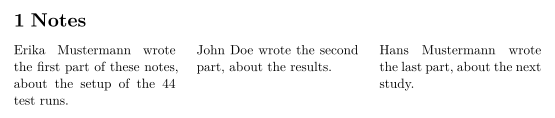
\columnbreak가 없으면 첫 번째 단이 다 찬 뒤에 두 번째 단이 시작되므로, 짧은 텍스트는 첫 번째 단에 머무릅니다. 환경 앞에 쓴 제목은 양쪽에서 모두 작동합니다.
multicols 앞에 쓴 제목
\section{Notes}
\begin{multicols}{2}
The heading above spans the page, as it would in a TeX installation.
\columnbreak

This paragraph starts the second column.
\end{multicols}
문서 전체를 2단으로 하려면 클래스 옵션을 쓰세요.
twocolumn 클래스 옵션
\documentclass[twocolumn]{article}
\title{Two Columns}
\author{Erika Mustermann}
\begin{document}
\maketitle
\section{Introduction}
This document is set in two columns with the \texttt{twocolumn}
option of the class. Every paragraph flows from the left column to
the right one. Lorem ipsum dolor sit amet, consectetuer adipiscing
elit. Ut purus elit, vestibulum ut, placerat ac, adipiscing vitae,
felis. Curabitur dictum gravida mauris. Nam arcu libero, nonummy
eget, consectetuer id, vulputate a, magna.
\section{Method}
John Doe measured 44 samples. Donec vehicula augue eu neque.
Pellentesque habitant morbi tristique senectus et netus et malesuada
fames ac turpis egestas. Mauris ut leo.
\end{document}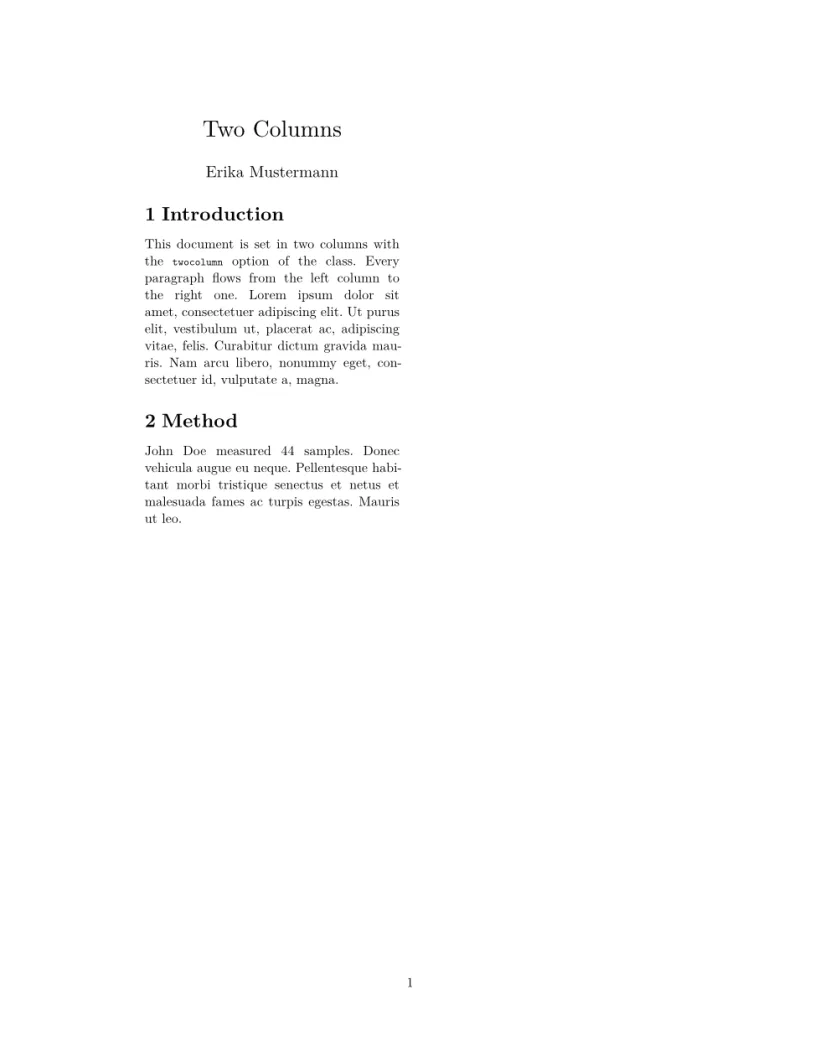
호환성
- TeX 설치 환경에서 여기로:
multicols안의 텍스트는 단으로 나뉘지만 높이가 맞춰지지 않습니다. 단이 끝나야 할 곳에\columnbreak를 넣으세요. - 여기서 TeX 설치 환경으로: 문서는 그곳에서 수정 없이 컴파일되며, 단의 높이가 맞춰집니다.
전체 설명서는 CTAN에 있습니다: ctan.org/pkg/multicol. 페이지 레이아웃, 여백, 용지 크기도 참고하세요.
페이지 레이아웃, enumitem, paralist, 지원되지 않는 패키지도 참고하세요.
질문과 답변
Scissor LaTeX에서 2단으로 조판하려면 어떻게 하나요?
문서 전체라면 \documentclass[twocolumn]{article}을, 페이지 일부라면 \begin{multicols}{2}를 쓰세요.
왜 텍스트가 모두 첫 번째 단에 있나요?
여기서는 단의 높이를 맞추지 않고 하나씩 차례로 채웁니다. 다음 단이 시작되어야 할 곳에 \columnbreak를 넣으세요.
이 페이지의 모든 예제는 사이트를 빌드할 때 Scissor LaTeX로 조판됩니다. 마지막 업데이트: 2026-11-07