


LaTeX 中的註腳
在註腳所屬的字詞或標點符號後面緊接著寫 \footnote{Your note.};LaTeX 會在那裡放上一個上標編號,並把註腳內容放在頁面底部。
第一個註腳
\footnote{...} 要緊接在它所說明的文字後面,前面不留空格。編號會自動計算。
兩個註腳
The survey asked 44 people.\footnote{All of them volunteers.}
Most answered within a week,\footnote{The last answer came after 19 days.}
so the results were ready early.
當註腳屬於整個句子時,把它放在句號或逗號之後;當它只屬於某個字詞時,就緊接在那個字詞後面。
註腳中的格式
註腳和一般文字一樣,可以包含格式、數學式、連結和引用。
註腳中的數學式和連結
The growth was quadratic.\footnote{That is, $f(n) = a n^2 + b$ with $a > 0$;
see \url{https://example.com/growth} for the data.}
參照註腳
在註腳文字中放一個 \label,就能用 \ref 印出該註腳的編號,例如寫「見註腳 2」。
註腳中的 \label
The first claim.\footnote{A short note.}
The second claim.\footnote{A longer note.\label{fn:long}}
As footnote~\ref{fn:long} explains, the second claim needs care.
表格中的註腳
tabular 中的 \footnote 可以正常運作:編號會出現在儲存格中,註腳內容則在頁面底部。
表格儲存格中的註腳
\begin{tabular}{lr}
Name & Points \\
Erika Mustermann & 44\footnote{After a recount.} \\
John Doe & 38 \\
\end{tabular}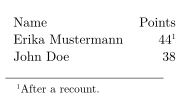
\footnotemark、\footnotetext 和 \thanks
在 LaTeX 中,\footnotemark 只印出編號,之後再由 \footnotetext 提供文字,這是在不允許使用 \footnote 的地方變通的方法。Scissor LaTeX 在任何地方都允許 \footnote,所以你很少需要這組指令。如果你使用它們,請注意這兩半並不會連在一起:
| 指令 | 在 Scissor LaTeX 中 | 備註 |
|---|---|---|
\footnote{text} | 可以使用 | 在整份文件中依序編號。 |
\footnote[44]{text} | 部分支援 | 會印出註腳;你給的編號會被忽略,計數照常繼續。 |
\footnotemark | 被省略 | 不會印出標記。 |
\footnotetext{text} | 部分支援 | 變成一個獨立的註腳,標記放在寫下 \footnotetext 的位置。 |
\thanks{text} | 部分支援 | 在仿研討會格式的版面(IEEE、ACM、NeurIPS ...)中會印出。在 article、report 和 book 中,文字會被省略。 |
\footnotetext 會變成獨立的註腳
A sentence with a mark.\footnotemark{} The mark is not printed,
and the text appears here instead.\footnotetext{The text of the mark.}
與 TeX 安裝環境的差異
footmisc 的使用手冊位於 CTAN:ctan.org/pkg/footmisc。要參照其他有編號的對象,請見標籤與交互參照。
常見問題
怎麼在 LaTeX 中加入註腳?
在註腳所屬的字詞或句子後面緊接著寫 \footnote{text}。編號和頁面底部的註腳內容都會自動加上。
可以在表格中放註腳嗎?
可以。在 Scissor LaTeX 中,\footnote 可以在 tabular 裡使用,註腳內容會放在頁面底部。
為什麼我的 \thanks 註腳沒有出現?
在 article、report 和 book 中,Scissor LaTeX 會省略 \thanks 的文字。請改用正文中的註腳,或使用會印出它的仿研討會格式版面。
本頁的每個範例都在建置網站時由 Scissor LaTeX 排版。 最後更新:2026-11-07