


LaTeX の相互参照:\label と \ref
参照したいものの直後(\section{...} の後、\caption{...} の後、数式の中)に \label{key} を書き、番号を表示したい場所に \ref{key} と書きます。組版するときに Scissor LaTeX が番号を埋めます。
ラベルを付けて参照する
相互参照は 2 つの部分から成ります。\label{key} が番号の付いたものに印を付け、\ref{key} がその番号を出力します。キーには好きな名前を付けられます。sec:、fig:、tab:、eq: などの接頭辞は、キーを読みやすくするための習慣であって、規則ではありません。
セクションと図を参照する
\section{Results}
\label{sec:results}

\begin{figure}[h]
  \centering
  \begin{tikzpicture}
    \draw (0,0) -- (1,0.8) -- (2,0.3) -- (3,1.1);
  \end{tikzpicture}
  \caption{Measured values.}
  \label{fig:values}
\end{figure}

Section~\ref{sec:results} shows the values in Figure~\ref{fig:values}.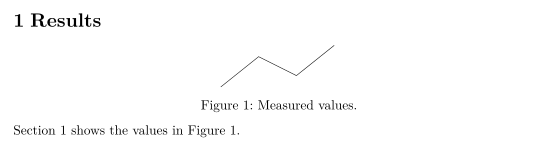
単語と参照の間の ~ は改行されないスペースで、「Figure」とその番号が同じ行に収まります。
ラベルを置く場所
ラベルは、その直前にあるいちばん近い番号付きのものの番号を受け取ります。
| 参照するもの | \label を置く場所 | \ref が出力するもの |
|---|---|---|
| セクション | \section{...}(または \subsection、\chapter)の直後 | 2、2.1 |
| 図や表 | フロートの中、\caption{...} の後 | 1 |
| 数式 | equation または番号付きの align の中 | 1 |
| リストの項目 | enumerate の \item の後 | 2、2b |
| 定理 | theorem、lemma などの環境の中 | 1 |
| 脚注 | \footnote{...} のテキストの中 | 2 |
数式
\eqref{key} は、数式番号を通常の表記どおりかっこ付きで出力します。\ref{key} は番号だけを出力します。
数式に対する \eqref と \ref
\begin{equation}
  a^2 + b^2 = c^2
  \label{eq:pythagoras}
\end{equation}
Equation~\eqref{eq:pythagoras} is famous; its number is \ref{eq:pythagoras}.
Scissor LaTeX では、align や gather のブロックには、行ごとではなくブロック全体に番号が 1 つ付きます。ブロック内で保持されるのは最初の \label だけなので、後の行のラベルへの参照は ?? と出力されます。詳しくは数式、整列、番号付けをご覧ください。
名前も付けるコマンド:\autoref と \cref
\autoref(hyperref)と \cref(cleveref)は、番号と一緒にそれが何であるかを出力するので、「Figure」と自分で書く必要がありません。\cref は cleveref の既定に従い、小文字の短い名前(「fig.」、「eq.」)を使います。文頭では \Cref を使うと、大文字で始まる省略しない名前になります。
\autoref、\cref、\Cref
\section{Method}
\label{sec:method}
\begin{equation}
  y = 44x
  \label{eq:line}
\end{equation}
\begin{table}[h]
  \centering
  \caption{Settings.}
  \label{tab:settings}
  \begin{tabular}{lr} Runs & 44 \\ \end{tabular}
\end{table}
\autoref{sec:method} uses \cref{tab:settings} and \cref{eq:line}.
\Cref{tab:settings} lists the runs.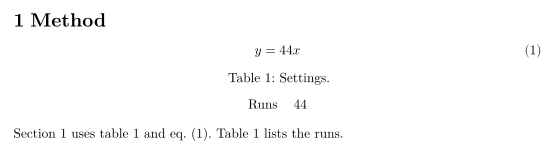
cleveref では、複数のラベルや範囲を一度に参照することもできます。
\cref による列挙と範囲
\begin{equation} a = 1 \label{eq:a} \end{equation}
\begin{equation} b = 2 \label{eq:b} \end{equation}
See \cref{eq:a,eq:b}, or \crefrange{eq:a}{eq:b}.
パッケージのオプション capitalise(または capitalize)、noabbrev、nameinlink は読み取られ、プリアンブルの \crefname と \Crefname も同様です。
cleveref のオプションと \crefname
\documentclass{article}
\usepackage{amsmath}
\usepackage[capitalise,noabbrev]{cleveref}
\crefname{table}{Tab.}{Tabs.}
\begin{document}
\begin{equation} E = mc^2 \label{eq:e} \end{equation}
\begin{table}[h]
  \centering
  \caption{Masses.}
  \label{tab:m}
  \begin{tabular}{l} 44 kg \\ \end{tabular}
\end{table}
\cref{eq:e} uses the mass in \cref{tab:m}.
\end{document}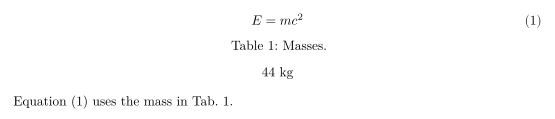
| コマンド | Scissor LaTeX では | 備考 |
|---|---|---|
\ref{key} | 使える | 番号のみ。 |
\eqref{key} | 使える | かっこ付きの番号。 |
\pageref{key} | 使える | ラベルのあるページの番号。 |
\autoref{key} | 一部のみ | 「Section 2」、「Figure 1」、「Table 1」、「Theorem 1」。数式では「Equation 1」ではなく番号だけを出力する。 |
\cref、\Cref | 使える | 1 つまたは複数のラベル。cleveref の既定の名前か、\crefname で指定した名前。 |
\crefrange、\cpageref、\namecref | 使える | 範囲、ページ、または名前だけ。 |
\nameref{key} | 一部のみ | セクションのタイトルではなく番号を出力する。 |
\vref{key} | 一部のみ | 「on the next page」なしで番号を出力する。 |
\hyperref[key]{text} | 使える | 書いたテキストをラベルへのリンクとして出力する。 |
ページと見つからないラベル
\pageref は、ラベルのあるページを出力します。存在しないラベルへの参照は、LaTeX の 2 回目の実行前と同じように太字の ?? を出力し、問題タブには見つからないラベルがそれぞれ 1 回ずつ表示されます:「References to labels that do not exist (shown as ??): sec:nowhere」。
\pageref と見つからないラベル
\section{Data}
\label{sec:data}
The data is described on page~\pageref{sec:data}.
This label does not exist: Section~\ref{sec:nowhere}.
「問題」タブ: References to labels that do not exist (shown as ??): sec:nowhere
TeX のインストール環境との違い
パッケージについては cleveref と hyperref をご覧ください。完全なマニュアルは CTAN にあります:cleveref、hyperref。
よくある質問
LaTeX で参照が ?? と表示されるのはなぜですか?
ラベルが存在しないか、\ref と綴りが違っています。Scissor LaTeX では、番号が 1 つしか付かない align ブロックの 2 つ目のラベルである可能性もあります。
数式をかっこ付きで参照するにはどうすればよいですか?
amsmath の \eqref{key} を使います。(1) のように、番号をかっこ付きで出力します。
\ref と \autoref の違いは何ですか?
\ref は番号だけを出力します。\autoref は「Figure 1」や「Section 2」のように種類も付けるので、その語を自分で入力する手間が省けます。
このページの例はすべて、サイトのビルド時に Scissor LaTeX で組版されています。 最終更新:2026-11-07