


LaTeX 中的交叉引用:\label 和 \ref
在你想引用的对象之后紧接着写 \label{key}(写在 \section{...} 之后、\caption{...} 之后或公式内部),然后在需要编号的地方写 \ref{key};Scissor LaTeX 会在排版时填入编号。
先加标签,再引用
交叉引用由两部分组成。\label{key} 标记一个带编号的对象,\ref{key} 输出它的编号。键可以是你选择的任何名称;sec:、fig:、tab: 和 eq: 这类前缀只是让键更易读的习惯,并不是规则。
引用一个章节和一个图
\section{Results}
\label{sec:results}

\begin{figure}[h]
  \centering
  \begin{tikzpicture}
    \draw (0,0) -- (1,0.8) -- (2,0.3) -- (3,1.1);
  \end{tikzpicture}
  \caption{Measured values.}
  \label{fig:values}
\end{figure}

Section~\ref{sec:results} shows the values in Figure~\ref{fig:values}.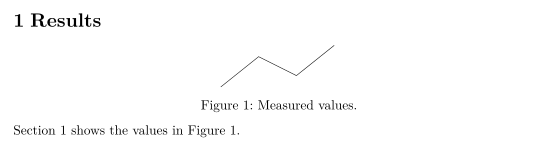
单词和引用之间的 ~ 是一个永不断行的空格,所以“Figure”和它的编号会留在同一行。
标签放在哪里
标签取的是它之前最近的带编号对象的编号:
| 要引用的对象 | \label 的位置 | \ref 输出 |
|---|---|---|
| 章节 | 紧接在 \section{...}(或 \subsection、\chapter)之后 | 2, 2.1 |
| 图或表 | 在浮动体内部,\caption{...} 之后 | 1 |
| 公式 | 在 equation 或带编号的 align 内部 | 1 |
| 列表项 | 在 enumerate 中的 \item 之后 | 2, 2b |
| 定理 | 在 theorem、lemma 等环境内部 | 1 |
| 脚注 | 在 \footnote{...} 的文字内部 | 2 |
公式
\eqref{key} 输出带括号的公式编号,这是公式编号通常的显示方式。\ref{key} 给出不带括号的编号。
公式的 \eqref 和 \ref
\begin{equation}
  a^2 + b^2 = c^2
  \label{eq:pythagoras}
\end{equation}
Equation~\eqref{eq:pythagoras} is famous; its number is \ref{eq:pythagoras}.
在 Scissor LaTeX 中,align 或 gather 块只得到一个编号,而不是每行一个。块中只保留第一个 \label,所以引用后面某行的标签会输出 ??。详情请参阅公式、对齐与编号。
自动加上名称的命令:\autoref 和 \cref
\autoref(来自 hyperref)和 \cref(来自 cleveref)会把对象的类型和编号一起输出,所以你不必自己写“Figure”。\cref 遵循 cleveref 的默认设置:小写和简称(“fig.”、“eq.”);在句首使用 \Cref 则得到首字母大写的完整名称。
\autoref、\cref 和 \Cref
\section{Method}
\label{sec:method}
\begin{equation}
  y = 44x
  \label{eq:line}
\end{equation}
\begin{table}[h]
  \centering
  \caption{Settings.}
  \label{tab:settings}
  \begin{tabular}{lr} Runs & 44 \\ \end{tabular}
\end{table}
\autoref{sec:method} uses \cref{tab:settings} and \cref{eq:line}.
\Cref{tab:settings} lists the runs.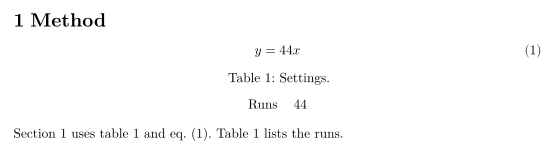
cleveref 还可以同时引用多个标签,或者引用一个范围:
用 \cref 引用列表和范围
\begin{equation} a = 1 \label{eq:a} \end{equation}
\begin{equation} b = 2 \label{eq:b} \end{equation}
See \cref{eq:a,eq:b}, or \crefrange{eq:a}{eq:b}.
宏包选项 capitalise(或 capitalize)、noabbrev 和 nameinlink 会被读取,导言区中的 \crefname 和 \Crefname 也会被读取。
cleveref 选项和 \crefname
\documentclass{article}
\usepackage{amsmath}
\usepackage[capitalise,noabbrev]{cleveref}
\crefname{table}{Tab.}{Tabs.}
\begin{document}
\begin{equation} E = mc^2 \label{eq:e} \end{equation}
\begin{table}[h]
  \centering
  \caption{Masses.}
  \label{tab:m}
  \begin{tabular}{l} 44 kg \\ \end{tabular}
\end{table}
\cref{eq:e} uses the mass in \cref{tab:m}.
\end{document}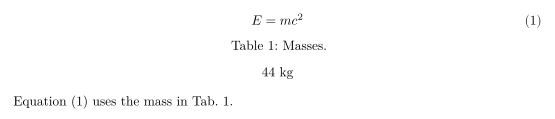
| 命令 | 在 Scissor LaTeX 中 | 说明 |
|---|---|---|
\ref{key} | 可用 | 只输出编号。 |
\eqref{key} | 可用 | 输出带括号的编号。 |
\pageref{key} | 可用 | 输出标签所在的页码。 |
\autoref{key} | 部分可用 | 输出“Section 2”“Figure 1”“Table 1”“Theorem 1”。对公式只输出编号,而不是“Equation 1”。 |
\cref, \Cref | 可用 | 一个或多个标签;使用 cleveref 的默认名称,或你用 \crefname 设置的名称。 |
\crefrange, \cpageref, \namecref | 可用 | 分别输出范围、页码或仅名称。 |
\nameref{key} | 部分可用 | 输出编号,而不是章节标题。 |
\vref{key} | 部分可用 | 输出编号,不带“on the next page”之类的字样。 |
\hyperref[key]{text} | 可用 | 把你的文字输出为指向该标签的链接。 |
页码和缺失的标签
\pageref 输出标签所在的页码。引用一个不存在的标签会输出粗体的 ??,和 LaTeX 第二次运行之前的表现一样;“问题”标签页会把每个缺失的标签列出一次:“References to labels that do not exist (shown as ??): sec:nowhere”。
\pageref 和缺失的标签
\section{Data}
\label{sec:data}
The data is described on page~\pageref{sec:data}.
This label does not exist: Section~\ref{sec:nowhere}.
“问题”标签页: References to labels that do not exist (shown as ??): sec:nowhere
与 TeX 发行版的区别
关于这些宏包,请参阅 cleveref 和 hyperref;完整手册可在 CTAN 上找到:cleveref、hyperref。
常见问题
为什么 LaTeX 中我的引用显示为 ???
该标签不存在,或者它的拼写与 \ref 中的不同。在 Scissor LaTeX 中,这也可能意味着该标签是 align 块中的第二个标签,而这种块只得到一个编号。
如何引用带括号的公式编号?
使用 amsmath 的 \eqref{key}。它会输出带括号的编号,例如 (1)。
\ref 和 \autoref 有什么区别?
\ref 只输出编号。\autoref 会加上类型,例如“Figure 1”或“Section 2”,省去你自己输入这个词的麻烦。
本页的每个示例都在构建网站时由 Scissor LaTeX 排版。 最后更新:2026-11-07