


Scissor LaTeX의 biblatex 패키지
Scissor LaTeX에서 biblatex 패키지는 일부 작동합니다. \addbibresource, \cite, \parencite, \textcite, \autocite, \printbibliography는 작동하지만, style=authoryear 같은 패키지 옵션은 무시되고(\bibliographystyle을 추가하지 않으면 인용에 번호가 붙음), \footcite는 본문 줄에 남으며, \fullcite와 \citetitle은 지원되지 않습니다.
패키지가 하는 일
biblatex는 BibTeX 스타일을 대신하는 현대적인 패키지입니다. \addbibresource{refs.bib}로 .bib 파일을 지정하고, \parencite와 \textcite 같은 명령으로 인용하며, \printbibliography로 목록을 출력합니다. 모양은 \usepackage[style=authoryear]{biblatex} 같은 패키지 옵션으로 고르며, TeX 설치 환경에서는 Biber 프로그램이 항목의 서식을 맞춥니다.
여기서 작동하는 것
| 명령 또는 옵션 | Scissor LaTeX에서 | 비고 |
|---|---|---|
\addbibresource{refs.bib} | 작동 | 이름과 관계없이 프로젝트의 모든 .bib 파일을 읽습니다. |
\printbibliography | 작동 | 제목은 항상 "References"입니다. |
\printbibliography[title=..., heading=...] | 일부 | 옵션은 무시됩니다. |
\cite, \parencite, \autocite, \smartcite | 작동 | 괄호형. 기본 스타일에서는 대괄호 안의 번호. |
\textcite, \Textcite | 작동 | 저자 뒤에 번호나 연도. |
\parencite[44]{key} | 작동 | 메모가 인용 안에 들어갑니다. |
\citeyear{key} | 작동 | 연도만. |
\citeauthor{key} | 일부 | \textcite와 똑같이 출력합니다. |
\footcite, \supercite | 일부 | 일반 인용으로 본문 줄에 출력됩니다. |
\fullcite, \citetitle | 지원 안 됨 | 메시지를 남기고 건너뛰며, 키가 텍스트로 출력됩니다. |
style=, sorting=, backend=, maxnames= ... | 생략 | 패키지 옵션은 무시됩니다. |
biblatex와 함께 쓴 \bibliographystyle{...} | 작동 | biblatex 문법은 아니지만, 여기서는 이것으로 스타일을 고릅니다. |
\DeclareFieldFormat, \defbibheading, \AtEveryBibitem ... | 생략 | 프리앰블에서는 무시됩니다. 본문에서는 메시지를 남기고 건너뛰며 인수가 텍스트로 출력됩니다. |
예제
일반적인 형태로 biblatex를 쓴 문서:
\parencite, \textcite, \printbibliography
\documentclass{article}
\usepackage{biblatex}
\addbibresource{refs.bib}
\begin{document}
\textcite{doe2024} describe how to measure carefully.
Long tables are a subject of their own \parencite[44]{mustermann2021}.

\printbibliography
\end{document}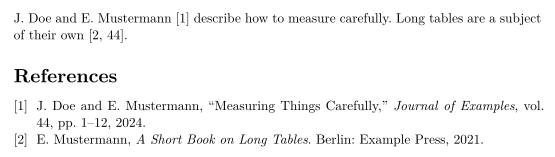
style=authoryear는 무시되므로 인용에 번호가 남습니다. 저자-연도 인용을 쓰려면 apalike 같은 저자-연도 스타일로 \bibliographystyle 줄을 추가하세요.
\bibliographystyle로 지정한 저자-연도 스타일
\documentclass{article}
\usepackage[style=authoryear]{biblatex}
\addbibresource{refs.bib}
\bibliographystyle{apalike}
\begin{document}
Plots can explain themselves \parencite{mustermann2023}, as
\textcite{doe2024} also note.

\printbibliography
\end{document}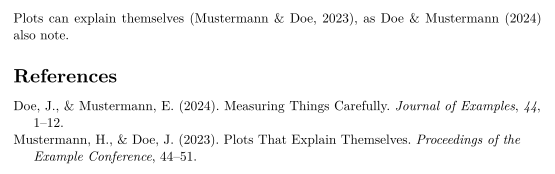
\footcite는 각주를 만들지 않고, 인용이 본문 줄에 남습니다.
\footcite는 본문 줄에 남음
\documentclass{article}
\usepackage{biblatex}
\addbibresource{refs.bib}
\begin{document}
Erika Mustermann wrote a short book on long tables.\footcite{mustermann2021}

\printbibliography
\end{document}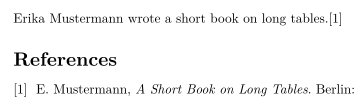
호환성
- TeX 설치 환경에서 여기로: 인용과 참고문헌 목록은 작동하며,
\bibliographystyle을 추가하지 않으면 번호가 붙습니다. 스타일 옵션과 참고문헌 사용자 지정은 적용되지 않습니다. - 여기서 TeX 설치 환경으로: 이 편집기를 위해 추가한
\bibliographystyle줄을 지우기만 하면, 문서는 그곳에서 Biber로 컴파일됩니다.
전체 설명서는 CTAN에 있습니다: ctan.org/pkg/biblatex. 참고문헌과 인용과 natbib도 참고하세요.
질문과 답변
style=authoryear가 작동하지 않는 이유는 무엇인가요?
Scissor LaTeX는 biblatex의 패키지 옵션을 읽지 않습니다. 스타일을 고르려면 \bibliographystyle{apalike}(또는 다른 저자-연도 스타일 이름)를 추가하세요.
Biber가 필요한가요?
아니요. Scissor LaTeX는 조판할 때마다 .bib 파일을 직접 읽으므로 따로 실행할 필요가 없습니다.
참고문헌 제목을 바꿀 수 있나요?
아직은 안 됩니다. \printbibliography[title=Sources]는 받아들여지지만 제목은 "References"로 남습니다.
이 페이지의 모든 예제는 사이트를 빌드할 때 Scissor LaTeX로 조판됩니다. 마지막 업데이트: 2026-11-07