


Scissor LaTeX 中的 biblatex
biblatex 套件在 Scissor LaTeX 中部分可用:\addbibresource、\cite、\parencite、\textcite、\autocite 和 \printbibliography 都能用,但 style=authoryear 等套件選項會被忽略(除非加上 \bibliographystyle,否則引用會以數字編號),\footcite 會留在行內,\fullcite 和 \citetitle 則不支援。
套件的用途
biblatex 是取代 BibTeX 格式的現代做法。你用 \addbibresource{refs.bib} 指定 .bib 檔案,用 \parencite 和 \textcite 等指令引用,再用 \printbibliography 印出清單。外觀由套件選項決定,例如 \usepackage[style=authoryear]{biblatex},TeX 安裝環境則用 Biber 程式來格式化各個條目。
在這裡可用的功能
| 指令或選項 | 在 Scissor LaTeX 中 | 備註 |
|---|---|---|
\addbibresource{refs.bib} | 可用 | 專案中的每個 .bib 檔案都會被讀取,不論名稱為何。 |
\printbibliography | 可用 | 標題一律是「References」。 |
\printbibliography[title=..., heading=...] | 部分支援 | 選項會被忽略。 |
\cite, \parencite, \autocite, \smartcite | 可用 | 括號形式;使用預設格式時,是方括號中的數字。 |
\textcite, \Textcite | 可用 | 作者,後接編號或年份。 |
\parencite[44]{key} | 可用 | 附註放在引用內。 |
\citeyear{key} | 可用 | 只有年份。 |
\citeauthor{key} | 部分支援 | 印出和 \textcite 相同的內容。 |
\footcite, \supercite | 部分支援 | 以一般引用的形式印在行內。 |
\fullcite, \citetitle | 不支援 | 會被略過並顯示訊息;鍵會以文字印出。 |
style=、sorting=、backend=、maxnames= ... | 忽略 | 套件選項會被忽略。 |
搭配 biblatex 的 \bibliographystyle{...} | 可用 | 不是 biblatex 的語法,但在這裡要用它來選擇格式。 |
\DeclareFieldFormat、\defbibheading、\AtEveryBibitem ... | 忽略 | 在導言區中會被忽略。在內文中會被略過並顯示訊息,它們的參數會以文字印出。 |
範例
使用 biblatex 的一般寫法的文件:
\parencite、\textcite 和 \printbibliography
\documentclass{article}
\usepackage{biblatex}
\addbibresource{refs.bib}
\begin{document}
\textcite{doe2024} describe how to measure carefully.
Long tables are a subject of their own \parencite[44]{mustermann2021}.

\printbibliography
\end{document}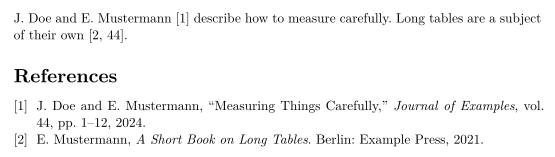
style=authoryear 會被忽略,所以引用仍以數字編號。如果要得到作者-年份引用,請加上一行 \bibliographystyle,並指定 apalike 等作者-年份格式:
透過 \bibliographystyle 使用作者-年份格式
\documentclass{article}
\usepackage[style=authoryear]{biblatex}
\addbibresource{refs.bib}
\bibliographystyle{apalike}
\begin{document}
Plots can explain themselves \parencite{mustermann2023}, as
\textcite{doe2024} also note.

\printbibliography
\end{document}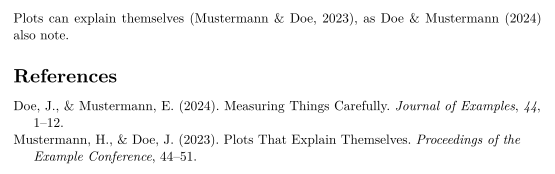
\footcite 不會產生註腳;引用會留在行內:
\footcite 會留在行內
\documentclass{article}
\usepackage{biblatex}
\addbibresource{refs.bib}
\begin{document}
Erika Mustermann wrote a short book on long tables.\footcite{mustermann2021}

\printbibliography
\end{document}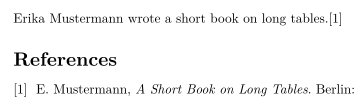
相容性
- 從 TeX 安裝環境搬到這裡:引用和參考文獻清單都能用;除非加上
\bibliographystyle,否則會以數字編號。格式選項和參考文獻的自訂設定不會套用。 - 從這裡搬到 TeX 安裝環境:只要移除你為這個編輯器加上的
\bibliographystyle那一行,文件就能在那裡搭配 Biber 編譯。
完整手冊在 CTAN 上:ctan.org/pkg/biblatex。另請參閱參考文獻與引用和 natbib。
常見問題
為什麼 style=authoryear 沒有作用?
Scissor LaTeX 不會讀取 biblatex 的套件選項。請加上 \bibliographystyle{apalike}(或其他作者-年份格式名稱)來選擇格式。
需要 Biber 嗎?
不需要。Scissor LaTeX 每次排版時都會自己讀取 .bib 檔案,所以不需要另外執行。
可以更改參考文獻的標題嗎?
目前還不行。\printbibliography[title=Sources] 會被接受,但標題仍是「References」。
本頁的每個範例都在建置網站時由 Scissor LaTeX 排版。 最後更新:2026-11-07