


Scissor LaTeX 中的 biblatex
biblatex 宏包在 Scissor LaTeX 中部分可用:\addbibresource、\cite、\parencite、\textcite、\autocite 和 \printbibliography 都可用,但 style=authoryear 等宏包选项会被忽略(除非你加上 \bibliographystyle,否则引用都是数字编号),\footcite 留在行内,\fullcite 和 \citetitle 不受支持。
宏包的作用
biblatex 是 BibTeX 样式的现代替代方案。你用 \addbibresource{refs.bib} 指定 .bib 文件,用 \parencite、\textcite 等命令引用,再用 \printbibliography 输出文献列表。外观通过宏包选项选择,例如 \usepackage[style=authoryear]{biblatex},TeX 发行版则用 Biber 程序格式化各个条目。
这里可用的功能
| 命令或选项 | 在 Scissor LaTeX 中 | 说明 |
|---|---|---|
\addbibresource{refs.bib} | 可用 | 项目中的每个 .bib 文件都会被读取,无论叫什么名字。 |
\printbibliography | 可用 | 标题始终是“References”。 |
\printbibliography[title=..., heading=...] | 部分可用 | 选项被忽略。 |
\cite, \parencite, \autocite, \smartcite | 可用 | 括号形式;使用默认样式时,是方括号中的数字。 |
\textcite, \Textcite | 可用 | 先写作者,再写编号或年份。 |
\parencite[44]{key} | 可用 | 附注放在引用中。 |
\citeyear{key} | 可用 | 只输出年份。 |
\citeauthor{key} | 部分可用 | 输出与 \textcite 相同。 |
\footcite, \supercite | 部分可用 | 在行内输出为普通引用。 |
\fullcite, \citetitle | 不支持 | 会被跳过并显示提示;键作为文本输出。 |
style=, sorting=, backend=, maxnames= ... | 忽略 | 宏包选项被忽略。 |
与 biblatex 一起使用 \bibliographystyle{...} | 可用 | 这不是 biblatex 的语法,但在这里要靠它选择样式。 |
\DeclareFieldFormat, \defbibheading, \AtEveryBibitem ... | 忽略 | 在导言区中被忽略。在正文中会被跳过并显示提示,它们的参数会作为文本输出。 |
示例
以常见写法使用 biblatex 的文档:
\parencite、\textcite 和 \printbibliography
\documentclass{article}
\usepackage{biblatex}
\addbibresource{refs.bib}
\begin{document}
\textcite{doe2024} describe how to measure carefully.
Long tables are a subject of their own \parencite[44]{mustermann2021}.

\printbibliography
\end{document}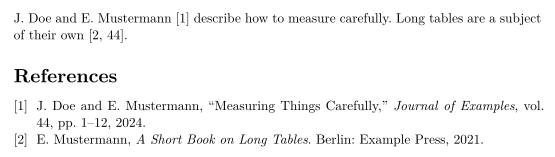
style=authoryear 会被忽略,所以引用仍然是数字编号。要得到作者-年份引用,请加上一行 \bibliographystyle,指定 apalike 等作者-年份样式:
通过 \bibliographystyle 使用作者-年份样式
\documentclass{article}
\usepackage[style=authoryear]{biblatex}
\addbibresource{refs.bib}
\bibliographystyle{apalike}
\begin{document}
Plots can explain themselves \parencite{mustermann2023}, as
\textcite{doe2024} also note.

\printbibliography
\end{document}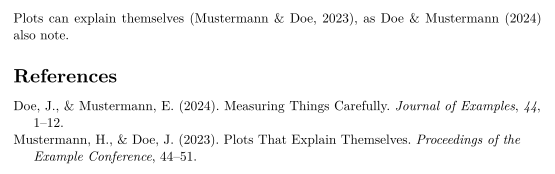
\footcite 不会生成脚注;引用留在行内:
\footcite 留在行内
\documentclass{article}
\usepackage{biblatex}
\addbibresource{refs.bib}
\begin{document}
Erika Mustermann wrote a short book on long tables.\footcite{mustermann2021}

\printbibliography
\end{document}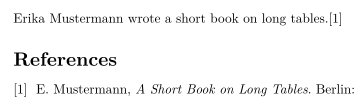
兼容性
- 从 TeX 发行版迁移到这里: 引用和参考文献列表都可用;除非你加上
\bibliographystyle,否则使用数字编号。样式选项和对参考文献的自定义不会生效。 - 从这里迁移到 TeX 发行版: 只要删除你为本编辑器添加的
\bibliographystyle行,文档就能在那里配合 Biber 编译。
完整手册见 CTAN:ctan.org/pkg/biblatex。另请参阅参考文献和引用和 natbib。
常见问题
为什么 style=authoryear 不起作用?
Scissor LaTeX 不读取 biblatex 的宏包选项。请加上 \bibliographystyle{apalike}(或其他作者-年份样式名称)来选择样式。
我需要 Biber 吗?
不需要。Scissor LaTeX 每次排版时都会自己读取 .bib 文件,所以不需要单独运行。
能修改参考文献的标题吗?
暂时还不能。\printbibliography[title=Sources] 会被接受,但标题仍是“References”。
本页的每个示例都在构建网站时由 Scissor LaTeX 排版。 最后更新:2026-11-07