


학회 LaTeX 템플릿: IEEE, ACM, CVPR, NeurIPS, ICML
Scissor LaTeX에는 IEEE, CVPR, ACM sigconf, Springer LNCS, NeurIPS, ICML, ICLR, ACL, arxiv.sty 프리프린트 스타일 등 9가지 논문 형식을 본뜬 무료 템플릿이 있습니다. 문서가 IEEEtran, acmart, llncs, \usepackage{neurips_2026}처럼 학회의 클래스나 스타일 파일을 쓰면, 편집기가 그 형식으로 레이아웃을 잡고, 형식에 따라 심사용 모드와 최종본 모드도 제공합니다.
이 템플릿은 무엇인가요
학회는 저자 키트를 배포합니다. 페이지, 글꼴, 제목 블록, 제목 스타일을 정하는 클래스나 스타일 파일입니다. Scissor LaTeX는 그 파일을 실행할 수 없으므로, 대신 클래스나 패키지 줄을 알아보고 같은 스타일의 자체 레이아웃으로 전환합니다. .tex는 표준 그대로이므로, 공식 키트 파일을 옆에 두면 같은 파일이 TeX 설치 환경에서도 컴파일됩니다.
9가지 레이아웃
| 형식 | 켜는 줄 | 모드 | 페이지 |
|---|---|---|---|
| arXiv 프리프린트(arxiv.sty) | \usepackage{arxiv} | 없음 | Letter, 1단 |
| IEEE 학회 | \documentclass[conference]{IEEEtran} | 없음 | Letter(또는 A4), 2단 |
| CVPR(ICCV, WACV도 포함) | \usepackage[review]{cvpr} | review, rebuttal, final, pagenumbers | Letter, 2단 |
| ACM sigconf | \documentclass[sigconf]{acmart} | review, anonymous, nonacm | Letter, 2단 |
| Springer LNCS | \documentclass[runningheads]{llncs} | 없음 | Letter(또는 A4), 1단 |
| NeurIPS | \usepackage{neurips_2026} | submission, preprint, final | Letter, 1단 |
| ICML | \usepackage{icml2026} | submission, preprint, accepted | Letter, 2단 |
| ICLR | \usepackage{iclr2026_conference,times} | submission, final(\iclrfinalcopy) | Letter, 1단 |
| ACL(NAACL, EMNLP 등도 포함) | \usepackage[review]{acl} | review, preprint, final | A4, 2단 |
패키지 이름에 든 연도는 이름에서 읽습니다. neurips_2025, icml2025, iclr2027_conference도 작동하며, 안내 문구에 그 연도가 표시됩니다.
레이아웃이 정하는 것
키트가 감지되면 \documentclass 옵션과 상관없이 형식이 용지 크기, 단 수, 글자 크기를 정합니다. 그 밖에도 다음을 정합니다.
- 글꼴: 비슷하게 생긴 무료 글꼴(Times 대신 TeX Gyre Termes, ACM의 Libertine 대신 Libertinus, LNCS에는 Latin Modern)을 쓰며, 문서에 처음 필요할 때 내려받습니다.
- 형식의 제목 블록, 저자 배치, 초록 스타일
- 제목 번호와 스타일, 캡션 레이블(IEEE는 "Fig. 1.", 대부분의 다른 형식은 "Figure 1:")
- 해당 모드가 있는 형식의 줄 번호, 머리글, 안내 문구, 익명 저자 블록
- 형식의 기본 참고문헌 스타일
모든 키트 문서는 문제 탭에 레이아웃과 모드, 공식 파일을 받을 곳을 알려 주는 메모를 하나 보여 줍니다.
키트 줄 하나로 레이아웃이 바뀜: 프리프린트 모드의 NeurIPS
\documentclass{article}
\usepackage[preprint]{neurips_2026}
\title{Adaptive Step Sizes under Heavy-Tailed Noise}
\author{Erika Mustermann \\ Example University \And John Doe \\ Institute of Example Studies}
\begin{document}
\maketitle
\begin{abstract}
We propose a step-size rule that stays stable when the gradient noise has heavy tails.
\end{abstract}
\section{Introduction}
Stochastic gradient methods need a step size, and a fixed one is either too cautious
early on or unstable later.
\end{document}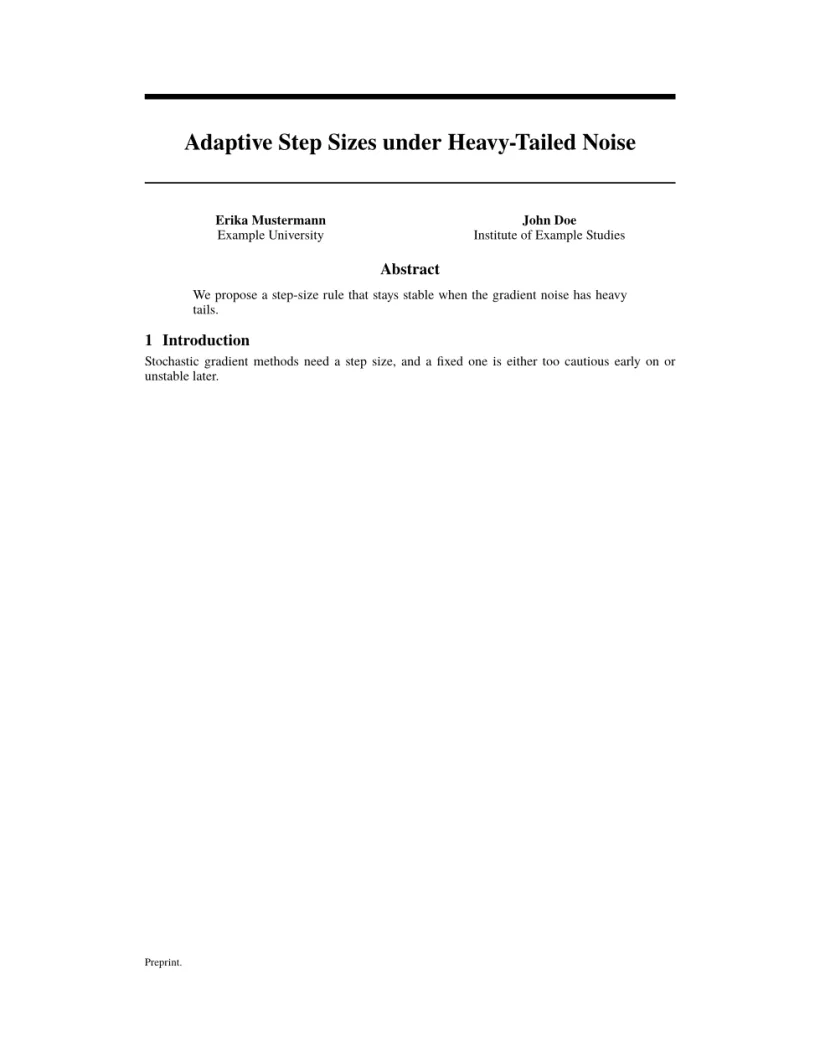
문제 탭: Layout in the style of the NeurIPS style (preprint mode). Not official. To compile elsewhere, add the NeurIPS style file from neurips.cc.
심사용, 프리프린트, 최종본 모드
대부분의 키트에는 익명 심사용 모드(저자 숨김, 줄 번호 표시)와 최종본 모드가 있습니다. 공식 키트와 똑같이 패키지나 클래스 옵션으로 전환하며, 바꾸는 즉시 미리보기가 갱신됩니다.
ACL 심사용 모드의 같은 종류 논문
\documentclass[11pt]{article}
\usepackage[review]{acl}
\usepackage{times}
\title{Label-Efficient Text Classification}
\author{Erika Mustermann \\ Example University \And John Doe \\ Institute of Example Studies}
\begin{document}
\maketitle
\begin{abstract}
We calibrate class prototypes with a handful of labelled examples per class.
\end{abstract}
\section{Introduction}
Labelled data is expensive, so we start from 44 examples per class.
\end{document}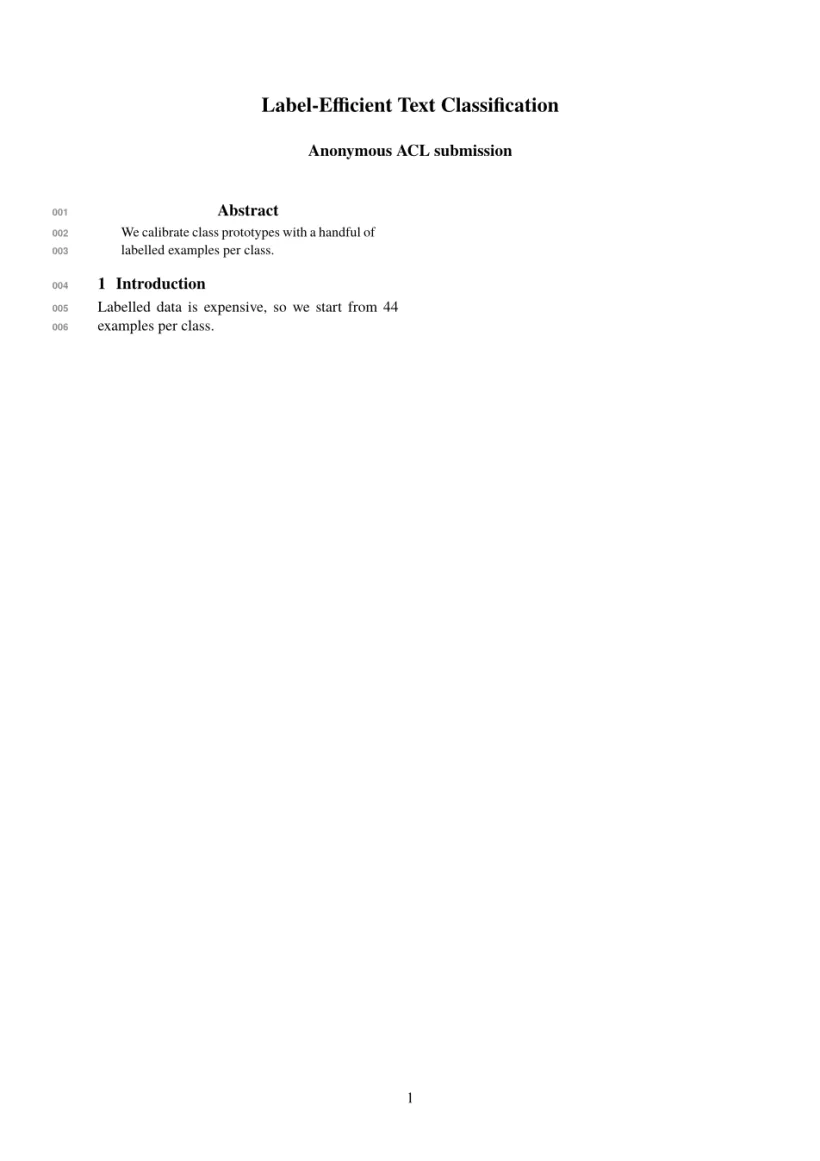
문제 탭: Layout in the style of the ACL style (anonymous review mode). Not official. To compile elsewhere, add acl.sty from github.com/acl-org/acl-style-files.
모든 레이아웃에서 똑같은 것
Scissor LaTeX가 지원하는 LaTeX는 키트 문서 안에서도 모두 작동합니다. 수식, 표, 그림, pgfplots 그래프, 인용, 상호 참조입니다. 2단 형식에서 figure*와 table*는 두 단에 걸쳐 놓입니다. LaTeX 배우기 안내서를 보세요.
함께 보기
- 일반 템플릿은 시작 템플릿을 보세요.
- APS, AIP, Elsevier, Springer Nature, AMS, IEEE Transactions, ACM 저널, A&A, IOP, MDPI, PLOS ONE, AAS는 저널 형식 템플릿을 보세요.
\bibliographystyle이름이 어떤 스타일에 대응하는지는 참고문헌과 인용을 보세요.
질문과 답변
이것이 공식 학회 템플릿인가요?
아니요. 초안 작성과 미리보기를 위해 본뜬 레이아웃입니다. 제출할 때는 공식 키트를 내려받으세요. 내 .tex 파일은 바꾸지 않고 그대로 공식 키트와 함께 쓸 수 있습니다.
목록에 없는 학회 클래스를 쓸 수 있나요?
네. 다만 일반 article(또는 report/book)로 조판되며, 그 클래스 고유의 명령은 메시지를 남기고 건너뛸 수 있습니다.
내 IEEE 논문은 왜 a4paper 옵션을 무시하나요?
무시하지 않습니다. IEEE에서는 [conference,a4paper]로 A4가 됩니다. 다른 키트는 용지를 직접 고정합니다. 예를 들어 ACL은 항상 A4, NeurIPS는 항상 Letter입니다.
이 페이지의 모든 예제는 사이트를 빌드할 때 Scissor LaTeX로 조판됩니다. 마지막 업데이트: 2026-11-07