


会议 LaTeX 模板:IEEE、ACM、CVPR、NeurIPS、ICML
Scissor LaTeX 为九种论文格式提供免费的仿照模板:IEEE、CVPR、ACM sigconf、Springer LNCS、NeurIPS、ICML、ICLR、ACL 以及 arxiv.sty 预印本样式。当你的文档使用会议的文档类或样式文件,例如 IEEEtran、acmart、llncs 或 \usepackage{neurips_2026} 时,编辑器会按该格式排版,并在格式提供时支持评审模式和终稿模式。
这些模板是什么
会议会发布作者工具包:一个设置页面、字体、标题区和标题样式的文档类或样式文件。Scissor LaTeX 无法运行这些文件,所以它会识别 class 或 package 那一行,并切换到自己的同风格版式。你的 .tex 保持标准:只要旁边放上官方工具包文件,同一个文件就能在 TeX 发行版中编译。
九种版式
| 格式 | 启用它的那一行 | 模式 | 页面 |
|---|---|---|---|
| arXiv 预印本(arxiv.sty) | \usepackage{arxiv} | 无 | Letter,单栏 |
| IEEE 会议 | \documentclass[conference]{IEEEtran} | 无 | Letter(或 A4),双栏 |
| CVPR(以及 ICCV、WACV) | \usepackage[review]{cvpr} | review、rebuttal、final、pagenumbers | Letter,双栏 |
| ACM sigconf | \documentclass[sigconf]{acmart} | review、anonymous、nonacm | Letter,双栏 |
| Springer LNCS | \documentclass[runningheads]{llncs} | 无 | Letter(或 A4),单栏 |
| NeurIPS | \usepackage{neurips_2026} | submission、preprint、final | Letter,单栏 |
| ICML | \usepackage{icml2026} | submission、preprint、accepted | Letter,双栏 |
| ICLR | \usepackage{iclr2026_conference,times} | submission、final(\iclrfinalcopy) | Letter,单栏 |
| ACL(以及 NAACL、EMNLP ……) | \usepackage[review]{acl} | review、preprint、final | A4,双栏 |
宏包名称中的年份会从名称中读取:neurips_2025、icml2025 或 iclr2027_conference 也能使用,页面上的声明会显示该年份。
版式设置了什么
识别到工具包后,无论 \documentclass 的选项如何,纸张大小、栏数和字号都由该格式决定。它还会设置:
- 字体:免费的仿照字体(用 TeX Gyre Termes 代替 Times,用 Libertinus 代替 ACM 的 Libertine,LNCS 用 Latin Modern),在文档第一次需要时下载;
- 该格式的标题区、作者排列方式和摘要样式;
- 标题的编号和样式、图注标签(IEEE 为“Fig. 1.”,其他大多数为“Figure 1:”);
- 在提供这些功能的模式中,显示行号、页眉、声明和匿名作者区;
- 该格式默认的参考文献样式。
每个使用工具包的文档都会在“问题”标签页中显示一条说明,指出所用的版式和模式,以及在哪里获取官方文件。
任何工具包那一行都会切换版式:这里是预印本模式的 NeurIPS
\documentclass{article}
\usepackage[preprint]{neurips_2026}
\title{Adaptive Step Sizes under Heavy-Tailed Noise}
\author{Erika Mustermann \\ Example University \And John Doe \\ Institute of Example Studies}
\begin{document}
\maketitle
\begin{abstract}
We propose a step-size rule that stays stable when the gradient noise has heavy tails.
\end{abstract}
\section{Introduction}
Stochastic gradient methods need a step size, and a fixed one is either too cautious
early on or unstable later.
\end{document}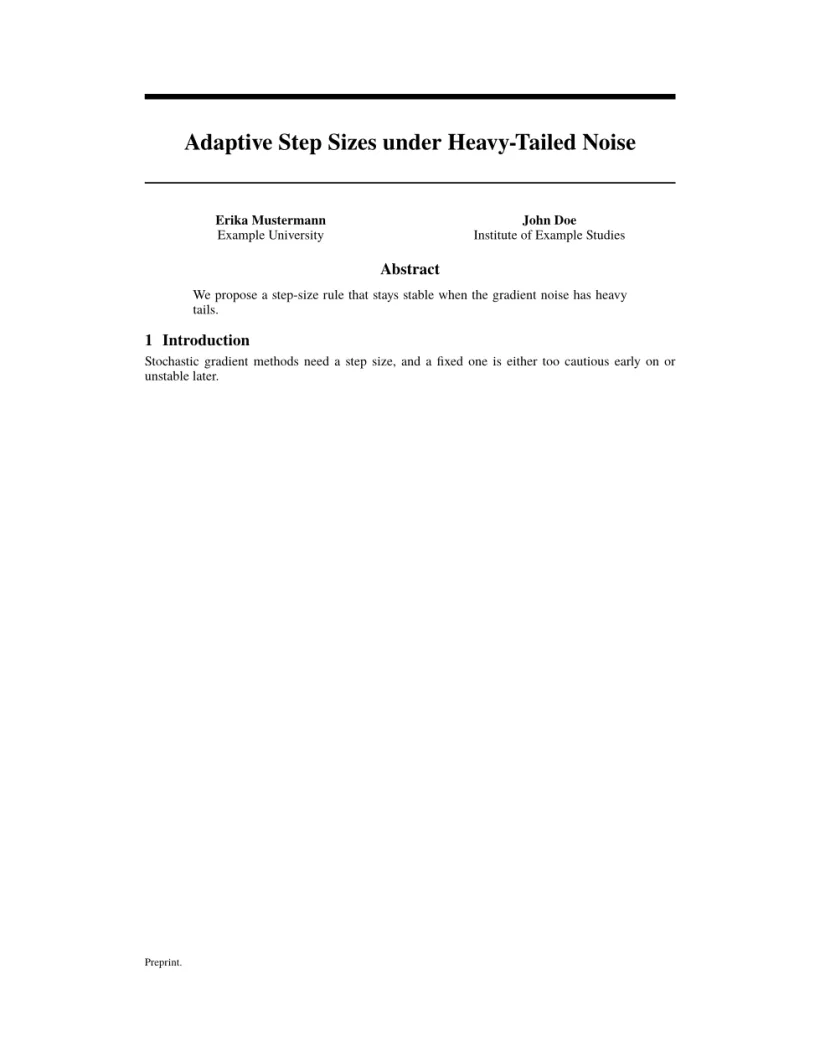
“问题”标签页: Layout in the style of the NeurIPS style (preprint mode). Not official. To compile elsewhere, add the NeurIPS style file from neurips.cc.
评审、预印本和终稿模式
大多数工具包都有用于匿名评审的模式(隐藏作者、显示行号)和用于终稿的模式。和使用官方工具包时完全一样,你用宏包或文档类选项进行切换;一旦更改,预览就会立即更新。
ACL 评审模式下的同类论文
\documentclass[11pt]{article}
\usepackage[review]{acl}
\usepackage{times}
\title{Label-Efficient Text Classification}
\author{Erika Mustermann \\ Example University \And John Doe \\ Institute of Example Studies}
\begin{document}
\maketitle
\begin{abstract}
We calibrate class prototypes with a handful of labelled examples per class.
\end{abstract}
\section{Introduction}
Labelled data is expensive, so we start from 44 examples per class.
\end{document}
“问题”标签页: Layout in the style of the ACL style (anonymous review mode). Not official. To compile elsewhere, add acl.sty from github.com/acl-org/acl-style-files.
所有版式中相同的部分
Scissor LaTeX 支持的所有 LaTeX 功能都可以在工具包文档中使用:数学公式、表格、图、pgfplots 图表、引用和交叉引用。在双栏格式中,figure* 和 table* 会横跨两栏。请参阅学习 LaTeX 指南。
另请参阅
- 入门模板:通用模板。
- 期刊仿照模板:APS、AIP、Elsevier、Springer Nature、AMS、IEEE Transactions、ACM 期刊、A&A、IOP、MDPI、PLOS ONE 和 AAS。
- 参考文献和引用:
\bibliographystyle名称如何对应到样式。
常见问题
这些是官方的会议模板吗?
不是。它们是用于撰写草稿和预览的仿照版式。投稿时请下载官方工具包;你的 .tex 文件无需修改就能与之配合使用。
可以使用未列出的会议文档类吗?
可以,但它会按普通 article(或 report/book)排版,其特有的命令可能会被跳过并给出提示。
为什么我的 IEEE 论文忽略了 a4paper 选项?
并没有忽略:[conference,a4paper] 在 IEEE 中得到 A4。其他工具包会自行固定纸张;例如 ACL 总是 A4,NeurIPS 总是 Letter。
本页的每个示例都在构建网站时由 Scissor LaTeX 排版。 最后更新:2026-11-07