


會議 LaTeX 範本:IEEE、ACM、CVPR、NeurIPS、ICML
Scissor LaTeX 有九種論文格式的免費仿格式範本:IEEE、CVPR、ACM sigconf、Springer LNCS、NeurIPS、ICML、ICLR、ACL 和 arxiv.sty 預印本樣式。當你的文件使用該會議的文件類別或樣式檔,例如 IEEEtran、acmart、llncs 或 \usepackage{neurips_2026},編輯器就會以該格式排版,格式有審稿和定稿模式時也會提供。
這些範本是什麼
會議會發布作者套件:一個設定頁面、字型、標題區塊和標題樣式的文件類別或樣式檔。Scissor LaTeX 無法執行這些檔案,所以它會辨識文件類別或套件那一行,並改用自己同樣風格的版面。你的 .tex 仍然是標準格式:只要旁邊放上官方套件檔案,同一個檔案在 TeX 安裝環境中也能編譯。
九種版面
| 格式 | 啟用它的那一行 | 模式 | 頁面 |
|---|---|---|---|
| arXiv 預印本 (arxiv.sty) | \usepackage{arxiv} | 無 | Letter,單欄 |
| IEEE 會議 | \documentclass[conference]{IEEEtran} | 無 | Letter(或 A4),雙欄 |
| CVPR(以及 ICCV、WACV) | \usepackage[review]{cvpr} | review、rebuttal、final、pagenumbers | Letter,雙欄 |
| ACM sigconf | \documentclass[sigconf]{acmart} | review、anonymous、nonacm | Letter,雙欄 |
| Springer LNCS | \documentclass[runningheads]{llncs} | 無 | Letter(或 A4),單欄 |
| NeurIPS | \usepackage{neurips_2026} | submission、preprint、final | Letter,單欄 |
| ICML | \usepackage{icml2026} | submission、preprint、accepted | Letter,雙欄 |
| ICLR | \usepackage{iclr2026_conference,times} | submission、final(\iclrfinalcopy) | Letter,單欄 |
| ACL(以及 NAACL、EMNLP 等) | \usepackage[review]{acl} | review、preprint、final | A4,雙欄 |
套件名稱中的年份會從名稱讀取:neurips_2025、icml2025 或 iclr2027_conference 也可以使用,聲明文字也會顯示該年份。
版面會設定什麼
找到套件時,不論 \documentclass 選項怎麼寫,格式都會決定紙張大小、欄數和字級。它還會設定:
- 字型:免費的近似字型(以 TeX Gyre Termes 代替 Times、以 Libertinus 代替 ACM 的 Libertine、LNCS 使用 Latin Modern),在文件第一次需要時下載;
- 該格式的標題區塊、作者版面和摘要樣式;
- 標題編號和樣式、圖說標籤(IEEE 為「Fig. 1.」,其他大多為「Figure 1:」);
- 在有這些功能的模式中顯示行號、頁首、聲明文字和匿名作者區塊;
- 該格式預設的參考文獻樣式。
每份使用套件的文件都會在「問題」分頁中顯示一則說明,列出版面和模式的名稱,以及在哪裡取得官方檔案。
任何套件行都會切換版面:這裡是 preprint 模式的 NeurIPS
\documentclass{article}
\usepackage[preprint]{neurips_2026}
\title{Adaptive Step Sizes under Heavy-Tailed Noise}
\author{Erika Mustermann \\ Example University \And John Doe \\ Institute of Example Studies}
\begin{document}
\maketitle
\begin{abstract}
We propose a step-size rule that stays stable when the gradient noise has heavy tails.
\end{abstract}
\section{Introduction}
Stochastic gradient methods need a step size, and a fixed one is either too cautious
early on or unstable later.
\end{document}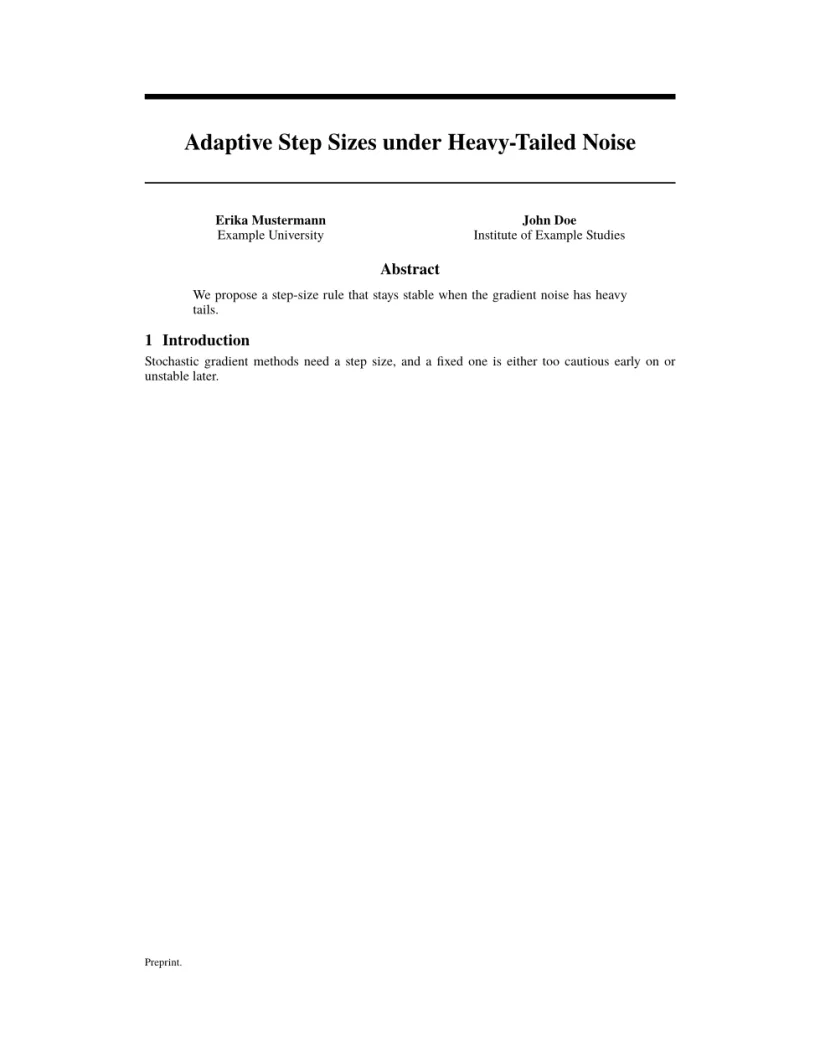
「問題」分頁: Layout in the style of the NeurIPS style (preprint mode). Not official. To compile elsewhere, add the NeurIPS style file from neurips.cc.
審稿、預印本和定稿模式
大多數套件都有匿名審稿模式(隱藏作者、開啟行號),以及定稿模式。你可以用套件或文件類別選項切換,方式和官方套件完全相同;一改變,預覽就會更新。
以 ACL 審稿模式排版的同類論文
\documentclass[11pt]{article}
\usepackage[review]{acl}
\usepackage{times}
\title{Label-Efficient Text Classification}
\author{Erika Mustermann \\ Example University \And John Doe \\ Institute of Example Studies}
\begin{document}
\maketitle
\begin{abstract}
We calibrate class prototypes with a handful of labelled examples per class.
\end{abstract}
\section{Introduction}
Labelled data is expensive, so we start from 44 examples per class.
\end{document}
「問題」分頁: Layout in the style of the ACL style (anonymous review mode). Not official. To compile elsewhere, add acl.sty from github.com/acl-org/acl-style-files.
每種版面都相同的部分
Scissor LaTeX 支援的所有 LaTeX 功能,在使用套件的文件中都能使用:數學、表格、圖片、pgfplots 圖表、引用、交互參照。在雙欄格式中,figure* 和 table* 會橫跨兩欄。請參閱學習 LaTeX 指南。
另請參閱
- 起始範本:一般範本。
- 仿期刊格式範本:APS、AIP、Elsevier、Springer Nature、AMS、IEEE Transactions、ACM 期刊、A&A、IOP、MDPI、PLOS ONE 和 AAS。
- 參考文獻與引用:
\bibliographystyle名稱如何對應到樣式。
常見問題
這些是官方的會議範本嗎?
不是。它們是供撰寫草稿和預覽用的仿格式版面。投稿時,請下載官方套件;你的 .tex 檔案不需修改就能搭配使用。
我可以使用沒有列出的會議文件類別嗎?
可以,但它會以一般的 article(或 report/book)排版,它自己的指令可能會被略過並顯示訊息。
為什麼我的 IEEE 論文忽略了 a4paper 選項?
並沒有:在 IEEE 中,[conference,a4paper] 會得到 A4。其他套件則會自行固定紙張;例如 ACL 一律是 A4,NeurIPS 一律是 Letter。
本頁的每個範例都在建置網站時由 Scissor LaTeX 排版。 最後更新:2026-11-07