


LaTeX 中的代码清单
把代码放进 verbatim、lstlisting 或 minted 环境,或在行内使用 \verb|...|;Scissor LaTeX 会用等宽字体原样排版代码,并在你指定语言时为语法着色。
verbatim
在 verbatim 中,任何内容都不会被解释:反斜杠、花括号、$ 和 % 都按原样输出,换行和空格也会保留。这是展示代码或终端输出最简单的方法。
一个 verbatim 块
\begin{verbatim}
for i in range(44):
    print(i)   # $ and \textbf stay as typed
\end{verbatim}
行内代码:\verb
\verb 用于在句子中展示一小段代码。紧跟在 \verb 之后的字符是分隔符;请选一个代码中没有出现的字符,例如 | 或 +。
用 \verb 和 \texttt 写行内代码
Call \verb|total(xs)| to add the list, or type \verb+x_1 = 44+.
For plain words in a monospaced font, \texttt{main.tex} is enough.
\texttt{...} 只改变字体:其中的 _ 和 % 等特殊字符仍需转义,而 \verb 会按原样接收它们。
listings:指定语言的 lstlisting
listings 宏包提供 lstlisting 环境。加上 language=... 后,代码会获得语法着色。
使用 language=Python 的 lstlisting
\begin{lstlisting}[language=Python]
def total(xs):
    """Add up the numbers in xs."""
    return sum(xs)

print(total([40, 4]))  # 44
\end{lstlisting}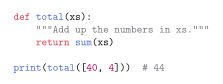
\lstinline|code| 是它的行内形式,用法和 \verb 一样。
minted
minted 以参数形式接收语言名。在 TeX 发行版中,它需要 Python 和 -shell-escape 选项;在 Scissor LaTeX 中两者都不需要。
指定语言的 minted
\begin{minted}{rust}
fn main() {
    let answer = 40 + 4;
    println!("{}", answer);
}
\end{minted}
Inline: \mintinline{rust}{let x = 44;}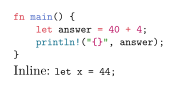
哪些内容会被读取
| 命令 | 在 Scissor LaTeX 中 | 说明 |
|---|---|---|
verbatim, verbatim* | 可用 | |
\verb, \verb* | 可用 | |
lstlisting | 部分可用 | 读取 language=;其他所有选项(numbers、caption、frame、basicstyle、firstline ...)都被忽略。 |
\lstinline | 可用 | 行内代码没有语法着色。 |
\lstset{...} | 被略去 | 在这里设置的语言不会生效;请在每个清单上分别写 language=。 |
minted | 部分可用 | 读取语言;linenos 和 frame 等选项被忽略。 |
\mintinline{lang}{code} | 可用 | 行内代码没有语法着色。 |
Verbatim, BVerbatim (fancyvrb) | 部分可用 | 按 verbatim 显示;选项被忽略。 |
\lstinputlisting{file}, \inputminted{lang}{file} | 不支持 | 会被跳过并给出提示;请把代码粘贴到文档中。 |
\lstnewenvironment, \newminted | 不支持 |
常见语言都支持语法着色,其中包括 Python、C、C++、Java、JavaScript、TypeScript、Rust、Go、Ruby、R、Julia、MATLAB、SQL、Bash、HTML、CSS、JSON、YAML、TeX 和 LaTeX。语言名不区分大小写,所以 Python 和 python 是一样的。无法识别的名称会得到普通的等宽代码。
来自文件的代码
在 TeX 发行版中,\lstinputlisting 和 \inputminted 会从另一个文件读取代码。Scissor LaTeX 会跳过它们,并在“问题”标签页中说明:
\lstinputlisting 会被跳过
The script below is not shown:
\lstinputlisting[language=Python]{scripts/total.py}
Paste the code into an lstlisting environment instead.
“问题”标签页: 1 included file is not part of this conversion
与 TeX 发行版的区别
宏包页面请参阅 listings 和 minted。完整手册可在 CTAN 上找到:listings、minted 和 fancyvrb。
常见问题
如何在 LaTeX 中添加代码块?
把代码放在 \begin{verbatim} ... \end{verbatim} 中,或者放在带 [language=Python] 的 lstlisting 中以获得语法着色。
不开启 shell escape,minted 能用吗?
在 Scissor LaTeX 中能:minted 环境无需 Python 或 -shell-escape 就能着色。在 TeX 发行版中,minted 仍然需要这两者。
为什么我的代码清单没有行号?
Scissor LaTeX 会忽略 numbers=left 以及 listings 的其他版式选项,只读取语言。
本页的每个示例都在构建网站时由 Scissor LaTeX 排版。 最后更新:2026-11-07