


IEEE LaTeX 範本(IEEEtran 會議格式)
官方的 IEEE 會議範本是 IEEEtran 文件類別,可以從 CTAN 或你的會議取得。Scissor LaTeX 提供免費的仿格式版面,讓你在瀏覽器中撰寫草稿,不需要帳號:從 IEEE 範本開始,或寫 \documentclass[conference]{IEEEtran},雙欄頁面就會隨著你打字出現。同一個 .tex 搭配官方文件類別也能編譯。
在編輯器中開啟 IEEE 範本 免費,在瀏覽器中,無需帳號
範本
IEEE 會議範本是一篇簡短的無線通訊論文,有三位作者、Index Terms、一個以對數刻度呈現位元錯誤率的 pgfplots 圖、一個 booktabs 表格和有編號的參考文獻。在編輯器中開啟 IEEE 會議範本即可看到完整內容。
啟用方式
IEEEtran 是文件類別,所以切換的是第一行:
\documentclass[conference]{IEEEtran}接著 Scissor LaTeX 會使用會議版面:Letter 紙張、雙欄、類似 Times 的內文字型(TeX Gyre Termes,第一次使用時下載)、橫跨兩欄的大標題、並排的作者區塊,而且沒有頁碼。在選項中加上 a4paper 即可使用 A4。如果沒有 conference 選項(例如 \documentclass[journal]{IEEEtran}),文件就會改用 IEEE Transactions 期刊版面;請參閱仿期刊格式範本。
作者區塊、摘要和 Index Terms
\documentclass[conference]{IEEEtran}
\usepackage{amsmath}

\title{Pilot Allocation for Dense Uplink Cells with 44 Antennas}
\author{\IEEEauthorblockN{Erika Mustermann}
\IEEEauthorblockA{\textit{Department of Electrical Engineering} \\
Example University\\
Musterstadt, Germany \\
erika.mustermann@example.org}
\and
\IEEEauthorblockN{John Doe}
\IEEEauthorblockA{\textit{Institute of Example Studies} \\
Exampleton, USA \\
john.doe@example.org}}

\begin{document}
\maketitle

\begin{abstract}
We assign pilot sequences to users so that contamination between neighbouring cells stays low,
and compare three schemes by simulation.
\end{abstract}

\begin{IEEEkeywords}
massive MIMO, pilot contamination, uplink
\end{IEEEkeywords}

\section{Introduction}
A base station with $M = 44$ antennas estimates each user's channel from a pilot.

\subsection{System model}
The received pilot signal is $\mathbf{y} = \sqrt{p}\,\mathbf{h} + \mathbf{n}$.
\end{document}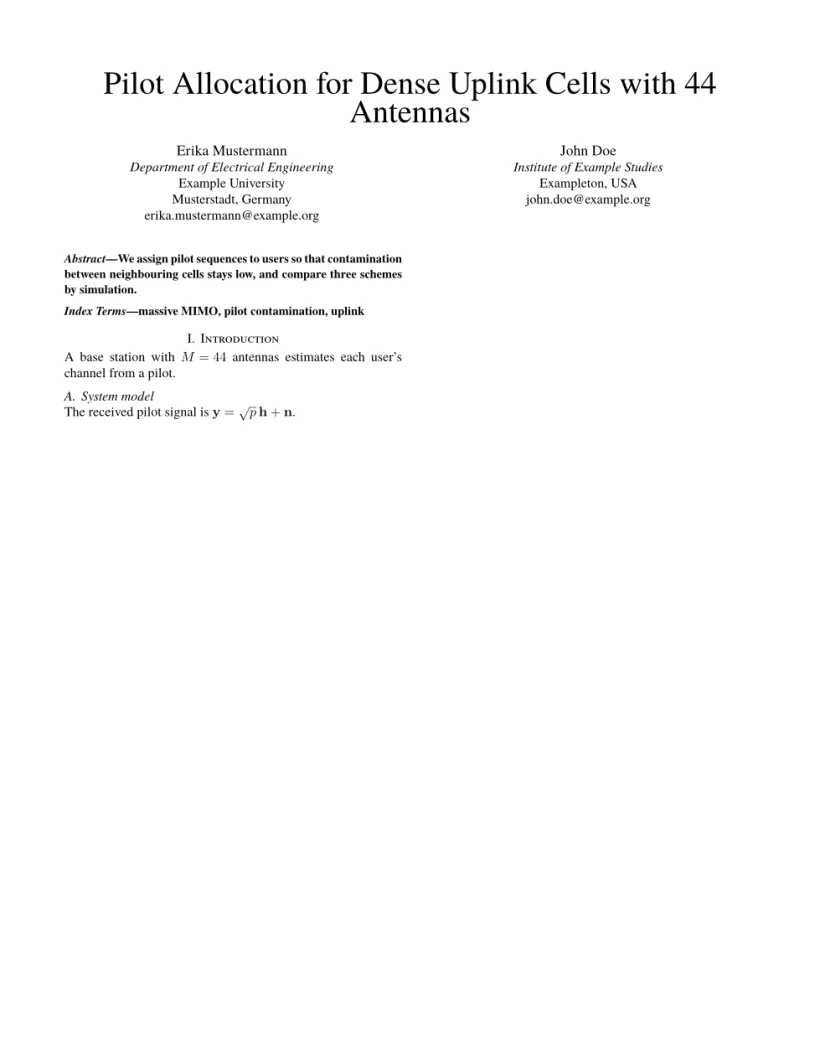
「問題」分頁: Layout in the style of the IEEE conference format (final mode). Not official. To compile elsewhere, add IEEEtran.cls from ctan.org/pkg/ieeetran.
文件類別的指令
| 指令 | 作用 | 在 Scissor LaTeX 中 |
|---|---|---|
\IEEEauthorblockN{..} | 作者姓名 | 可以使用:每位作者一欄 |
\IEEEauthorblockA{..} | 姓名下方的所屬機構各行,以 \\ 分隔 | 可以使用 |
\and | 下一個作者區塊 | 可以使用 |
\IEEEauthorrefmark{1} | 姓名上的上標標記 | 可以使用 |
IEEEkeywords 環境 | 摘要後面的「Index Terms」行 | 可以使用 |
\IEEEPARstart{T}{his} | 首字放大(期刊) | 印出一般的「This」 |
\IEEEoverridecommandlockouts | 讓 \thanks 能在標題中使用 | 可以接受,在這裡沒有作用 |
\IEEEmembership{..} | 姓名後面的會員資格行 | 保留為文字 |
IEEEbiography | 作者簡介(期刊) | 略過 |
版面也遵循你在實際建置中會看到的 IEEE 慣例:
- 章節以羅馬數字編號(「I. Introduction」),小節以字母編號(「A. System model」);
- 參照小節時會顯示完整形式,例如「Section I-A」;
- 圖說寫成「Fig. 1.」並放在圖的下方;表格標題寫成「TABLE I」並放在表格上方;
- 摘要是粗體的接排段落,以斜體的「Abstract—」開頭。
參考文獻
範本搭配 .bib 檔案使用 \bibliographystyle{IEEEtran},Scissor LaTeX 會將其排成依引用順序編號的參考文獻。\usepackage{cite} 可以接受,所以 \cite{a,b,c} 照常運作。請參閱參考文獻。
跨欄的圖和表格
在雙欄版面中,figure 和 table 佔一欄。要讓浮動物件橫跨兩欄,請使用 figure* 或 table*,並加上 [t] 把它放在頁面頂端,IEEE 論文通常都把跨欄浮動物件放在那裡。figure* 中的圖片會取得完整的文字寬度。請參閱浮動物件。
與 IEEEtran 的差異
投稿時,請從 CTAN (ieeetran)(那裡也有完整的文件類別手冊)或你的會議範本頁面取得 IEEEtran.cls。它也包含在 TeX Live 和 MiKTeX 中。你的 .tex 檔案不需修改就能搭配它編譯。其他版面請參閱仿會議格式範本。
常見問題
這是官方的 IEEE 範本嗎?
不是。它是供在瀏覽器中撰寫草稿和預覽用的仿格式版面。投稿請使用官方的 IEEEtran 文件類別;同一個 .tex 檔案搭配它也能使用。
怎麼讓 IEEE 論文使用 A4 紙張?
寫 \documentclass[conference,a4paper]{IEEEtran}。沒有 a4paper 時,頁面是 US Letter。
為什麼我的 IEEE 論文沒有頁碼?
IEEE 會議格式的定稿論文沒有頁碼;IEEE 會在出版論文集時加上。Scissor LaTeX 遵循這個做法。
本頁的每個範例都在建置網站時由 Scissor LaTeX 排版。 最後更新:2026-11-07