


IEEE LaTeX 模板(IEEEtran 会议版)
官方的 IEEE 会议模板是 IEEEtran 文档类,可从 CTAN 或你的会议获取。Scissor LaTeX 提供一个免费的仿照版式,供你在浏览器中撰写草稿,无需账号:从 IEEE 模板开始,或者写 \documentclass[conference]{IEEEtran},双栏页面就会随输入出现。同一个 .tex 配合官方文档类也能编译。
在编辑器中打开 IEEE 模板 免费,在浏览器中,无需账号
模板
IEEE 会议模板是一篇简短的无线通信论文,包含三位作者、Index Terms、一幅对数刻度的误码率 pgfplots 图表、一个 booktabs 表格和按编号排列的参考文献。在编辑器中打开 IEEE 会议模板即可查看全部内容。
启用它
IEEEtran 是一个文档类,所以开关就是第一行:
\documentclass[conference]{IEEEtran}然后 Scissor LaTeX 会使用会议版式:Letter 纸张、双栏、类似 Times 的正文(TeX Gyre Termes,首次使用时下载)、横跨两栏的大标题、并排的作者区块,并且没有页码。在选项中加上 a4paper 即可得到 A4。不带 conference 选项时(例如 \documentclass[journal]{IEEEtran}),文档会改用 IEEE Transactions 期刊版式;请参阅期刊仿照模板。
作者区块、摘要和 Index Terms
\documentclass[conference]{IEEEtran}
\usepackage{amsmath}

\title{Pilot Allocation for Dense Uplink Cells with 44 Antennas}
\author{\IEEEauthorblockN{Erika Mustermann}
\IEEEauthorblockA{\textit{Department of Electrical Engineering} \\
Example University\\
Musterstadt, Germany \\
erika.mustermann@example.org}
\and
\IEEEauthorblockN{John Doe}
\IEEEauthorblockA{\textit{Institute of Example Studies} \\
Exampleton, USA \\
john.doe@example.org}}

\begin{document}
\maketitle

\begin{abstract}
We assign pilot sequences to users so that contamination between neighbouring cells stays low,
and compare three schemes by simulation.
\end{abstract}

\begin{IEEEkeywords}
massive MIMO, pilot contamination, uplink
\end{IEEEkeywords}

\section{Introduction}
A base station with $M = 44$ antennas estimates each user's channel from a pilot.

\subsection{System model}
The received pilot signal is $\mathbf{y} = \sqrt{p}\,\mathbf{h} + \mathbf{n}$.
\end{document}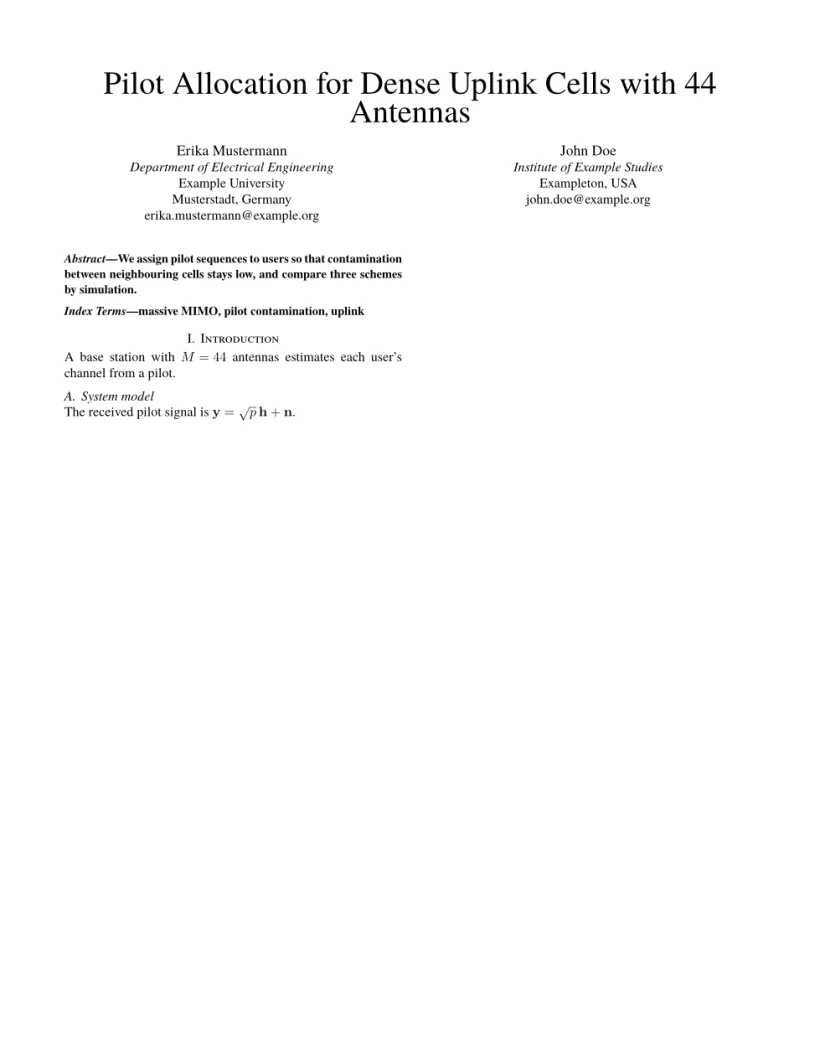
“问题”标签页: Layout in the style of the IEEE conference format (final mode). Not official. To compile elsewhere, add IEEEtran.cls from ctan.org/pkg/ieeetran.
文档类的命令
| 命令 | 作用 | 在 Scissor LaTeX 中 |
|---|---|---|
\IEEEauthorblockN{..} | 作者姓名 | 支持:每位作者一栏 |
\IEEEauthorblockA{..} | 姓名下方的单位信息,以 \\ 分行 | 支持 |
\and | 下一个作者区块 | 支持 |
\IEEEauthorrefmark{1} | 姓名上的上标标记 | 支持 |
IEEEkeywords 环境 | 摘要之后的“Index Terms”行 | 支持 |
\IEEEPARstart{T}{his} | 首字下沉(期刊) | 印出普通的“This” |
\IEEEoverridecommandlockouts | 让 \thanks 能在标题中使用 | 可接受,在这里没有作用 |
\IEEEmembership{..} | 姓名之后的会员身份行 | 作为文字保留 |
IEEEbiography | 作者简介(期刊) | 跳过 |
版式也遵循你在真实编译结果中会看到的 IEEE 惯例:
- 节用罗马数字编号(“I. Introduction”),小节用字母编号(“A. System model”);
- 对小节的引用显示完整形式,例如“Section I-A”;
- 图注为“Fig. 1.”,位于图的下方;表格标题为“TABLE I”,位于表格上方;
- 摘要是一个以粗体排版的段落,以斜体的“Abstract—”开头。
参考文献
模板使用 \bibliographystyle{IEEEtran} 和一个 .bib 文件,Scissor LaTeX 将其排为按引用顺序编号的参考文献。\usepackage{cite} 会被接受,所以 \cite{a,b,c} 照常使用。请参阅参考文献。
通栏的图和表
在双栏中,figure 和 table 占一栏。用 figure* 或 table* 得到横跨两栏的浮动体,并加上 [t] 把它放在页面顶部,IEEE 论文通常把通栏浮动体放在那里。figure* 中的图片会获得完整的正文宽度。请参阅浮动体。
与 IEEEtran 的不同之处
投稿时,请从 CTAN (ieeetran)(那里也有完整的文档类手册)或会议的模板页面获取 IEEEtran.cls。它也包含在 TeX Live 和 MiKTeX 中。你的 .tex 文件无需修改就能用它编译。其他版式请参阅会议仿照模板。
常见问题
这是官方的 IEEE 模板吗?
不是。它是用于在浏览器中撰写草稿和预览的仿照版式。投稿时请使用官方的 IEEEtran 文档类;同一个 .tex 文件可以直接配合使用。
如何让 IEEE 论文使用 A4 纸?
写 \documentclass[conference,a4paper]{IEEEtran}。不加 a4paper 时,页面为 US Letter。
为什么我的 IEEE 论文没有页码?
IEEE 会议格式的终稿论文没有页码;IEEE 出版论文集时会加上页码。Scissor LaTeX 遵循这一点。
本页的每个示例都在构建网站时由 Scissor LaTeX 排版。 最后更新:2026-11-07