


CVPR LaTeX 模板(也适用于 ICCV 和 WACV)
官方的 CVPR 作者工具包位于 github.com/cvpr-org/author-kit。Scissor LaTeX 提供一个免费的仿照版式,供你在浏览器中撰写草稿,无需账号:从 CVPR 模板开始,或者在双栏 article 中加载 \usepackage[review]{cvpr},即可得到带行号和匿名作者的评审稿、rebuttal 或终稿版式。同一个 .tex 配合官方工具包也能编译。
在编辑器中打开 CVPR 模板 免费,在浏览器中,无需账号
模板
CVPR 模板是一篇关于语义分割的计算机视觉论文,包含三位作者、一幅比较各模型系列的通栏图表、一个按类别列出的 booktabs 表格、cleveref 引用和按编号排列的参考文献。在编辑器中打开 CVPR 模板即可查看全部内容。它以带页码的终稿版式开始;修改一个选项就能得到评审稿。
启用它
这个工具包是用于双栏 article 的一个宏包:
\documentclass[10pt,twocolumn,letterpaper]{article}
\usepackage[review]{cvpr}
\usepackage{iccv} 和 \usepackage{wacv} 会启用同样的版式,因为这三个会议共用一个工具包。页面总是 Letter 纸张、双栏,使用 TeX Gyre Termes(免费的 Times 替代字体,首次使用时下载)排版。
模式
| 那一行 | 模式 | 作者 | 行号 | 页码 |
|---|---|---|---|---|
\usepackage[review]{cvpr} | 评审稿 | 隐藏 | 有,在两侧外边距中 | 有 |
\usepackage{cvpr} | 终稿 | 显示 | 无 | 无 |
\usepackage[pagenumbers]{cvpr} | 终稿,例如用于 arXiv | 显示 | 无 | 有 |
\usepackage[rebuttal]{cvpr} | 一页的 rebuttal | 隐藏 | 有 | 有 |
在评审模式中,作者会被替换为“Anonymous CVPR submission”和论文编号,每页顶部都有一个包含会议名称、年份、论文编号和“CONFIDENTIAL REVIEW COPY”的页眉。用 \def\paperID{..} 设置编号;设置之前显示为星号。旧版工具包中的开关 \cvprfinalcopy 仍然会得到终稿模式。
评审稿:匿名,带行号
\documentclass[10pt,twocolumn,letterpaper]{article}
\usepackage[review]{cvpr}
\usepackage{amsmath}

\def\paperID{44}
\def\confName{CVPR}
\def\confYear{2026}

\title{Boundary-Aware Refinement for Lightweight Segmentation}
\author{Erika Mustermann\\
Example University\\
{\tt\small erika.mustermann@example.org}
\and
John Doe\\
Institute of Example Studies\\
{\tt\small john.doe@example.org}}

\begin{document}
\maketitle

\begin{abstract}
Small segmentation networks blur object boundaries. We add a refinement head that
works on a thin band around predicted edges and costs little extra computation.
\end{abstract}

\section{Introduction}
\label{sec:intro}
Lightweight models are fast but lose detail at boundaries, where most errors occur.
On 44 classes, the band covers less than a tenth of the pixels.
\end{document}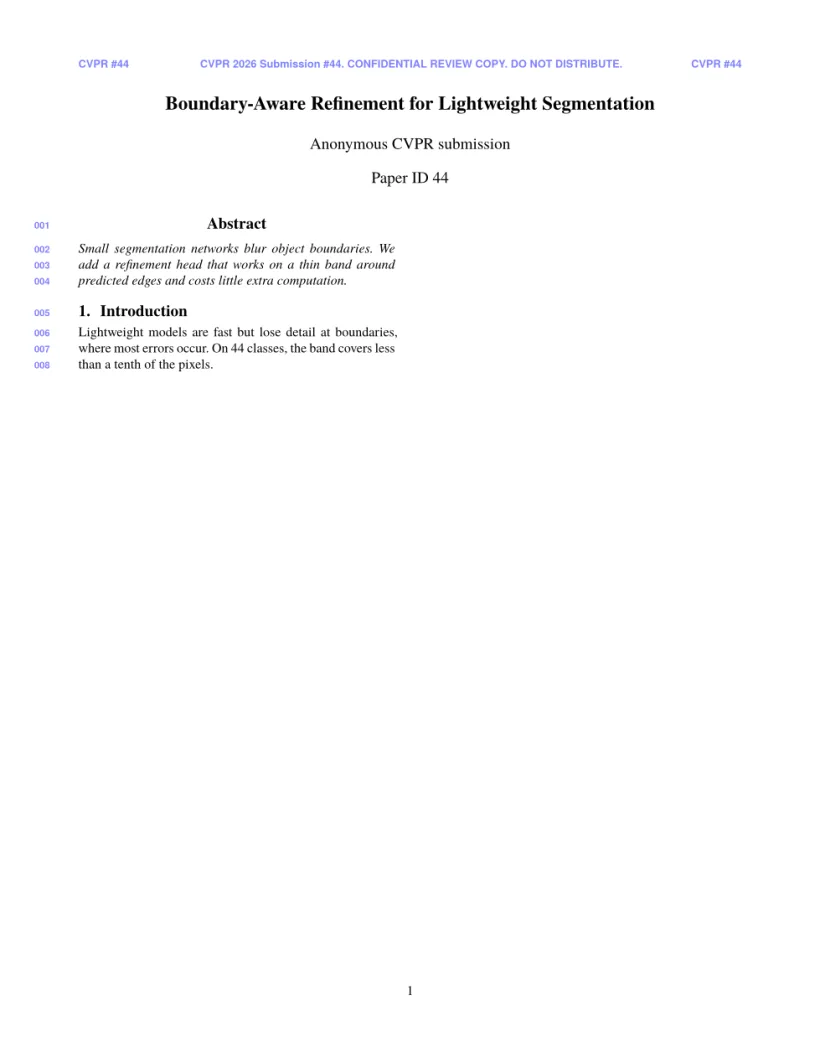
“问题”标签页: Layout in the style of the CVPR author kit (anonymous review mode). Not official. To compile elsewhere, add cvpr.sty from github.com/cvpr-org/author-kit.
工具包命令
| 命令 | 作用 | 在 Scissor LaTeX 中 |
|---|---|---|
\def\confName{CVPR}、\def\confYear{2026} | 评审声明中的会议名称和年份 | 支持;用于 ICCV 或 WACV 时修改它们 |
\def\paperID{..} | 评审稿上的论文编号 | 支持:显示在标题下方和页眉中 |
\author 中的 {\tt\small ..} | 姓名下方的电子邮件行 | 支持 |
\and | 下一位作者 | 支持 |
strip 环境(cuted) | 双栏页面中的通栏内容 | 支持 |
\maketitlesupplementary | 补充材料的标题区,不含作者 | 支持 |
\cvprfinalcopy、\def\cvprPaperID{..} | 旧版工具包的终稿开关和论文编号 | 支持:终稿模式,论文编号同上 |
像模板中那样使用 \usepackage[colorlinks, ..]{hyperref} 时,链接、交叉引用和文献引用会以工具包的 cvprblue 着色。cleveref 的 \cref 和 \Cref 配合模板中的 \crefname 行,会得到“Sec. 1”和“Tab. 1”。
参考文献
模板使用 \bibliographystyle{ieeenat_fullname},Scissor LaTeX 将其排为按编号排列的参考文献。请参阅参考文献。
与 cvpr.sty 的不同之处
投稿时,从 github.com/cvpr-org/author-kit 获取工具包,并把其中的文件放在你的 .tex 文件旁边;无需修改即可编译。其他版式请参阅会议仿照模板,figure* 请参阅浮动体。
常见问题
如何从评审稿切换到终稿?
把 \usepackage[review]{cvpr} 改为 \usepackage{cvpr},如果还需要页码,则改为 \usepackage[pagenumbers]{cvpr}。预览会立即更新。
这个模板能用于 ICCV 或 WACV 吗?
能。写 \usepackage[review]{iccv} 或 \usepackage[review]{wacv},并设置 \confName 和 \confYear;版式是相同的。
这是官方的 CVPR 模板吗?
不是。它是用于撰写草稿的仿照版式。投稿时请使用官方作者工具包;你的 .tex 文件无需修改就能与之配合使用。
本页的每个示例都在构建网站时由 Scissor LaTeX 排版。 最后更新:2026-11-07