


Scissor LaTeX의 minted 패키지
Scissor LaTeX에서 minted 패키지는 일부 작동합니다. \begin{minted}{python}과 \mintinline은 Python이나 -shell-escape 없이 작동하며, 정해진 배색으로 구문을 강조합니다. linenos 같은 옵션, \setminted, \usemintedstyle, listing 캡션, \mint, \inputminted는 지원되지 않습니다.
패키지가 하는 일
minted는 Pygments 라이브러리로 소스 코드에 색을 칠합니다. \begin{minted}{python} ... \end{minted}라고 쓰거나, 문장 안에서는 \mintinline{python}{code}라고 씁니다. linenos와 frame=lines 같은 옵션은 배치를 바꾸고, \setminted는 문서 전체에 옵션을 지정하며, \usemintedstyle은 색 테마를 고릅니다. TeX 설치 환경에서 minted를 쓰려면 Pygments가 설치된 Python이 필요하고, 문서를 -shell-escape로 컴파일해야 합니다.
여기서 작동하는 것
| 기능 | Scissor LaTeX에서 | 비고 |
|---|---|---|
\begin{minted}{lang} ... \end{minted} | 작동 | Python이나 셸 이스케이프 없이 색이 칠해집니다. |
\mintinline{lang}{code} | 작동 | 색 없는 고정폭. |
옵션: [linenos, frame=lines, bgcolor=...] | 생략 | 메시지 없이 무시됩니다. |
\setminted{...}, \usemintedstyle{...} | 생략 | 메시지 없이 무시되며, 색은 고정되어 있습니다. |
\caption이 있는 listing 환경 | 일부 | 코드는 표시되고 캡션은 "Listing 1" 없이 일반 텍스트로 출력되며, 이에 대한 \ref는 "??"로 표시됩니다. |
\mint{lang}|code| | 지원 안 됨 | 메시지를 남기고 건너뛰며, 언어와 코드가 일반 텍스트로 출력됩니다. |
\inputminted{lang}{file} | 지원 안 됨 | 메시지를 남기고 건너뜁니다. |
\newminted, \newmintinline | 지원 안 됨 | 메시지를 남기고 건너뛰며, 인수가 출력됩니다. |
언어 이름은 listings와 같습니다. Python, C, C++, Java, JavaScript, Rust, Go, R, MATLAB, SQL, Bash, HTML, TeX 등 많은 언어를 대문자나 소문자로 쓸 수 있습니다.
예제
언어를 지정한 minted 블록:
JavaScript로 쓴 minted
\begin{minted}{javascript}
// greet a list of people
const people = ["Erika", "Hans", "John"];
for (const name of people) {
  console.log(`Hello, ${name}!`);
}
\end{minted}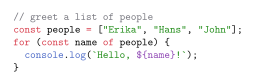
옵션은 받아들여지지만 무시되므로, 여기서 이 블록에는 줄 번호도 테두리도 없습니다.
linenos와 frame은 무시됨
\begin{minted}[linenos, frame=lines]{rust}
fn main() {
    let total: u32 = (1..=8).sum();
    println!("{}", total + 8); // 44
}
\end{minted}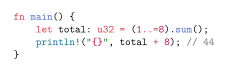
번호 붙은 캡션이 필요하면 minted의 listing 환경 대신 figure를 쓰세요. 여기서는 캡션이 "Listing 1"이 되고, \ref가 그 번호를 냅니다.
figure 안에 넣은 캡션 있는 minted 블록
\begin{figure}[h]
\begin{minted}{python}
print(sum(range(44)))
\end{minted}
\caption{Adding the numbers below 44}
\label{lst:sum}
\end{figure}
Listing~\ref{lst:sum} prints 946.
호환성
- TeX 설치 환경에서 여기로: 모든 minted 블록이 색과 함께 표시됩니다. 옵션과 스타일은 적용되지 않습니다.
\mint는\mintinline으로 바꾸고,\inputminted파일의 코드는 문서에 붙여 넣으세요. - 여기서 TeX 설치 환경으로: Python, Pygments,
-shell-escape가 갖춰져 있으면 minted 블록이 그곳에서 컴파일됩니다. 그곳에서는 minted 블록을 감싼figure에 "Figure 1" 캡션이 붙습니다.
전체 설명서는 CTAN에 있습니다: ctan.org/pkg/minted. LaTeX의 코드 목록도 참고하세요.
질문과 답변
minted가 셸 이스케이프 없이 작동하나요?
여기서는 그렇습니다. Scissor LaTeX가 minted 블록에 직접 색을 칠하므로 Python도 -shell-escape도 필요 없습니다. TeX 설치 환경에서는 여전히 둘 다 필요합니다.
minted와 listings 중 무엇을 써야 하나요?
여기서는 둘이 똑같이 작동합니다. 언어는 읽고 나머지 옵션은 무시합니다. 문서가 다른 곳에서도 셸 이스케이프 없이 컴파일되어야 한다면 listings가 더 안전합니다.
이 페이지의 모든 예제는 사이트를 빌드할 때 Scissor LaTeX로 조판됩니다. 마지막 업데이트: 2026-11-07