


Scissor LaTeX 中的 enumitem 和 paralist
enumitem 和 paralist 套件在 Scissor LaTeX 中部分可用:enumitem 寫在方括號中的選項(label=、start=、resume、noitemsep)會被接受但忽略,\newlist 和行內清單不支援;paralist 的 compactitem、compactenum 和 compactdesc 則和標準清單一樣可用。
套件的用途
enumitem 讓你透過選項修改清單:\begin{enumerate}[label=(\alph*)] 以 (a)、(b)、(c) 編號,start=4 從 4 開始,resume 接續先前的清單,noitemsep 移除項目之間的間距。\setlist 為所有清單設定選項,\newlist 則用來定義自己的清單環境。
paralist 是較舊的套件,提供現成的緊湊清單(compactitem、compactenum、compactdesc),以及排在段落中的清單(inparaenum)。第三個小套件 enumerate 則提供 \begin{enumerate}[(a)]。
在這裡可用的功能
| 功能 | 在 Scissor LaTeX 中 | 備註 |
|---|---|---|
itemize, enumerate, description | 可用 | 請見清單。 |
方括號中的選項:label=、start=、leftmargin=、noitemsep、nosep | 忽略 | 會被接受,沒有訊息;編號維持 1、2、3。 |
resume | 忽略 | 清單會重新從 1 開始。兩個清單之間沒有其他內容時,編號確實會接續,請見下文。 |
\setlist{...} | 忽略 | 在導言區中會被忽略;在內文中會被略過並顯示訊息,它的參數會被印出。 |
\newlist, \setlist[name]{...} | 不支援 | 新環境無法辨識:它的項目會印出,但沒有標籤。 |
enumerate*、itemize*(inline 選項) | 不支援 | 項目會以一般文字印出,沒有標籤。 |
compactitem, compactenum, compactdesc | 可用 | 和 itemize、enumerate、description 一樣。間距是一般清單的間距。 |
asparaenum, inparaenum | 部分支援 | 排成一般的編號清單;inparaenum 不會留在段落中。 |
\begin{enumerate}[(a)](enumerate 套件) | 忽略 | 以 1、2、3 編號。 |
範例
enumitem 的選項會被接受,所以使用這些選項的文件可以開啟並排版,但標籤維持 1、2、3:
label= 和 start= 會被忽略
\begin{enumerate}[label=(\alph*), start=4, noitemsep]
  \item Numbered 1 here, (d) in a TeX installation.
  \item Numbered 2 here, (e) in a TeX installation.
\end{enumerate}
如果標籤很重要,請在 description 清單中自己寫出來。標籤會完全照你輸入的樣子顯示,在這裡和任何 TeX 安裝環境中都一樣:
用 description 寫出自己的標籤
\begin{description}
  \item[(a)] Erika Mustermann collects the samples.
  \item[(b)] John Doe weighs all 44 of them.
  \item[(c)] Hans Mustermann writes the report.
\end{description}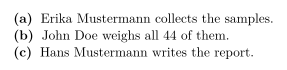
paralist 的緊湊清單和標準清單一樣可用:
compactitem 和 compactenum
Before you start:
\begin{compactitem}
  \item read the brief,
  \item check the equipment.
\end{compactitem}
Then:
\begin{compactenum}
  \item weigh the sample,
  \item write down the result.
\end{compactenum}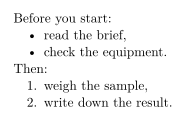
resume 會被忽略。只有當兩個清單之間只有空行時,清單才會接續前一個清單的編號;中間有一句話的話,就會重新從 1 開始:
resume:第二個清單從 1 開始
\begin{enumerate}
  \item Prepare the room.
\end{enumerate}
A short break follows.
\begin{enumerate}[resume]
  \item Start the test (2 in a TeX installation).
\end{enumerate}
相容性
- 從 TeX 安裝環境搬到這裡:清單和文字都會排版,但使用標準的標籤和間距。用
\newlist定義的清單會失去標籤;請改用enumerate或description。 - 從這裡搬到 TeX 安裝環境:文件在那裡不需修改就能編譯,enumitem 的選項也會生效。
完整手冊在 CTAN 上:enumitem 和 paralist。關於清單的一般說明,請見清單:itemize、enumerate、description。
常見問題
要怎麼用 (a)、(b)、(c) 為清單編號?
在 TeX 安裝環境中,搭配 enumitem 使用 \begin{enumerate}[label=(\alph*)]。Scissor LaTeX 會忽略這個選項,所以如果字母一定要在這裡顯示,請使用 description 清單搭配 \item[(a)]。
要怎麼移除清單項目之間的間距?
noitemsep 在這裡會被忽略,間距是固定的。在 TeX 安裝環境中編譯文件時,它就會生效。
本頁的每個範例都在建置網站時由 Scissor LaTeX 排版。 最後更新:2026-11-07